June 2018
Legrand PDU User Guide 149
Tip: If you have configured multiple static routes, you can click on any route and then make changes, use
or to re-sort the priority, or click to delete it.
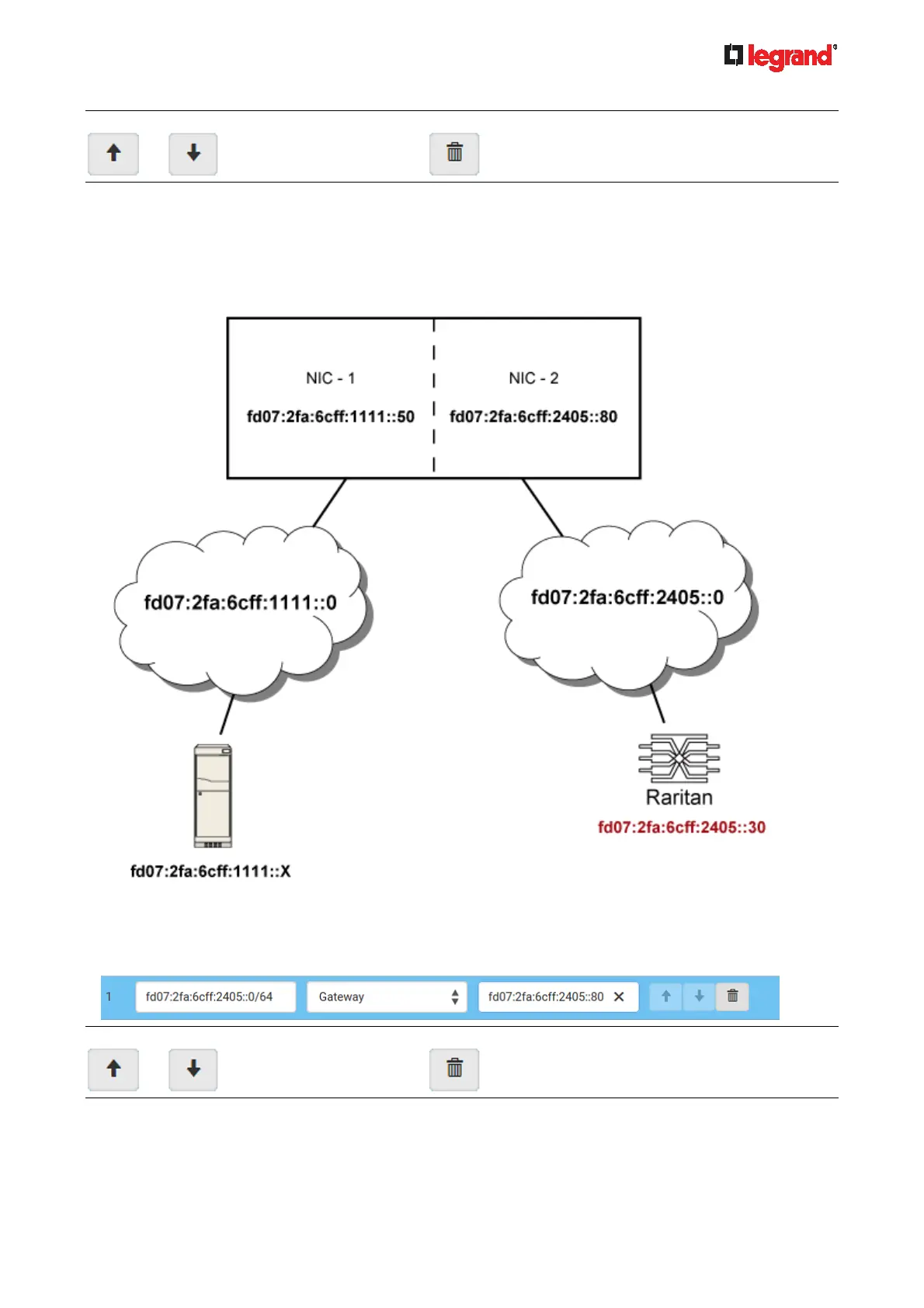
IPv6 example:
Your Legrand PDU: fd07:2fa:6cff:2405::30
Two NICs: fd07:2fa:6cff:1111::50 and fd07:2fa:6cff:2405::80
Two networks: fd07:2fa:6cff:1111::0 and fd07:2fa:6cff:2405::0
Prefix length: 64
In this example, NIC-2 (fd07:2fa:6cff:2405::80) is the next hop router for your Legrand PDU to communicate
with any device in the other subnet fd07:2fa:6cff:1111::0.
In the IPv6 "Static Routes" section, you should enter the data as shown below. Note that the address in the
first field must be of the Classless Inter-Domain Routing (CIDR) notation.
Tip: If you have configured multiple static routes, you can click on any route and then make changes, use
or to re-sort the priority, or click to delete it.



 To Next Page