June 2018
366 Legrand PDU User Guide
Using Default Thresholds
This command determines whether default thresholds, including the deassertion hysteresis and assertion
timeout, are applied to a specific environmental sensor.
config:# externalsensor <n> useDefaultThresholds <option>
Variables:
<n> is the ID number of the environmental sensor that you want to configure. The ID number is available
in the Legrand PDU web interface or using the command "show externalsensors <n>" in the CLI. It is
an integer between 1 and 32.
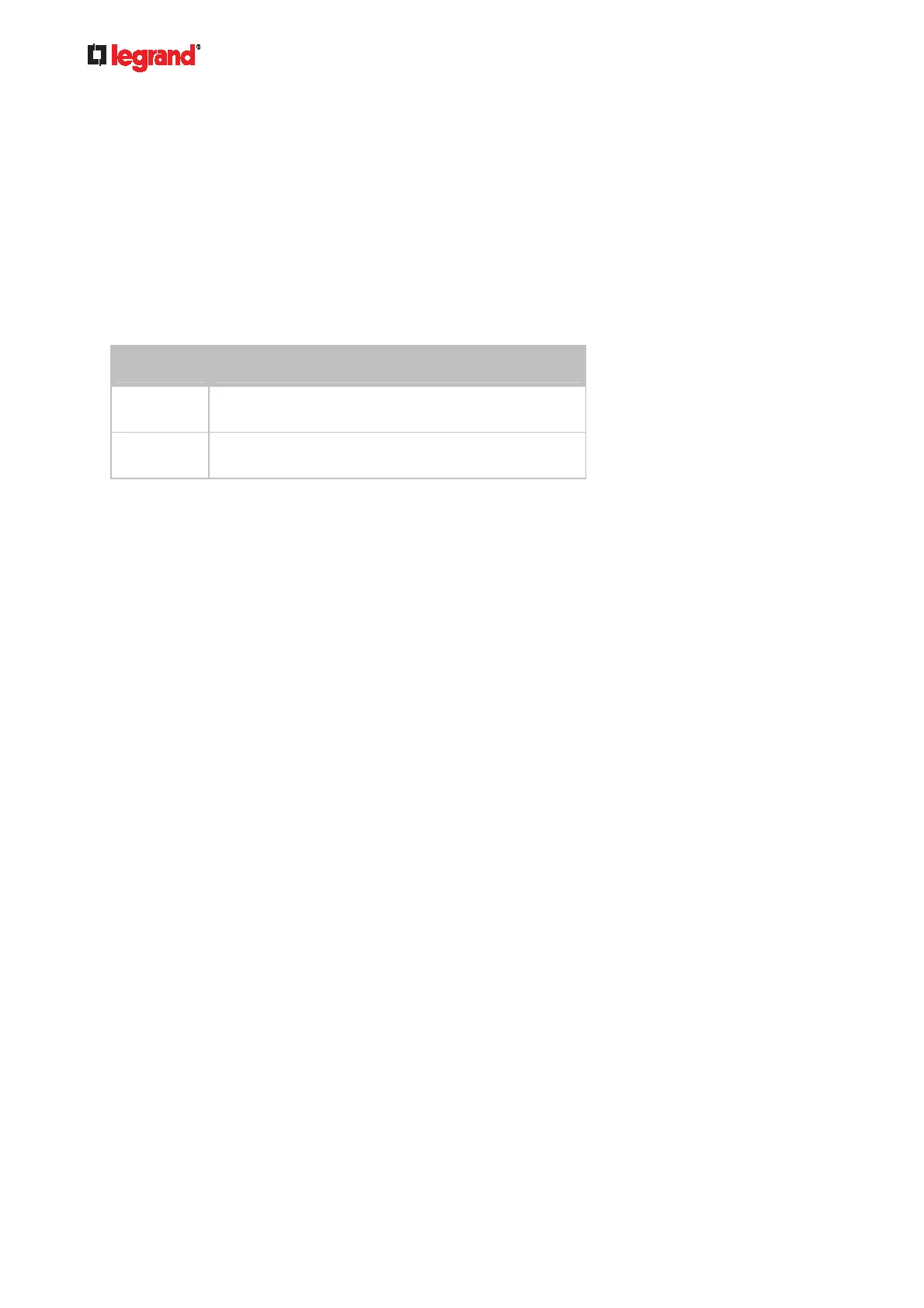
<option> is one of the options: true or false.
Option Description
true Default thresholds are selected as the threshold
option for the specified sensor.
false Sensor-specific thresholds are selected as the
threshold option for the specified sensor.
Setting the Alarmed to Normal Delay for DX-PIR
This command determines the value of the Alarmed to Normal Delay setting for a DX-PIR presence detector.
config:# externalsensor <n> alarmedToNormalDelay <time>
Variables:
<n> is the ID number of the environmental sensor that you want to configure. The ID number is available
in the Legrand PDU web interface or using the command "show externalsensors <n>" in the CLI. It is
an integer between 1 and 32.
<time> is an integer number in seconds, ranging between 0 and 300.
Examples
This section illustrates several environmental sensor configuration examples.
Example 1 - Environmental Sensor Naming
The following command assigns the name "Cabinet humidity" to the environmental sensor with the ID
number 4.
config:# externalsensor 4 name "Cabinet humidity"
Example 2 - Sensor Threshold Selection
The following command sets the environmental sensor #1 to use the default thresholds, including the
deassertion hysteresis and assertion timeout, as its threshold settings.
config:# externalsensor 1 useDefaultThresholds true



 To Next Page