Setting Content
[Traffic incident warning]
Touch turn the traffic incident warning
display on/off.
[Show POI icons settings]
Touch to change the Points Of Inter-
est(POI) icon settings.
[3D view settings]
Touch to change the display angle of the
3D map.
[On street parking suggestion]
Touch to turn the street parking sugges-
tions on/off.
[Map language]
*1
Touch to change the map language.
After touching [Region] or [System Lan-
guage],touch [OK].
Related Links
Map display customization settings(P. 81)
Display angle setting(P. 81)
Map display customization settings
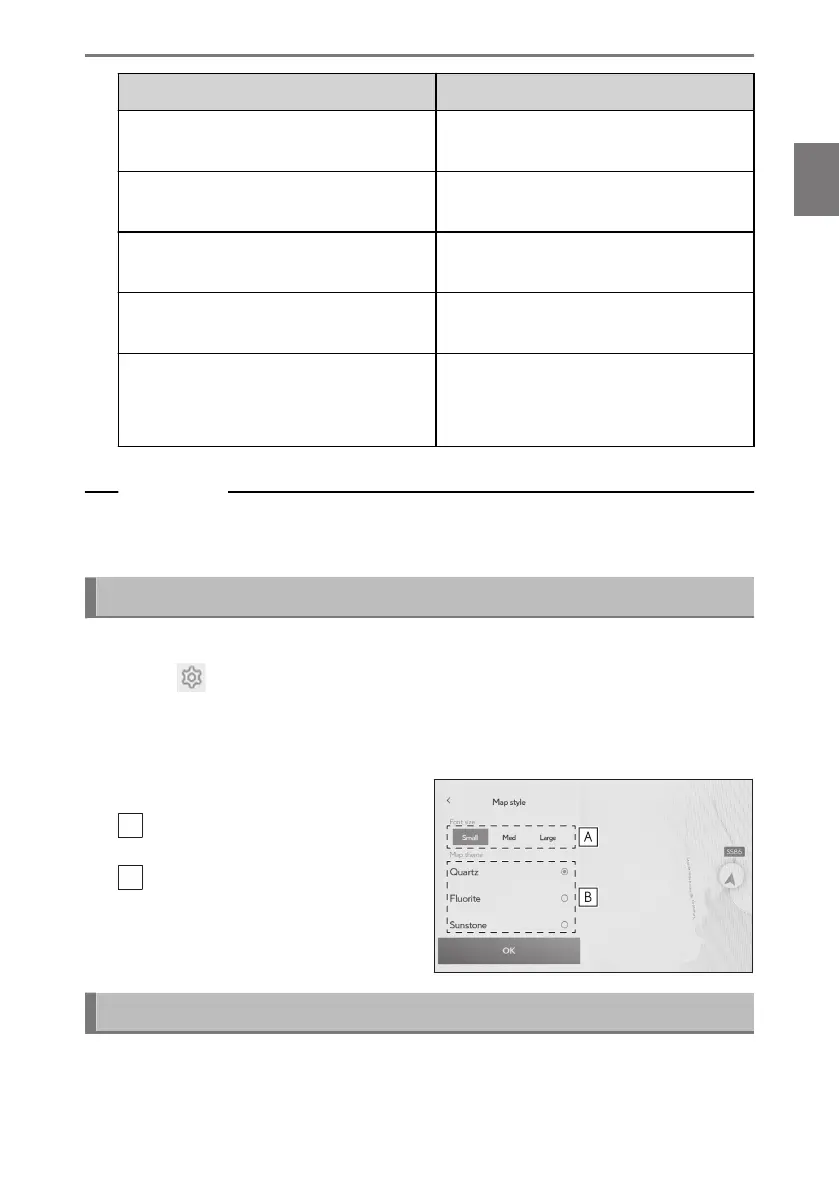
The map color and text size can be changed.
1 Touch [ ] from the main menu.
2 Touch [Navigation].
3 Touch [Map style customisation].
4 Touch the desired item.
A
Touch to change the size of the text
on the map display.
B
Touch to change the map color.
5 Touch[OK].
Display angle setting
The display angle of the 3D map can be set.
*1 : 14-inch display with built-in navigation system
2-8. Navigation Settings
81
2
Settings and registration













 To Next Page