L-DALI User Manual 356 LOYTEC
Version 5.2 LOYTEC electronics GmbH
Important: In any case do not set the dial to position “0” as this will make the sensor send
broadcasts!
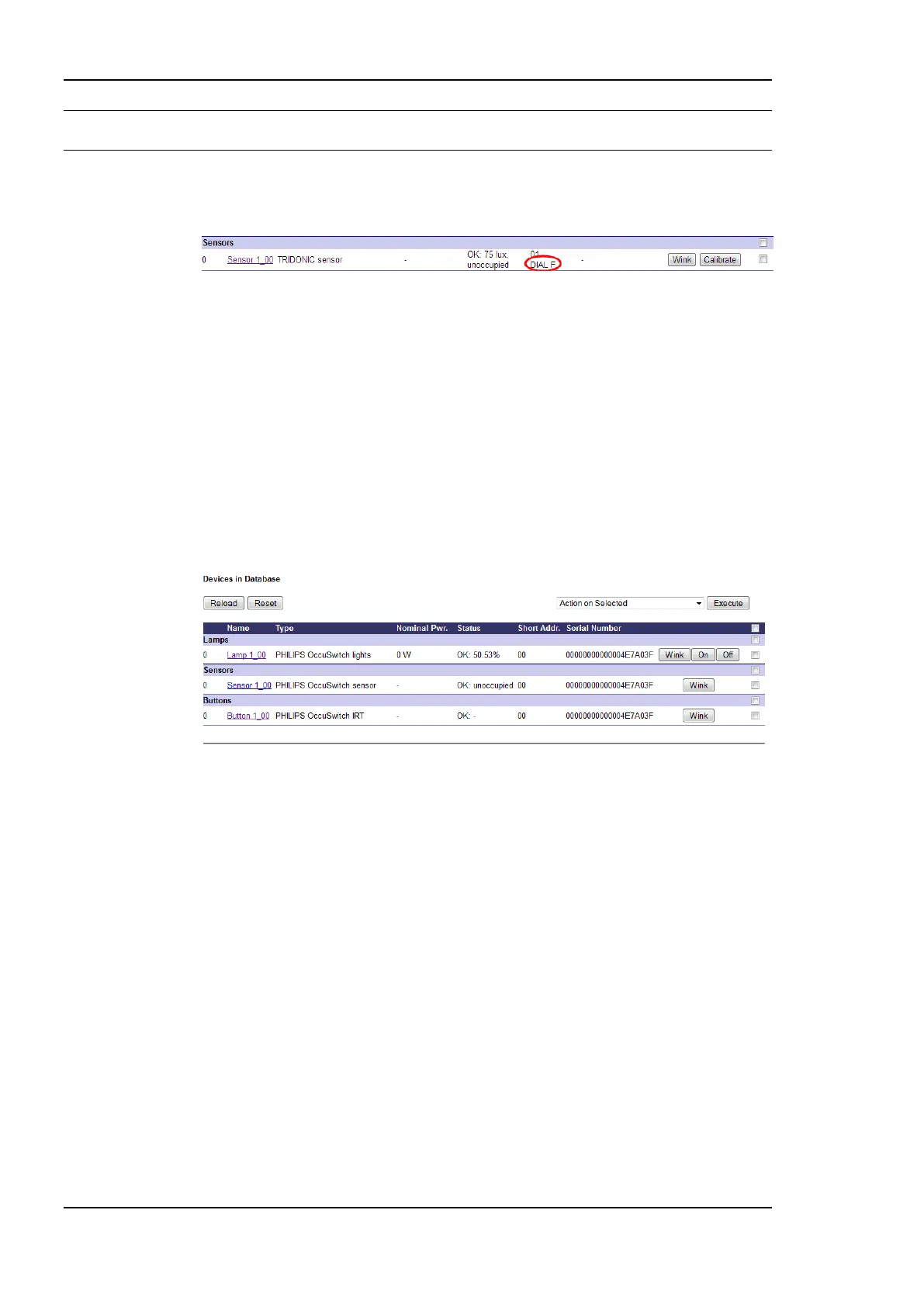
The dial position is shown in the Web Interface in the DALI Installation tab (see Figure
238).
Figure 238: The MSensor 02 5DPI 41 dial position is shown in the Web Interface in the DALI
Installation tab.
8.4.4.4 Philips OccuSwitch DALI LRM2090 with IRT 8080 IR-remote control
The Philips OccuSwitch DALI LRM2090 is represented as three devices on the DALI
channel (see Figure 239):
Philips OccuSwitch lights: This part represents the ballast functionality of the
OccuSwitch. Similar to a ballast the OccuSwitch reports the current dim level of
the ballast it controls. By dimming this device the lighting control application of
the OccuSwitch can be temporarily overridden. Further it provides the information
on the ballast status (lamp failure etc.) of the ballasts controlled by the
OccuSwitch. Only this part of the OccuSwitch can be assigned to groups. If the
ballast part is assigned to a group this automatically affects all other parts as well.
Figure 239: Philips OccuSwitch DALI LRM2090/20 is represented as three DALI devices.
Philips OccuSwitch sensor: This part represents the occupancy sensor
functionality of the OccuSwitch. The OccuSwitch does not provide any light level
information (lux). Note, that if multiple OccuSwitch devices are assigned to a
group only one of these sensors needs to be assigned to a LONMARK or BACnet
Occupancy Sensor object, as all sensors in a group will share their occupancy
status (if one detects occupancy all will report occupancy).
Philips OccuSwitch IRT: This part represents the IRT 8080 IR-remote control
functionality as described in Section 8.2.11.2. It allows controlling sunblinds, fan
speed, and HVAC setpoint in a room. Currently this functionality is only supported
in the LDALI-3E10X models. If no IRT 8080 is available, these parts need not be
assigned.
All three instances will have an identical short address and serial number.
If the Philips OccuSwitch DALI was assigned to DALI groups using the IRT 8099/10
omniprog the group number assigned will be used auto-assignment of the devices. Example:
If an OccuSwitch was given the group number 8 pressing the Auto-Assign button will assign
the ballast representation of the device to Lamp Actuator object 8, the occupancy sensor
representation to Occupancy Sensor object 8, and the button representation to Button object
8. If these objects are not available, a different object will be assigned in case of the ballast
and button part, while no assignment will be done in case of the sensor part.



 To Next Page