L-DALI User Manual 83 LOYTEC
Version 5.2 LOYTEC electronics GmbH
the status of the selected devices. A test is pending if its execution is delayed as
the current state does not permit the execution of the test (e.g. battery not fully
charged, other test being performed, etc.). Test results will be stored in the
appropriate emergency light test log (see Section 8.1.4).
Emergency Light: Stop Duration Test: Abort any duration test currently
executed or pending.
5.3.4.5 Replace a DALI device
If one or more broken DALI device must be replaced, the following steps must be
performed:
1. Install the new device.
2. Press the Scan button to detect the newly installed and unconfigured device.
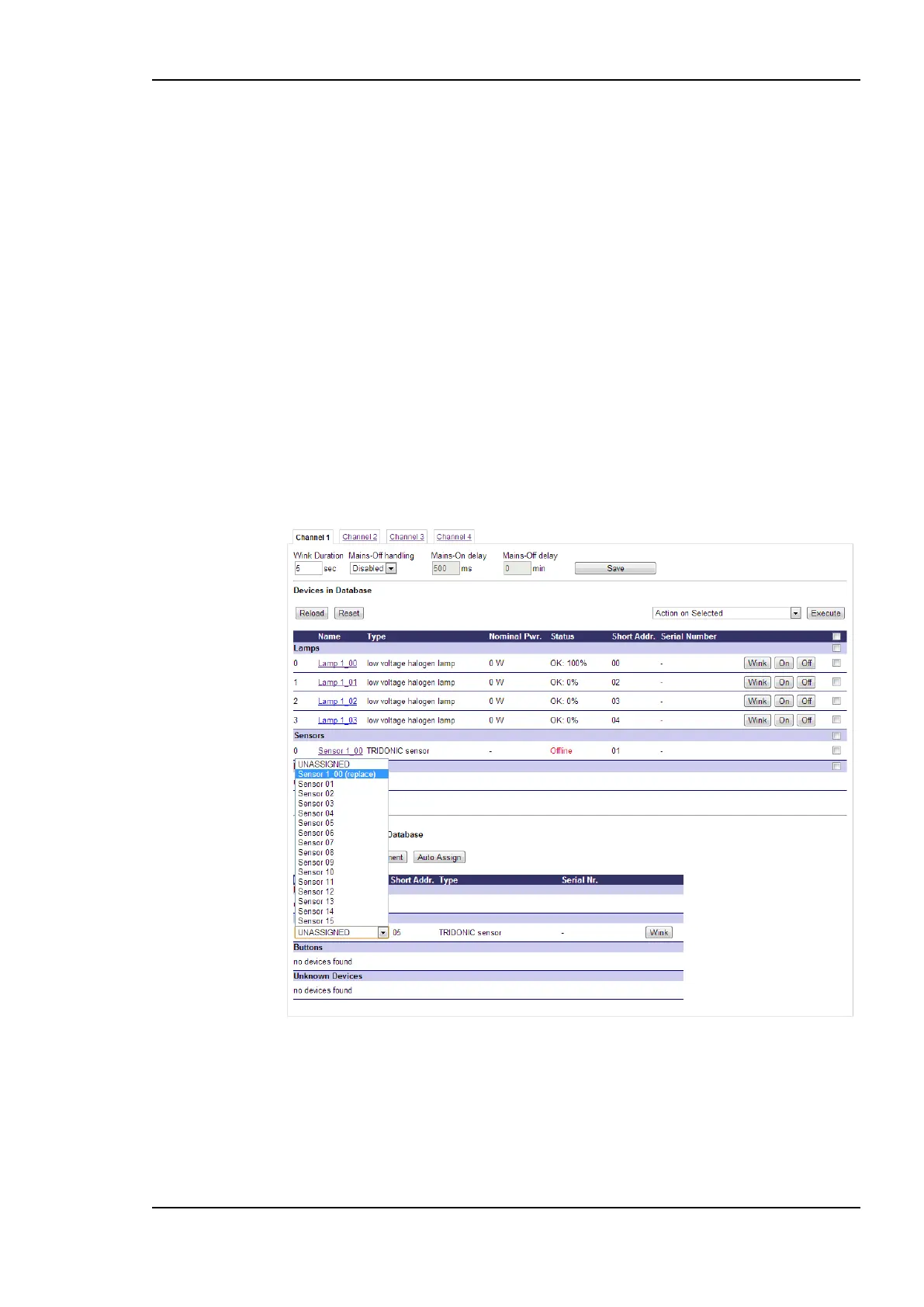
3. After the scan, the DALI configuration page should look similar to Figure 80. The
broken device should be marked “Offline” in the Status field and the new device should
be listed in the Scanned Devices not in Database section. Select the defective device
in the drop-down list and press the Save Assignment button.
Figure 80: Replacing a defective DALI device
5.3.4.6 Sensor Calibration
To calibrate a light sensor press the Calibrate button on the DALI Installation page. The
DALI sensor calibration page is shown in Figure 81. The L-DALI device allows calibrating
the light sensor under up to seven different light conditions to counter any non-linearity of
the sensor.



 To Next Page