214327 158 Revision B
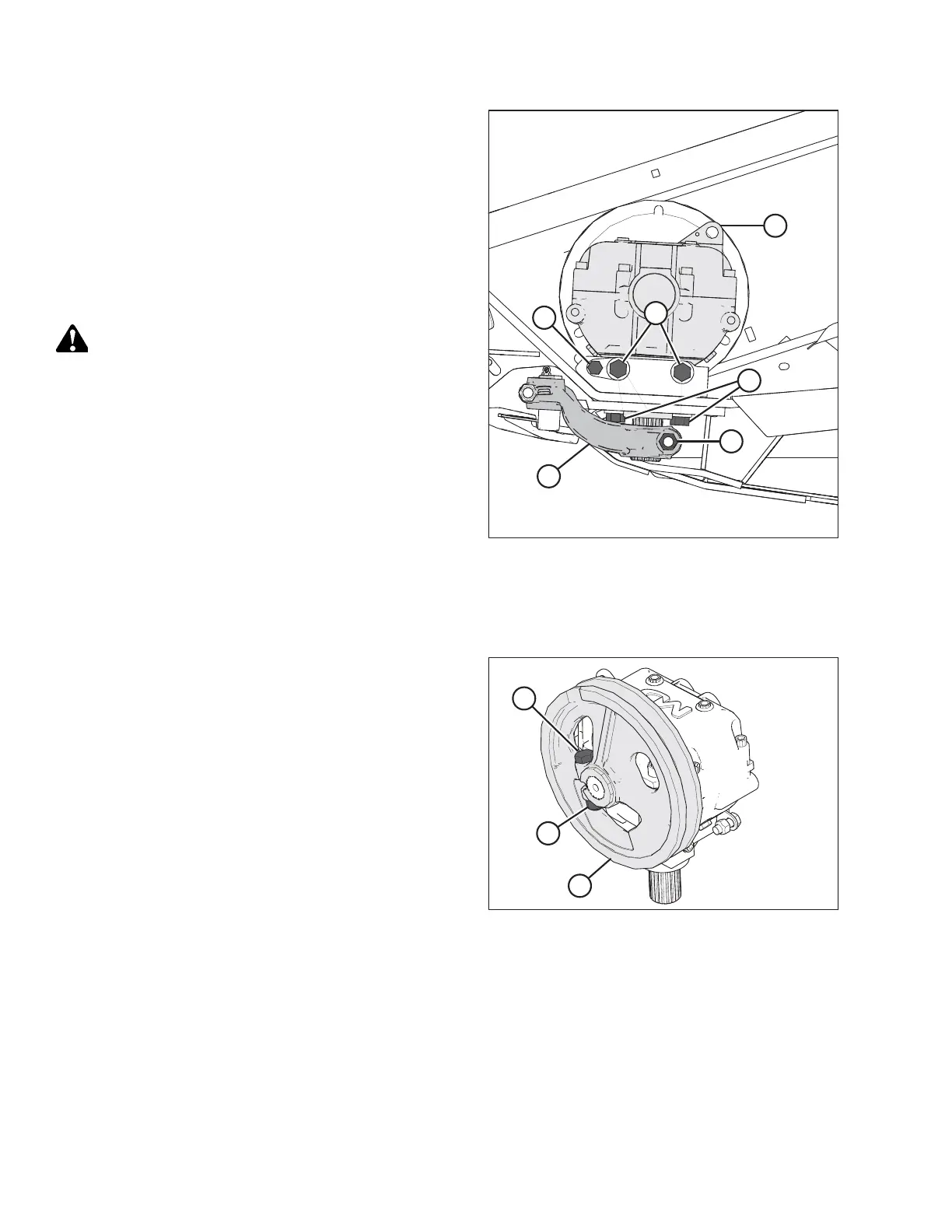
Figure 5.62: Knife Drive Box
20. Remove bolt (A) that clamps knife drive arm (B) to the knife
drive box output shaft.
21. Remove knife drive arm (B) from the knife drive box
output shaft.
22. Remove four knife drive box mounting bolts (C) and (D).
NOTE:
Bolt (E) is factory set; do NOT remove it. It is used to secure
the knife drive box in the proper fore-aft position.
CAUTION
The knife drive box and pulley weigh over 35 kg (65 lb.) Use
care when removing or installing it. Lug (L) can be used for
lifting. If the speed sensor is installed at this location, you will
need to remove it before using it for lifting.
23. Remove the knife drive box and place it on a bench for
disassembly.
24. Double-knife headers: Repeat this procedure for the
opposite end of the header.
Removing Knife Drive Box Pulley
To remove the knife drive box pulley, follow the recommended removal procedure provided here.
Figure 5.63: Knife Drive Box and Pulley
1. Loosen and remove knife drive box pulley clamping bolt (A)
and nut (B).
2. Remove knife drive box pulley (C) using a three-jaw puller.
MAINTENANCE AND SERVICING



 To Next Page