214327 207 Revision B
Centering Single Reel
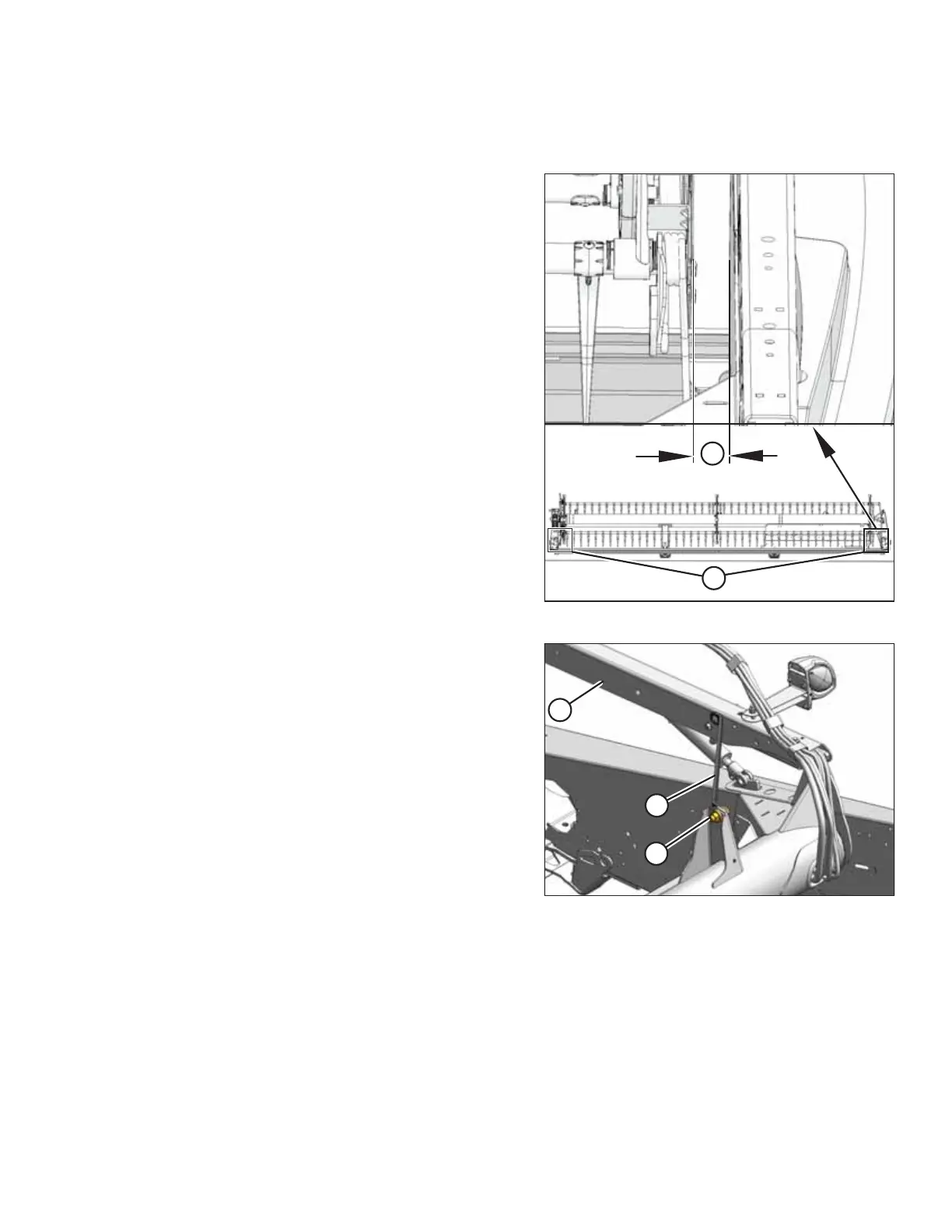
The reel needs to be centered on the header to avoid any contact with the endsheets.
Figure 5.163: Centering the Reel
1. Start the engine and set the cutterbar height at
approximately 150 mm (6 in.) above the ground.
2. Lower the reel and adjust the fore-aft position to 5 on the
reel arm decal.
3. Shut down the engine, and remove the key from
the ignition.
4. Measure clearance (A) at locations (B) between the reel
and the endsheet at both ends of the header. The
clearances should be the same if the reel is centered.
Figure 5.164: Reel Support Arm
5. Loosen bolt (A) on brace (B) at both ends of the reel.
6. Move the forward end of reel support arm (C) laterally as
required to center the reel.
7. Tighten bolts (A) and torque them to 359 Nm (265 lbf·ft).
5.8.4 Reel Tines and Fingers
If a steel tine or plastic finger is damaged or worn, it will need to be removed so it can be replaced.
IMPORTANT:
Keep the reel tines and fingers in good condition. Straighten or replace them as required.
MAINTENANCE AND SERVICING



 To Next Page