M A E D A Mini-Crawler Crane Section 5 – MACHINERY COVER
9/2020 MC285CB-3 5-11
MACHINERY COVER
WARNING!
• Be sure to stop the machine and remove the
starter switch key before removing the
machinery cover.
• Do not remove the machinery cover
immediately after the operation while the
machine is still hot.
Removing Machinery Cover
Remove the machinery cover with the following
procedure when performing inspection/
maintenance inside the machinery cover.
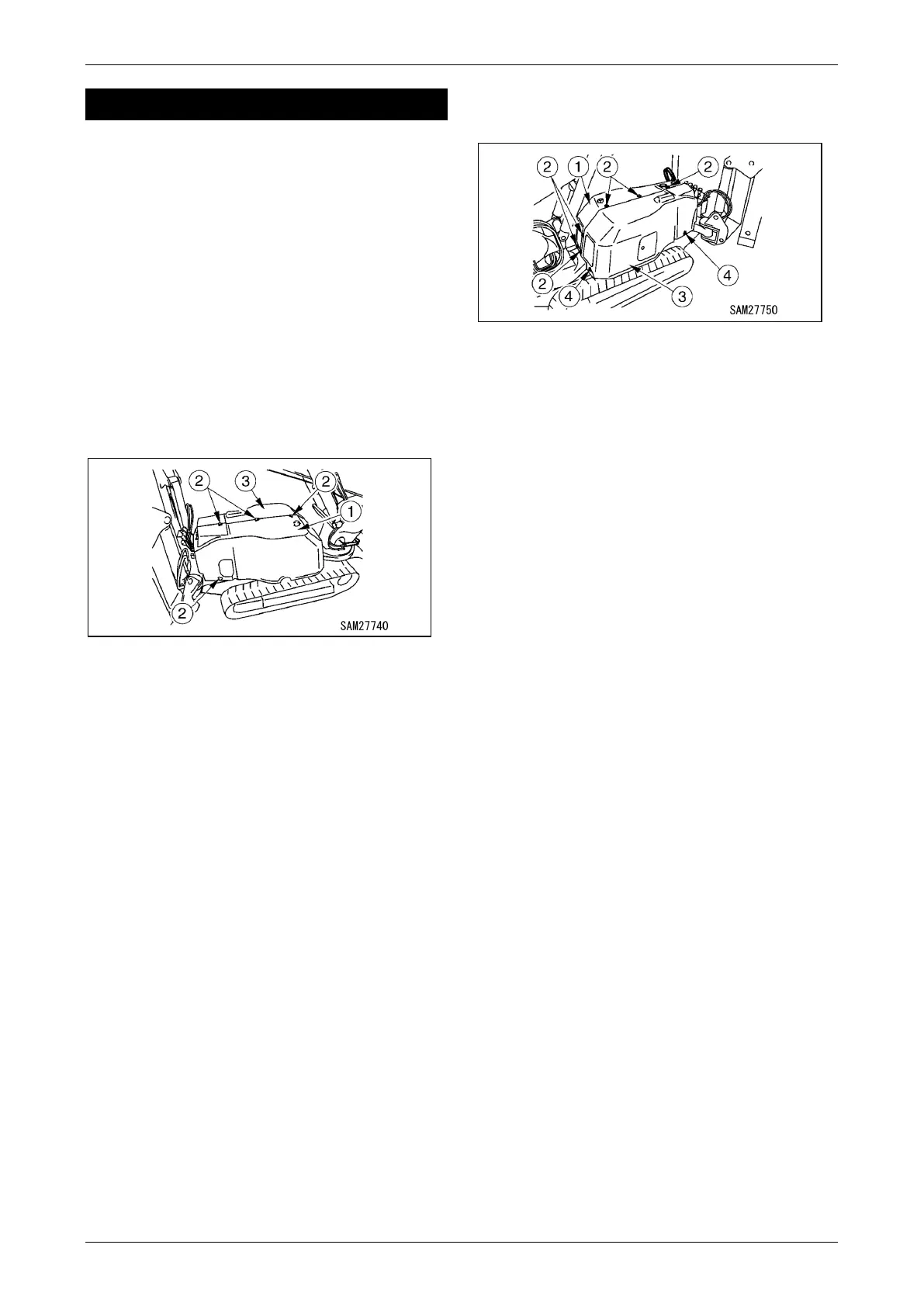
1. Remove 7 mounting bolts (2) from the left
side machinery cover (1).
Fig. 5-5
NOTICE: The mounting bolts (2) are positioned
with 3 at the top, 3 at the rear and 1 at the front left
lower side.
2. Remove 2 mounting bolts (4) from the right
side machinery cover (3).
Fig. 5-6
NOTICE: The mounting bolts (4) are positioned
with 1 at the rear lower side and 1 at the right
lower side.
3. Remove the left side machinery cover (1).
4. Remove the right side machinery cover (3).
Installing Machinery Cover
When you have finished inspection/maintenance
of the machinery cover, reinstate the machinery
cover using by reversing the procedure in
“Removing Machinery Cover” on page 5-11. Upon
completion, always check each part for
interference.



 To Next Page