12.1 wxPropView 91
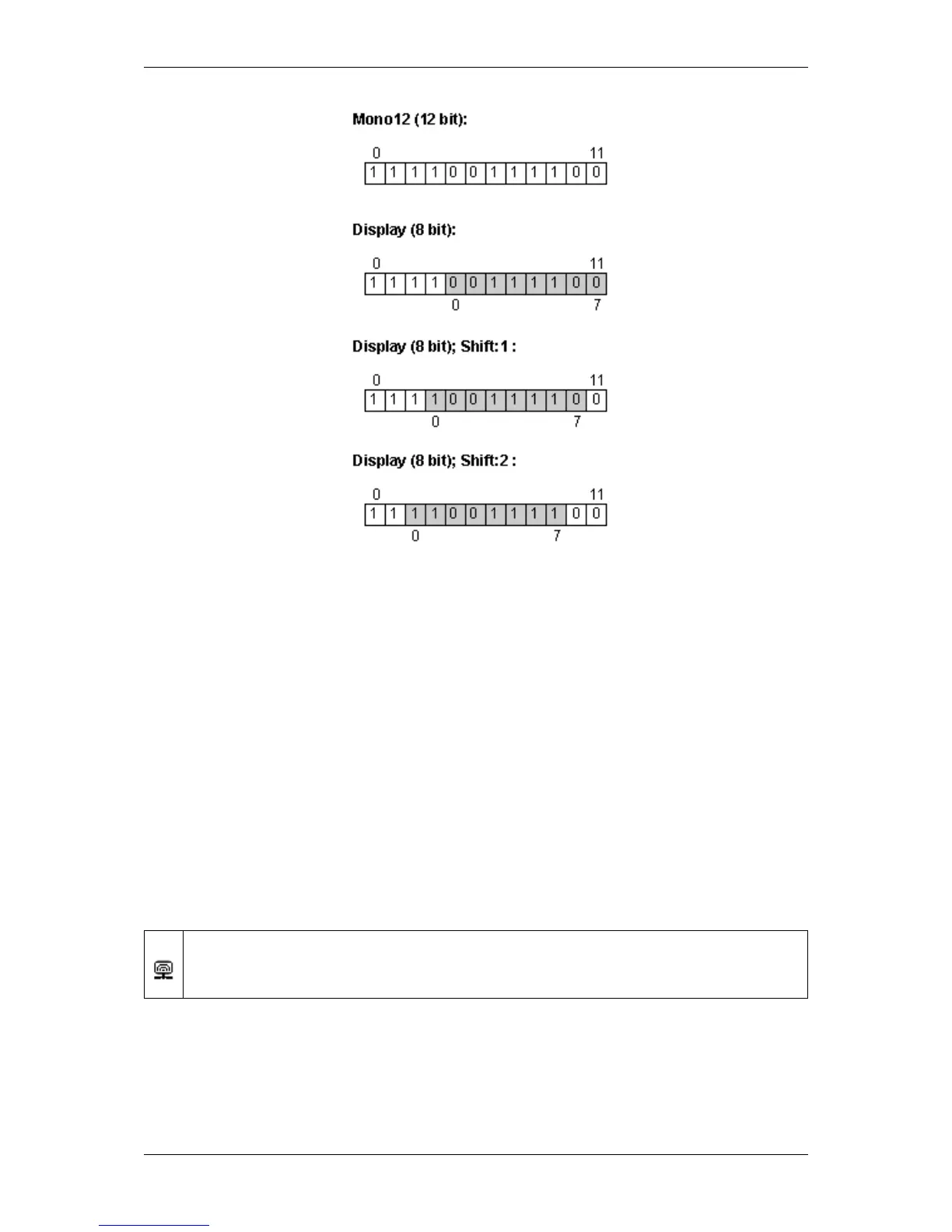
Figure 16:Mid-grey 12 bit pixel image and 8 bit display with 2 example shifts
In this particular case, the pixel will be brighter (as the most significant bits are 1’s). Perhaps you already recognized
it. Each shift means that each pixel value is multiplied or divided by 2 according to the direction.
Anyway, there is one restriction in the 8 bit display:
If the pixel value is greater than 255, the pixel value will be clipped to 255. To describe this from a programmer’s
view; a represents the pixel value:
a = ( a > 255 ) ? 255 : a
With wxPropView (p. 74) you can shift the bits in the display using the left and right arrow keys. Furthermore you
can turn on the monitor display to compare the images synchronously.
wxPropView - Bit-shifting an Image:
https://www.matrix-vision.com/tl_files/mv11/trainings/wxPropView/wx←-
PropView_Bit-shifting/index.html
12.1.1.11 Changing the view of the property grid to assist writing code that shall locate driver features
With wxPropView (p. 74) it is possible to switch the views between "Standard View" (user-friendly) and "Developers
View". While the first (default) view will display the device drivers feature tree in a way that might be suitable for most
users of a GUI application it might present the features in a slightly different order as they actually are implemented
MATRIX VISION GmbH



 To Next Page