218 CONTENTS
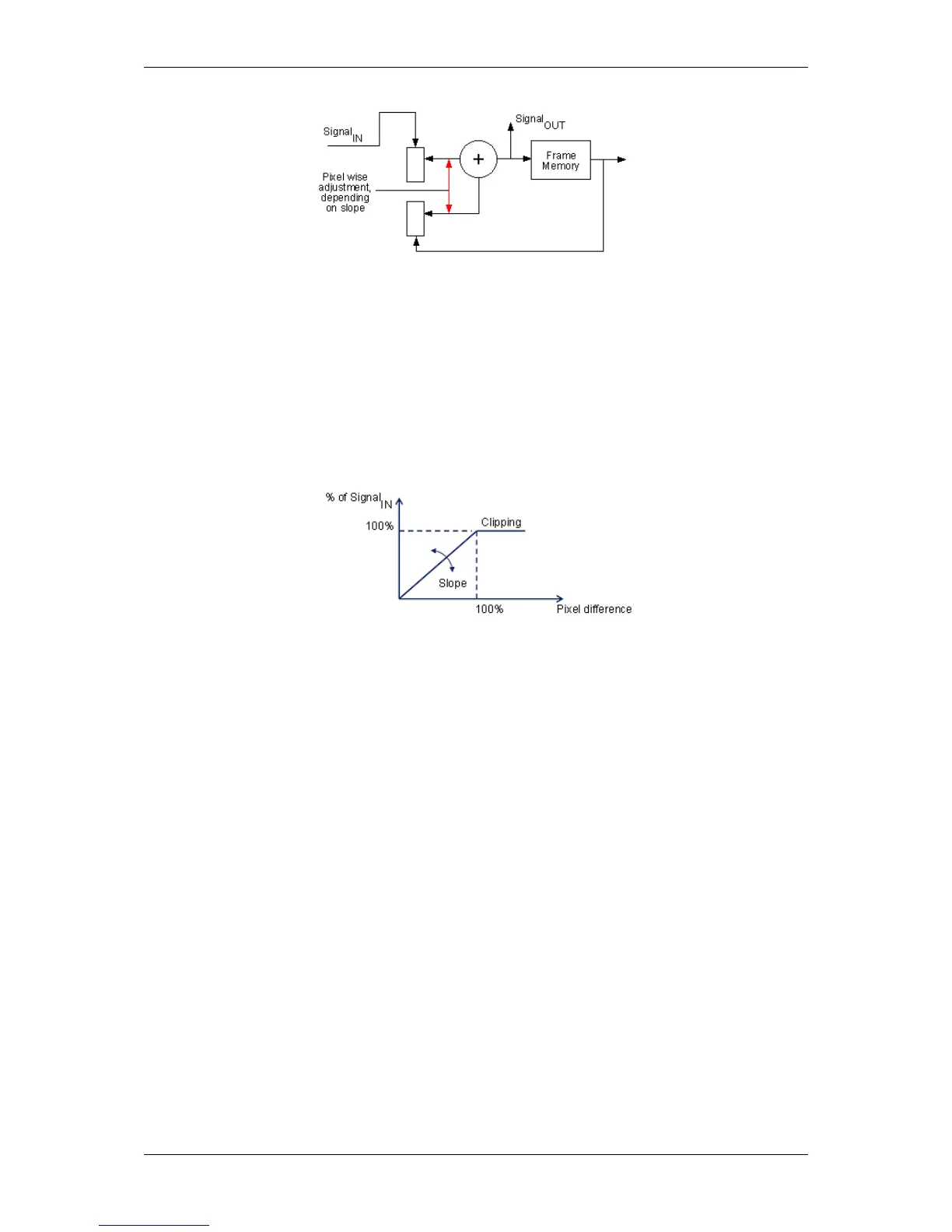
Figure 2: Frame average: Functional principle
This method is well known and is used in the same or a similar way in all flat screen televisions. The amount of de-
noising can be set with the slope factor: the smaller the value, the greater the feedback and therefore the de-noising
but also the motion blur in the image:
Slope: 256 = 100 % pixel_difference = 100 % signal_in
Figure 3: Frame average: Slope
There are no delays with this option because de-noising is recursive and the Signal
OUT
is extracted before the frame
memory.
20.3.3.3.1 Using wxPropView
Using the frame average mode "mvDynamic", you have to do the following step:
1. Start wxPropView (p. 74) and
2. connect to the camera.
3. Then specify in "Setting -> Base -> Camera -> GenICam -> Device Control" which processing unit of the
camera should do the frame averaging, e.g. unit 0 should do the frame averaging
"mv Device Processing Unit Selector = 0"
"mv Device Processing Unit = mvFrameAverage".
Afterwards, "mv Frame Average Control" is available.
4. Now open "Setting -> Base -> Camera -> GenICam -> mv Frame Average Control" and
5. select "mv Frame Average Mode = mvDynamic".
6. Set the slope, e.g. 5000: "mv Frame Average Slope = 5000".
7. Activate frame averaging by setting "mv Frame Average Enable = 1".
MATRIX VISION GmbH



 To Next Page