20.6 Working with HDR (High Dynamic Range Control) 253
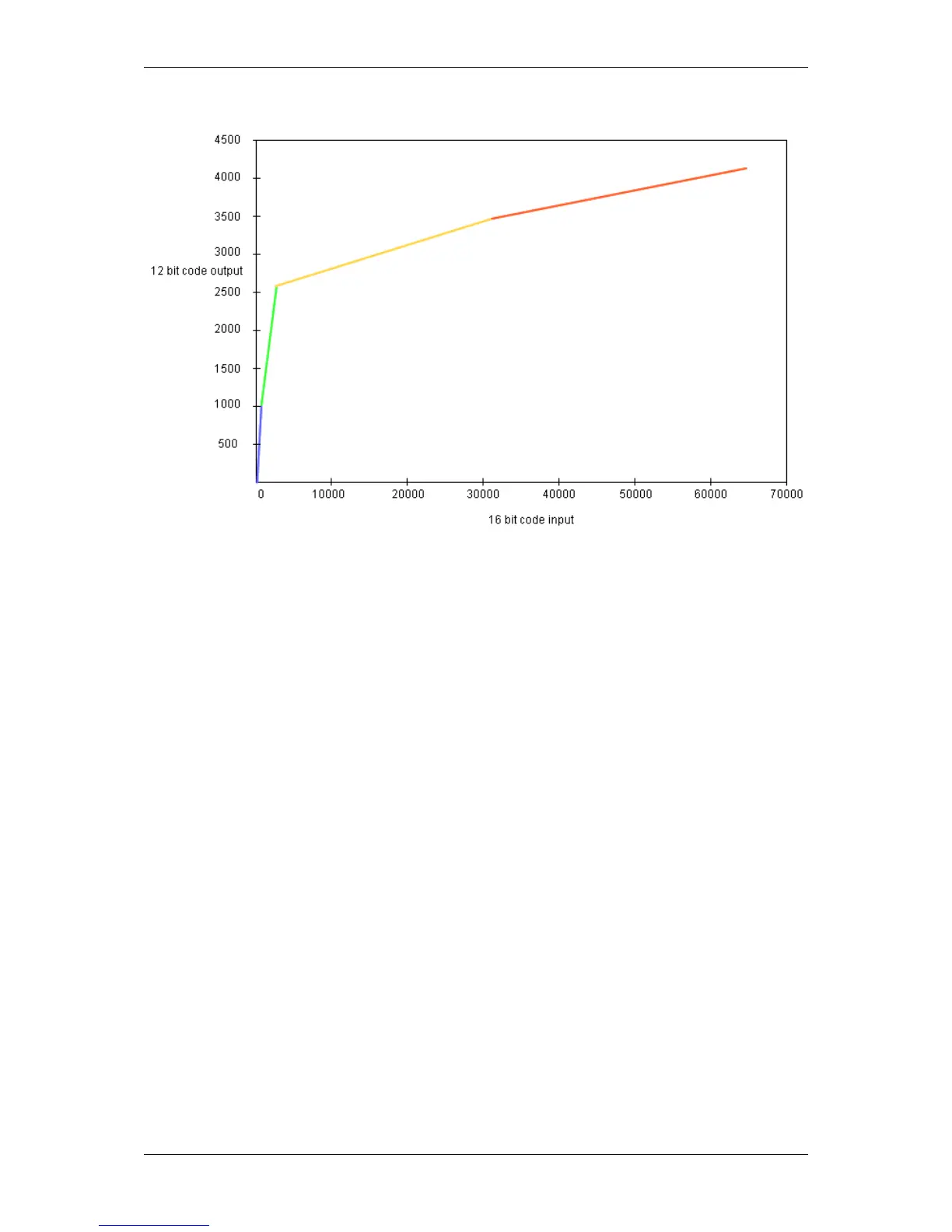
Figure 1: Compression from 16 to 12 bits
The HDR can be combined with
• image average for low noise images,
• the camera's auto exposure, and
• the camera's auto gain.
20.6.3.1.1 Adaptive Local Tone Mapping (ALTM)
The Adaptive Local Tone Mapping is used to compress the HDR image so that it can be nicely displayed on a low
dynamic range display (i.e. LCD with a contrast ratio about 1000:1). The AR0331 does ALTM internally and fully
automatic. The sensor also compensates both motion artifacts which occur because of the two exposures and noise
artifacts which occur because of the clipping.
20.6.3.2 Enabling the HDR mode with wxPropView
Using the HDR mode, you have to do the following step:
1. Start wxPropView (p. 74) and
2. connect to the camera.
3. Then in "Setting -> Base -> Camera -> GenICam -> mv High Dynamic Range Control" you can enable the
"mv HDR Enable".
MATRIX VISION GmbH



 To Next Page