8.4 Relationship between driver, firmware, FPGA file and user settings 49
Note
As it can be seen in the image the firmware file is NOT part of the device driver but comes as a separate
archive. It is important to notice that a firmware file that may be present on the host system will not be used
automatically but only when the user or an application explicitly updates the firmware on the device and will
only become active after power-cycling the device.
The name of the firmware update archive (∗ in the figure above) is:
• mvBlueFOX3_Update.mvu
Only during a firmware update the firmware file that has been selected from the file system of the host system will
be downloaded permanently into the device's non-volatile memory.
Warning
Each firmware archive might contain more than one specific firmware version per device thus in order to select
the one that is appropriate for the device appropriate tools such as mvDeviceConfigure (p. 100) should be
used.
So assume a device with a certain firmware version is connected to a host system.
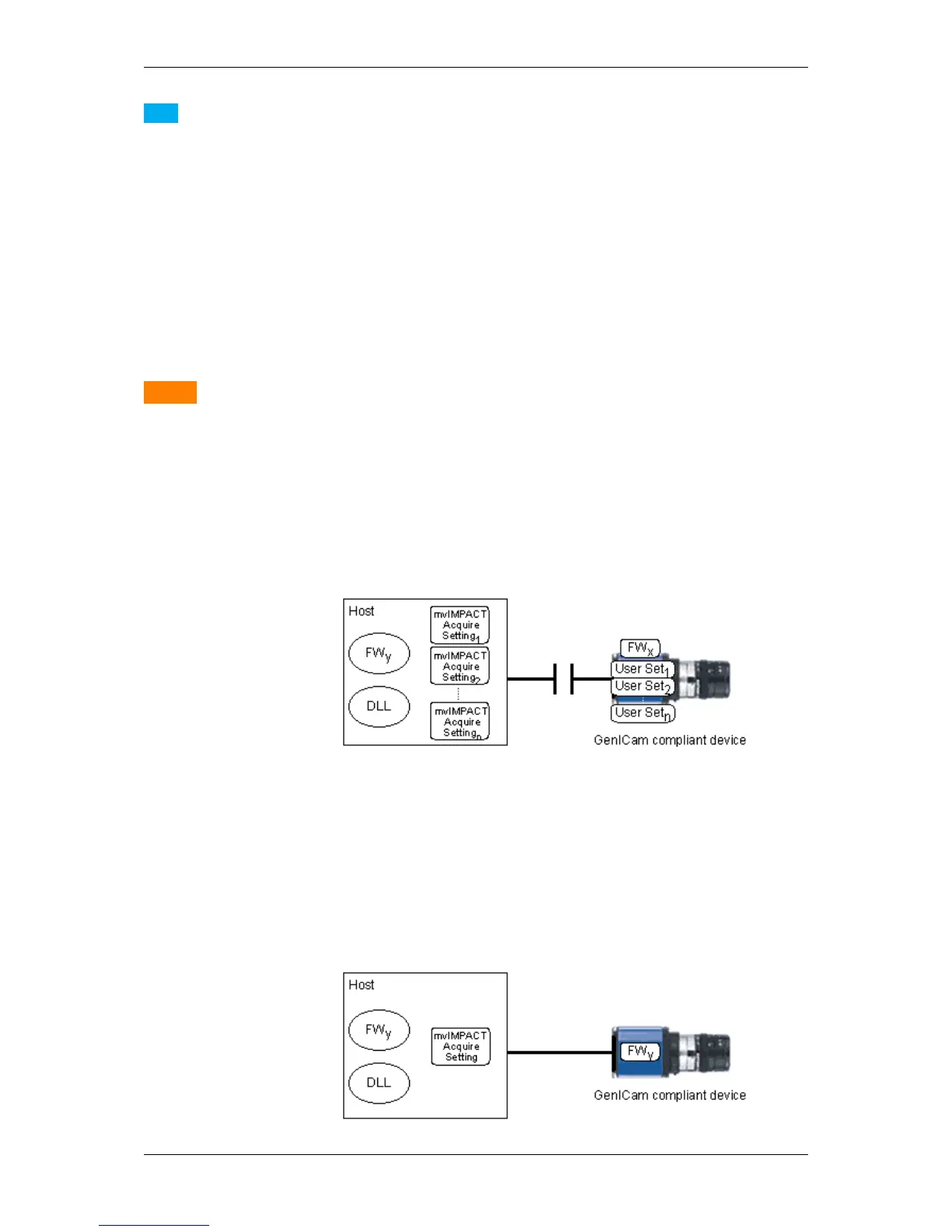
During an explicit firmware update, the firmware file will be downloaded onto the device. In order to become active
the device must be power-cycled:
Figure 8: Firmware file will be downloaded during an firmware update...
This can either be done by unplugging the device and then by plugging it back in or (for devices supporting this
feature) by resetting/rebooting the device by a certain software command (DeviceControl/DeviceReset). When
using mvDeviceConfigure (p. 100) to update devices the latter mechanism will be used by the tool thus it is NOT
necessary to unplug the device.
When the device has completed rebooting the new firmware version will become active:
MATRIX VISION GmbH



 To Next Page