50 CONTENTS
Figure 9: ... after repowering the device it will be active
• The current firmware version of the device can be obtained either by using one of the applications which are
part of the SDK such as mvDeviceConfigure (p. 100) or by reading the value of the property Device/←-
FirmwareVersion or DeviceControl/DeviceFirmwareVersion using the API
• The current FPGA file version used by the device can be obtained by reading the value of the property
DeviceControl/mvDeviceFPGAVersion
Note
The FPGA file is a part of the firmware and cannot be updated independently thus reading it's version just
provides some additional information.
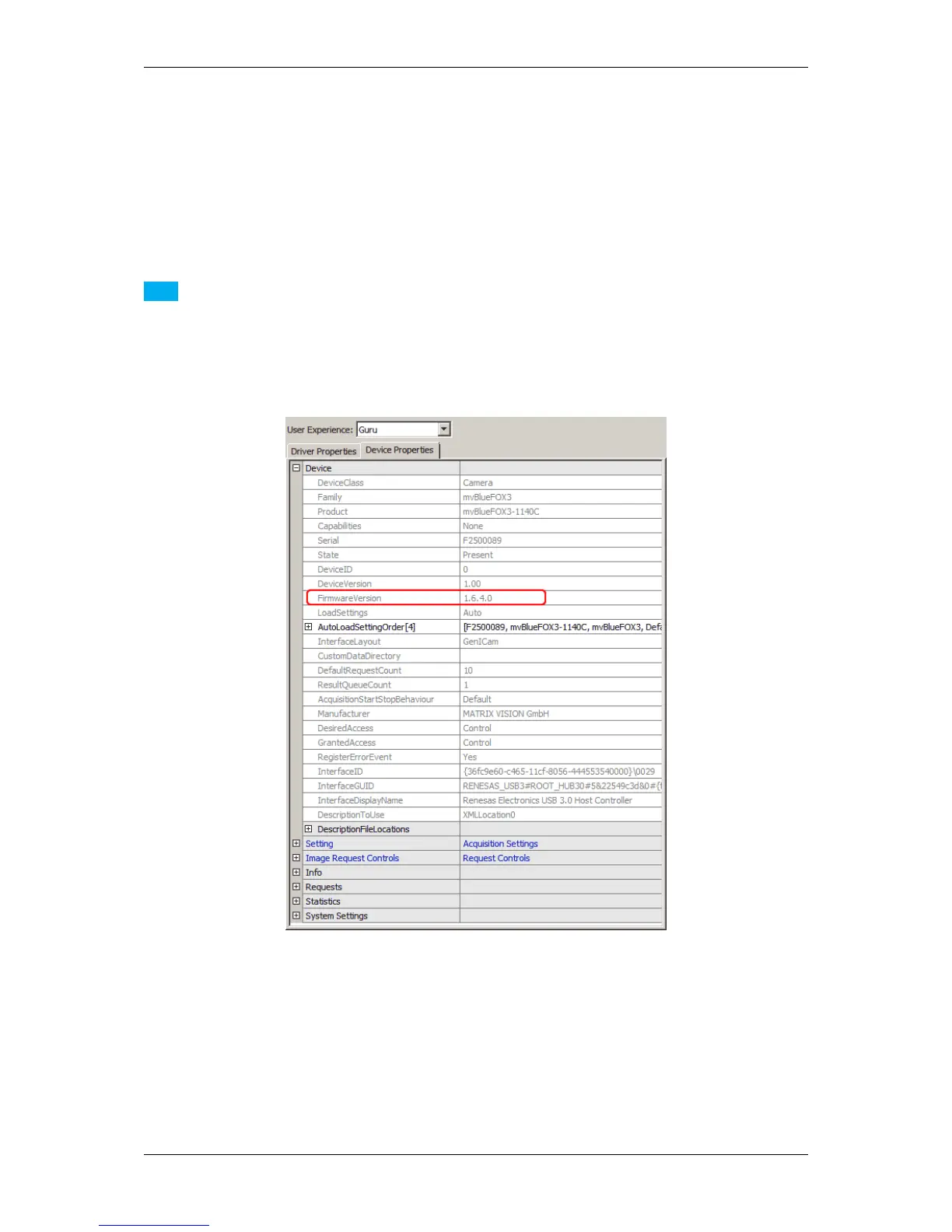
Using wxPropView (p. 74) the same information is available as indicated by the following figure:
Figure 10: wxPropView - FPGA and Firmware version numbers
Apart from the device driver and firmware relationship there are certain places where a device configuration can be
stored when dealing with GenICam (p. 155) compliant devices:
• There may be User Sets which are stored in the device's non-volatile memory. User Sets contain all the
features, which affect the device's behaviour such as transfer pixel format, exposure time etc. User Sets are
bound to major GenICam (p. 155) XML file releases, thus these settings will be lost whenever a firmware
contains a different major version of a devices GenICam (p. 155) XML file
MATRIX VISION GmbH



 To Next Page