Page 35
Operation
optoNCDT 1700
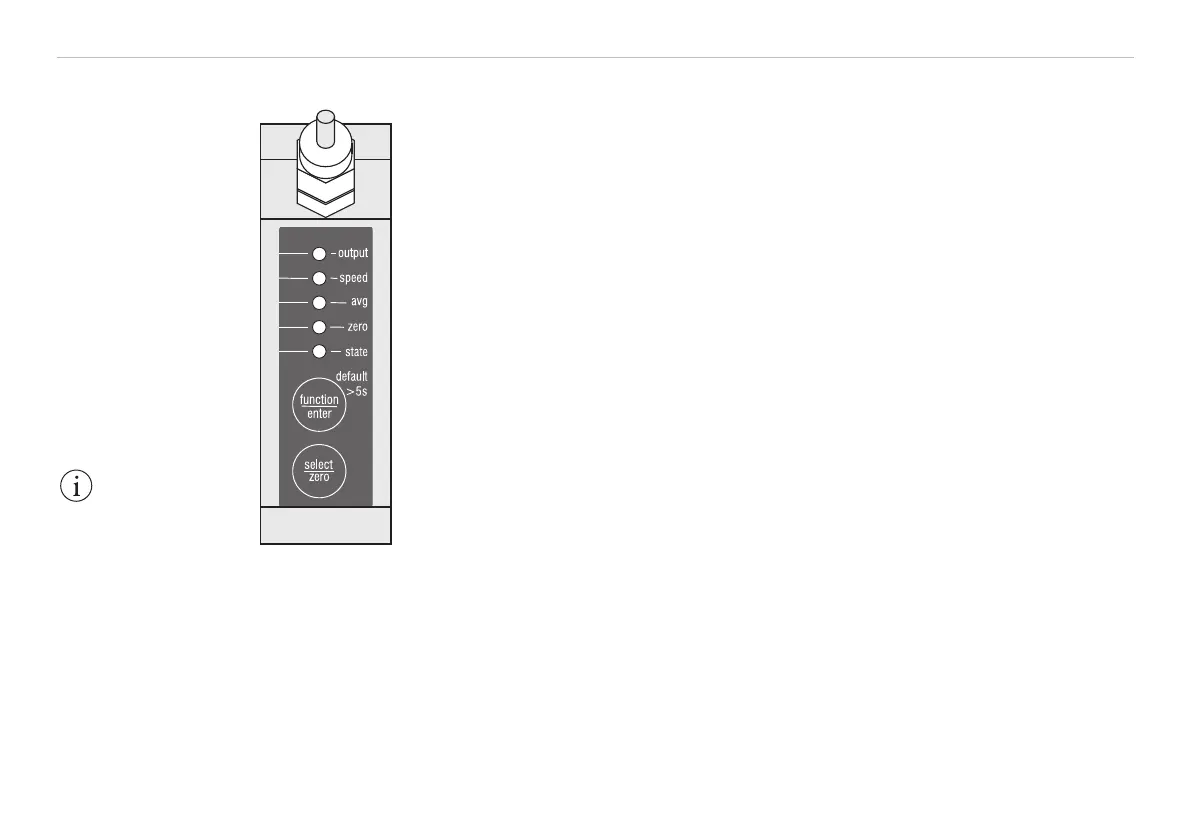
6.2 Membrane Keys
Fig. 20 Top view of the
optoNCDT1700
The two membrane keys function/enter and select/zero have dual as-
signments, depending on the operating status.
Measurement mode (normal operation):
- zero key:
Sets the analog output to the value for the mid-point of the
measurement range, i.e. 5 VDC or 12 mA.
Pressing the zero key again resets the function, see Chap. 6.7, see
Chap. 6.8.
- function key:
Switches the sensor to setup mode, see Chap. 6.5.
Pressing and holding the function/enter key for longer than 5 seconds
overwrites all the parameter values with the factory settings (default values,
see Chap. A 2.
Setup mode („function“ key actuated):
- function key:
For running through the levels and parameters.
- select key
To open the selection list and
select the value of the parameter in sequence.
- enter key:
For saving the selected parameter value and
Returning to measurement mode.
If approximately 15 seconds have elapsed since the last press of the func-
tion key or 30 seconds since the last press of the select key, the sensor
returns to measurement mode without changing the parameters.
IMPORTANT!
In setup mode the
sensor continues to
send measurement
values to the output.


 To Next Page