OM-267357 Page 19
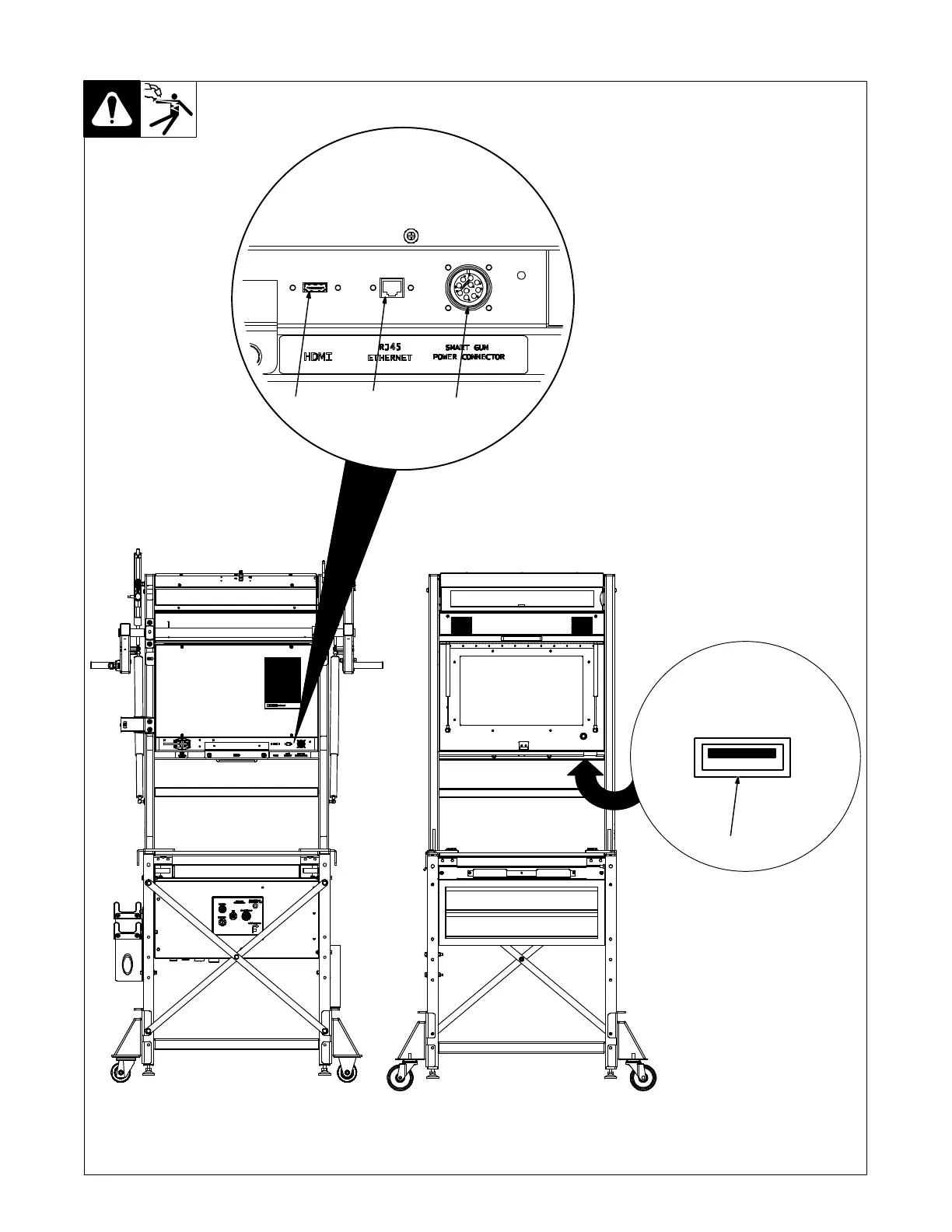
5-10. Making Connections To Touchscreen Monitor
See Section 12 for making
connections to monitor for
units equipped with optional
SMAW module.
1 SmartGun Power Receptacle
2 RJ45 Ethernet Receptacle
3 HDMI Receptacle
4 USB Receptacle
Connect data cable from Smart-
Gun to receptacle on back of moni-
tor. Tighten plug screws.
Use ethernet receptacle to con-
nect training system to a computer
network or connect via WiFi.
Use HDMI receptacle to connect
training system to an external
monitor.
If the training system is con-
nected to an external monitor,
restart the application to en-
able the monitor. (Section 8).
If the external monitor dis-
plays the warning screen dur-
ing welding, it is incorrectly
configured. Go to System
Admin and select Extend
Display to configure correctly.
Use USB receptacle to connect
computer mouse and keyboard,
save test results, and backup and
install software updates (see Sec-
tion 8-3).
123
Monitor Back Monitor Front
4
Ref. 268609-C















 To Next Page