OM-267357 Page 21
SECTION 6 − SYSTEM CONTROLS AND COMPONENTS
Welding-related hazards are present when using the welding training system. Read the welding power source and wire feeder Owner’s
Manuals and labels carefully for more information on arc welding hazards. Also read American National Standard Z49.1, Safety in
Welding, Cutting, and Allied Processes, from American Welding Society (www.aws.org). Operators must be trained on the proper use
of this equipment before using the equipment to train others.
6-1. Touchscreen Monitor Controls
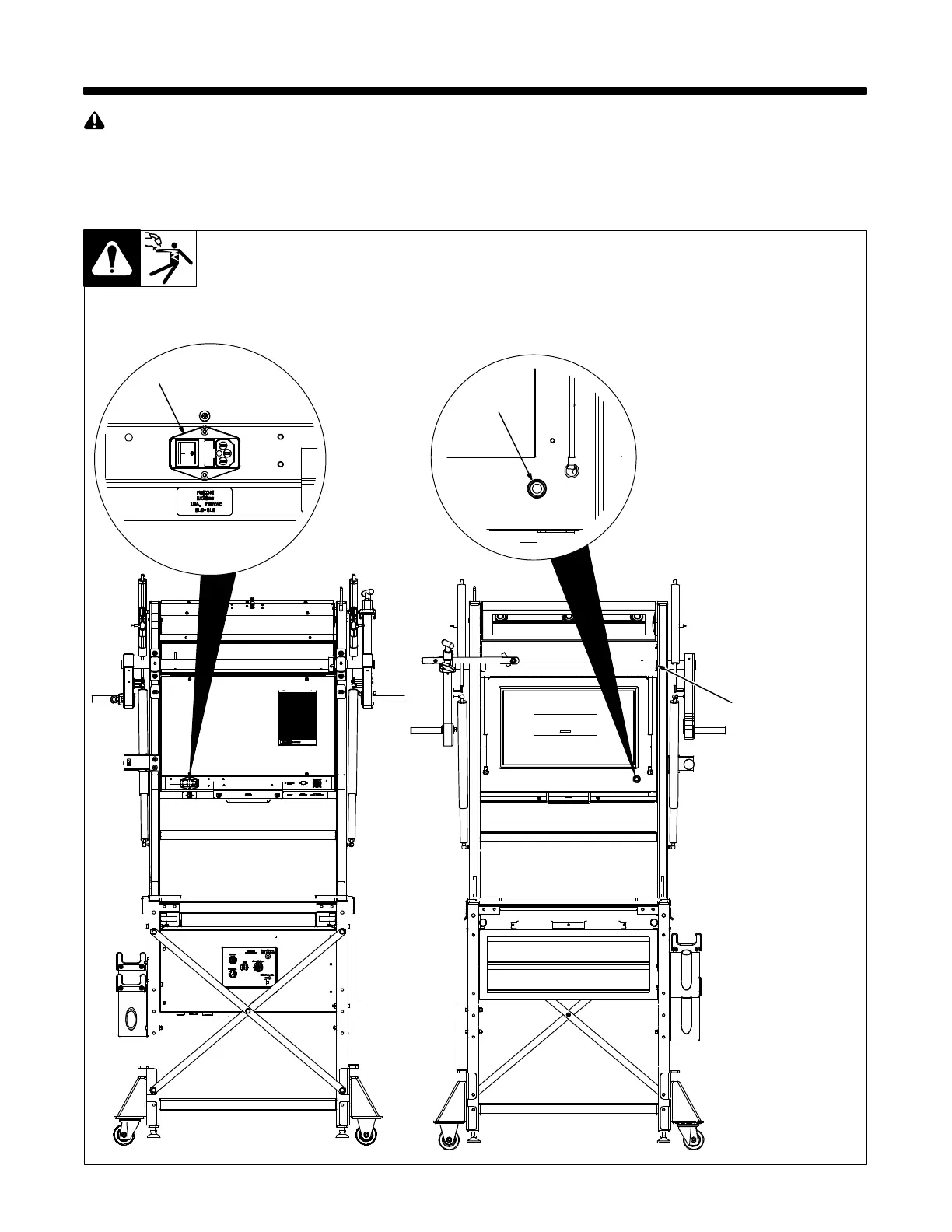
Monitor Back
1 Input Power Switch
2 On-Off Switch/LED
3 Monitor Cover
Place Input Power switch in On po-
sition to supply power to the moni-
tor (front panel LED turns on).
Press On-Off switch to turn unit on
and off.
System software may be con-
figured so only instructors can
turn unit off with On-Off switch
(Section 8-2).
Close cover before beginning
weld assignment. The LiveArc
system will not permit live
welding with cover open.
The monitor screensaver dis-
plays after four hours of inac-
tivity only if the on-screen ap-
plication contains no videos or
animations.
(Videos and ani-
mations prevent screensaver
from displaying.)
Monitor Front
1
3
Ref. 268609-C
2















 To Next Page