OM-267357 Page 33
7-2E. Practicing In SIM (Simulation) Mode (GMAW/FCAW Only)
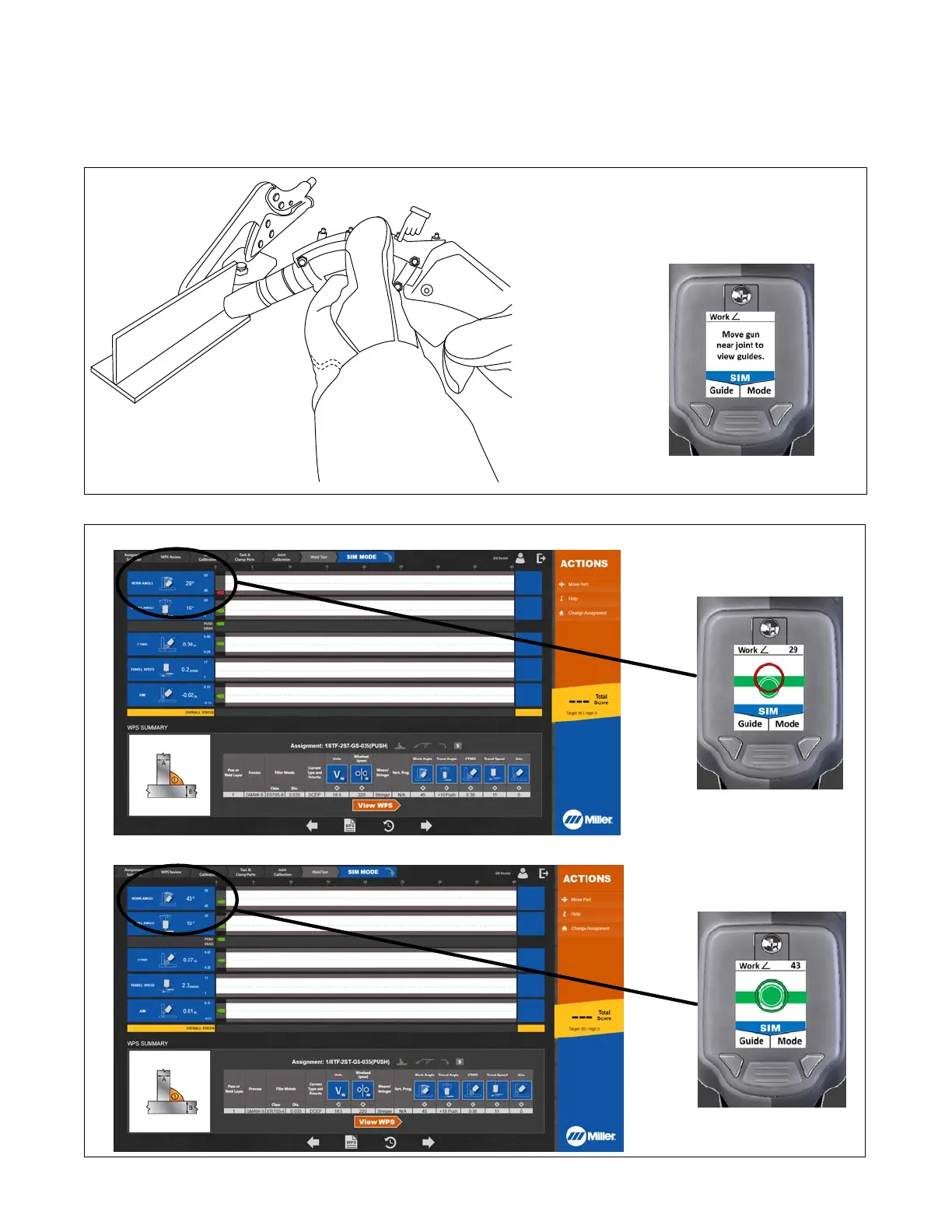
5. System is now in the SIM (simulation) mode (as indicated on SmartGun display screen) (Figure 7-15 and Figure 7-16). Move SmartGun near the
weld joint; gun positioning recommendations are displayed on the touchscreen and the SmartGun display screen. (If you wish to relocate the weld
coupons on the weld table, touch Move Part on the touchscreen.) Press Guide button to cycle through the parameters (work angle, travel angle,
travel speed, aim, CTWD, and Guide Disabled). The target on the SmartGun screen indicates if the gun is positioned correctly.
Whether the software detects pushing or dragging motion depends on starting position. If you start to the right of the midpoint of the two joint calibra-
tion points, it expects you to travel left. If you start to the left of the midpoint, it expects you to travel right.
161-048
Corresponding
SmartGun Display
Do not cover SmartGun LEDs.
Figure 7-15. Performing Simulated (SIM) Weld Test
Corresponding
SmartGun Display
(Gun Work Angle Incorrect)
Corresponding
SmartGun Display
(Gun Work Angle Correct)
Work Angle
Work Angle
Figure 7-16. Example Of Work Angle Guide In Simulated (SIM) Mode















 To Next Page