EasyManua.ls Logo

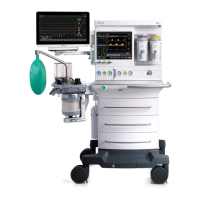
Mindray A8 - Service Manual

Mindray A8
424 pages
Print Icon
To Next Page IconTo Next Page
Loading...
Anesthesia System
ANESTHESIA SYSTEM
Service Manual
|

Table of Contents

Other manuals for Mindray A8

Questions and Answers

  • J
    Jacqueline CoxAug 19, 2025
    What to do if the anesthesia display cable and LCD cable are disconnected in Mindray Medical Equipment?
    • K
      Kayla DavisAug 19, 2025
      If the anesthesia display cable and LCD cable of the Mindray Medical Equipment are disconnected, reconnect them. If the issue persists, the display should be replaced.
  • J
    Jose CollinsNov 3, 2025
    What to do if the Mindray A8 main screen is off when turned on?
    • I
      Isaac SmithNov 3, 2025
      If the Mindray Medical Equipment's main screen remains off when switched on, ensure the AC power supply is properly connected. If the AC indicator is off, continue checking. If the AC indicator is on, or the small display is off, further investigation is needed. If the small display functions properly, continue checking. If the HFNC module can be started, replace the system switch, and if the problem continues, replace the DC-DC power board, and if the problem persists, replace the backplane. If the HFNC module cannot be started, replace the DC-DC board, and if the problem persists, replace the backplane. If the alarm light does not blink, and no alarm sound is generated, but the buzzer is ringing, reconnect or replace the cable between the backplane and the display, and replace the main b...

Mindray A8 Specifications

General IconGeneral
TypeAnesthesia Workstation
Weight155 kg (without vaporizers and gas cylinders)
Display Size15 inches
ConnectivityEthernet, USB
Monitoring ParametersECG, SpO2, NIBP, EtCO2, FiO2, Temperature
Ventilation ModesVCV, PCV, SIMV, PSV
Fresh Gas DeliveryElectronic control
Power SupplyAC 100-240V, 50/60Hz

Related product manuals