Dansensor® Lippke® 5000 EN User Guide 121
P/N 380419-C
05/2022
Device
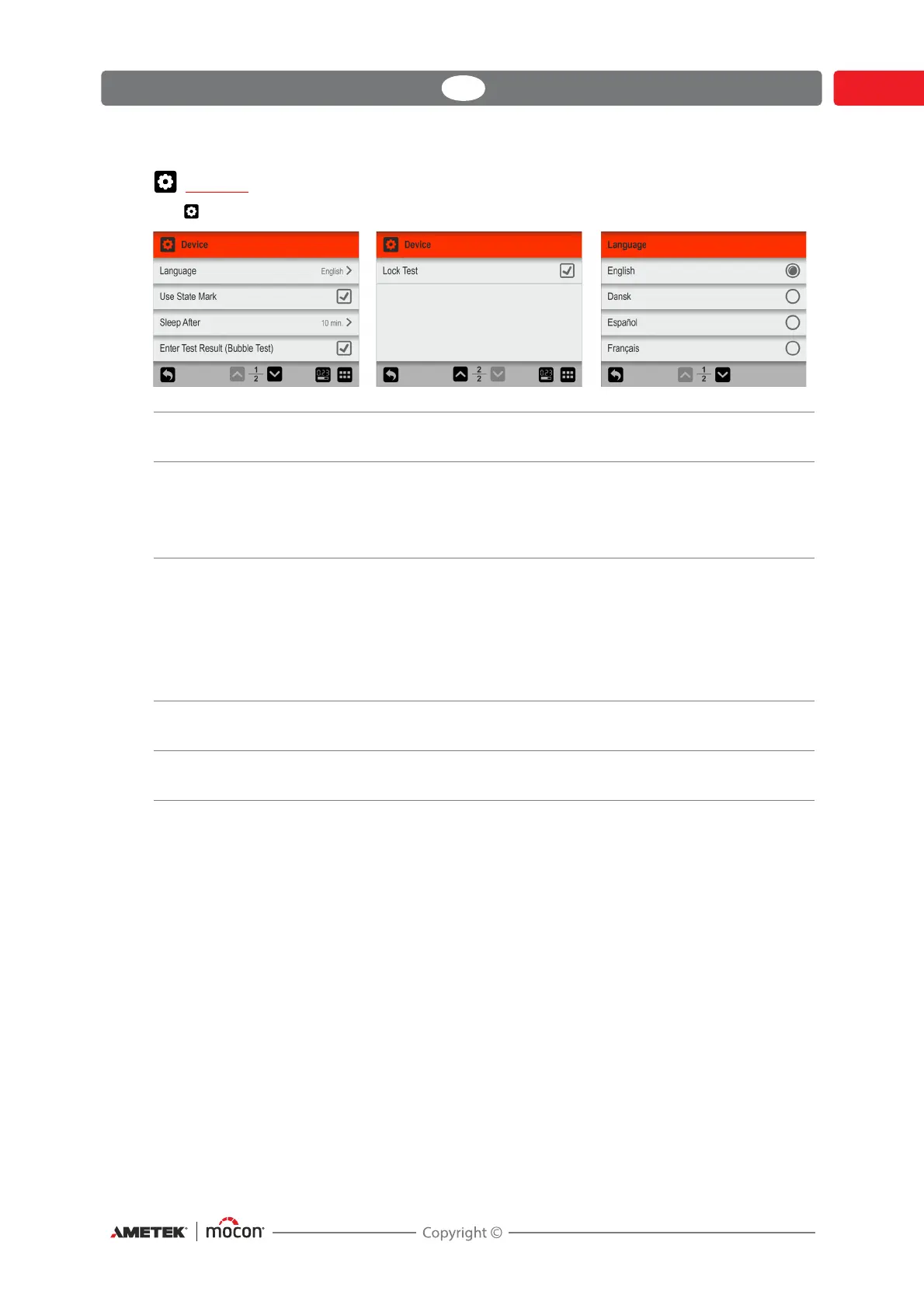
The Device screen holds some basic device setup parameters.
Language When selecting a language all text throughout the menus will be
displayed in this language
Use State Mark Select whether or not the State function should be used for test
definitions/workflows.
If function is disabled all test definitions/workflows are available for
users on all access levels.
Sleep After To save energy and reduce noise, you can make the device switch to
a “Sleep” mode when not in use for a period. This will cause e.g. the
fan in the chamber and the sample pump to stop and the display will
be dimmed.
Setting value to 0 will disable the function.
To “wake up” the device, simply tap anywhere on the screen.
Enter Test Result
(Bubble Test)
Select whether you want the option to enter the result of a “Bubble”
test.
Lock Test When enabled, most of a test definition’s parameters are locked from
editing when tests have been performed using the test definition.


 To Next Page