2. Preparation before Use
PROGRAMMABLE AC POWER SOURCE
36
7.
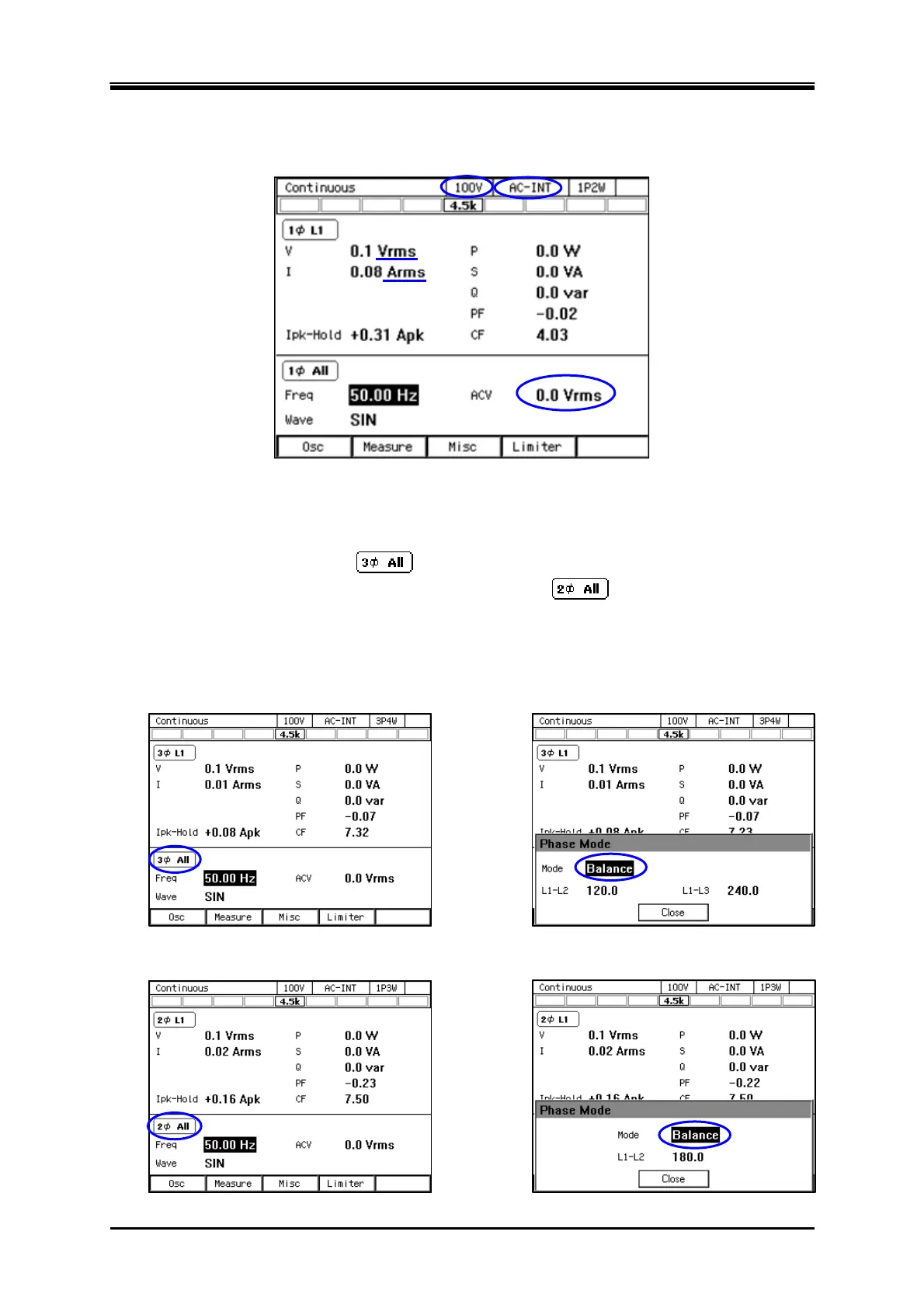
Check that the measured values of 100 V range, AC-INT, V, and I are displayed in rms, and that
the AC voltage (ACV) is set to 0 V.
8.
«Only for the polyphase model, the polyphase output of the Multi-phase model, or the
polyphase system» As shown in the figure below, for the three-phase model or three-phase
system, check that the icon
is displayed, and for the single-phase three-wire model or
the single-phase three-wire system, check that the icon
is displayed. Press the [Osc]
soft-key and select [6: Phs Mode] to display the [Phase Mode] window, and check that the
mode is set to [Balance] (balanced mode).
Three-phase model, three-phase output of Multi-pase model, or three-phase system
Single-phase three-wire model, single-phase three-wire output of Multi-phase model, or single-phase
three-wire system



 To Next Page