3. Basic Operation
PROGRAMMABLE AC POWER SOURCE
68
3.4.10 Switching the Display Format (RMS/AVG/Peak) of the Measured Value
You can switch the display format of the measured value (RMS/AVG/Peak) for the output voltage
and output current. The items which are displayed in each measuring mode are shown in Table 3-12.
Table 3-12 The Measuring Mode for the Measured Values of the Output Voltage and
Output Current
Measuring
mode
Items to be Displayed
(Output Voltage, Output Current)
RMS V, I, Ipk-Hold
AVG Vavg, Iavg, Ipk-Hold
Peak Vmax, Vmin, Imax, Imin, Ipk-Hold
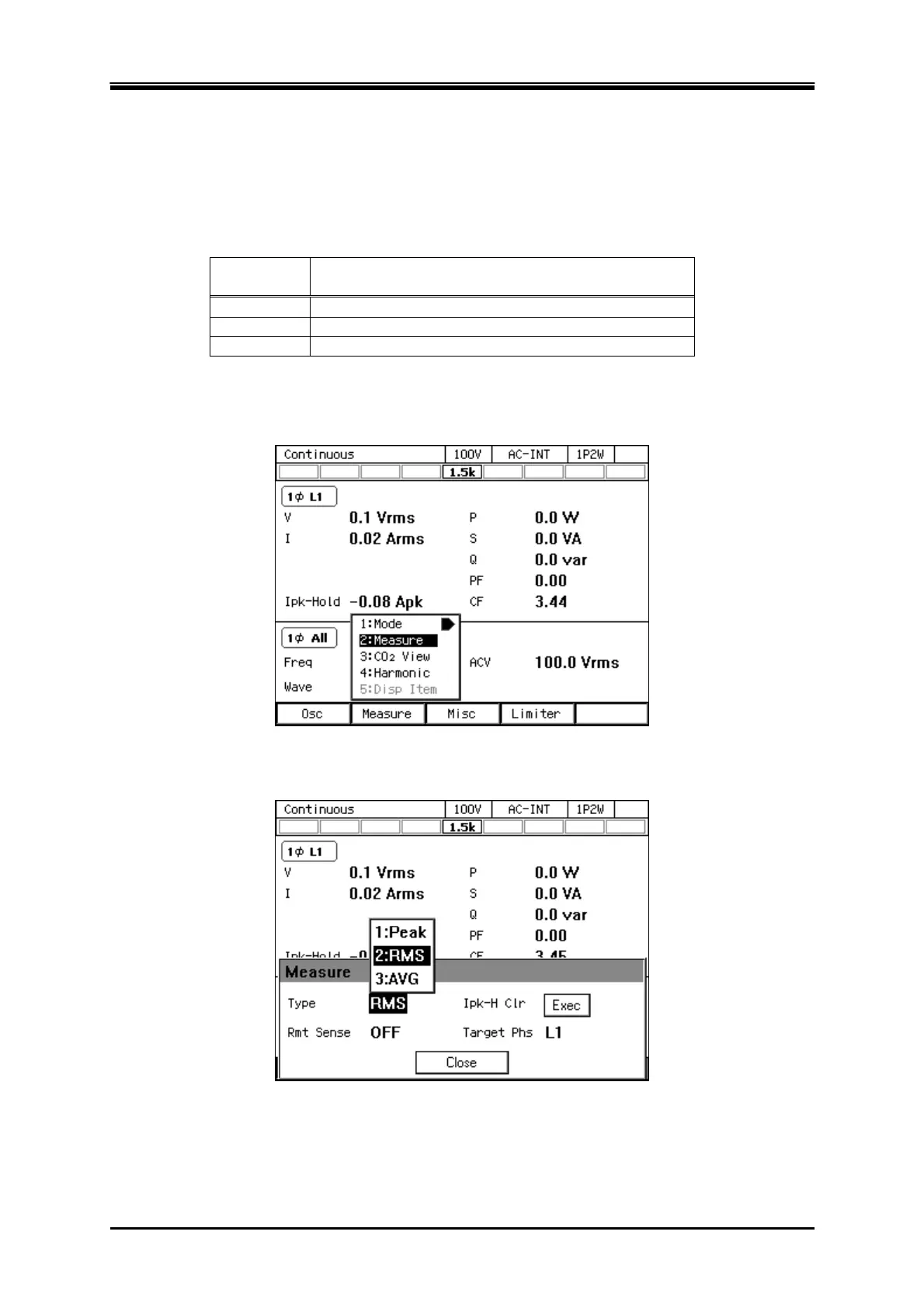
Operation procedures using soft-keys
1.
Press the [Measure] soft-key and select [2:Measure]. The [Measure] window opens.
2.
Select the [Type] item. In the displayed selection box, select the desired measuring mode.
3.
Close the window. For how to close the window, see
3.3.4
.



 To Next Page