•
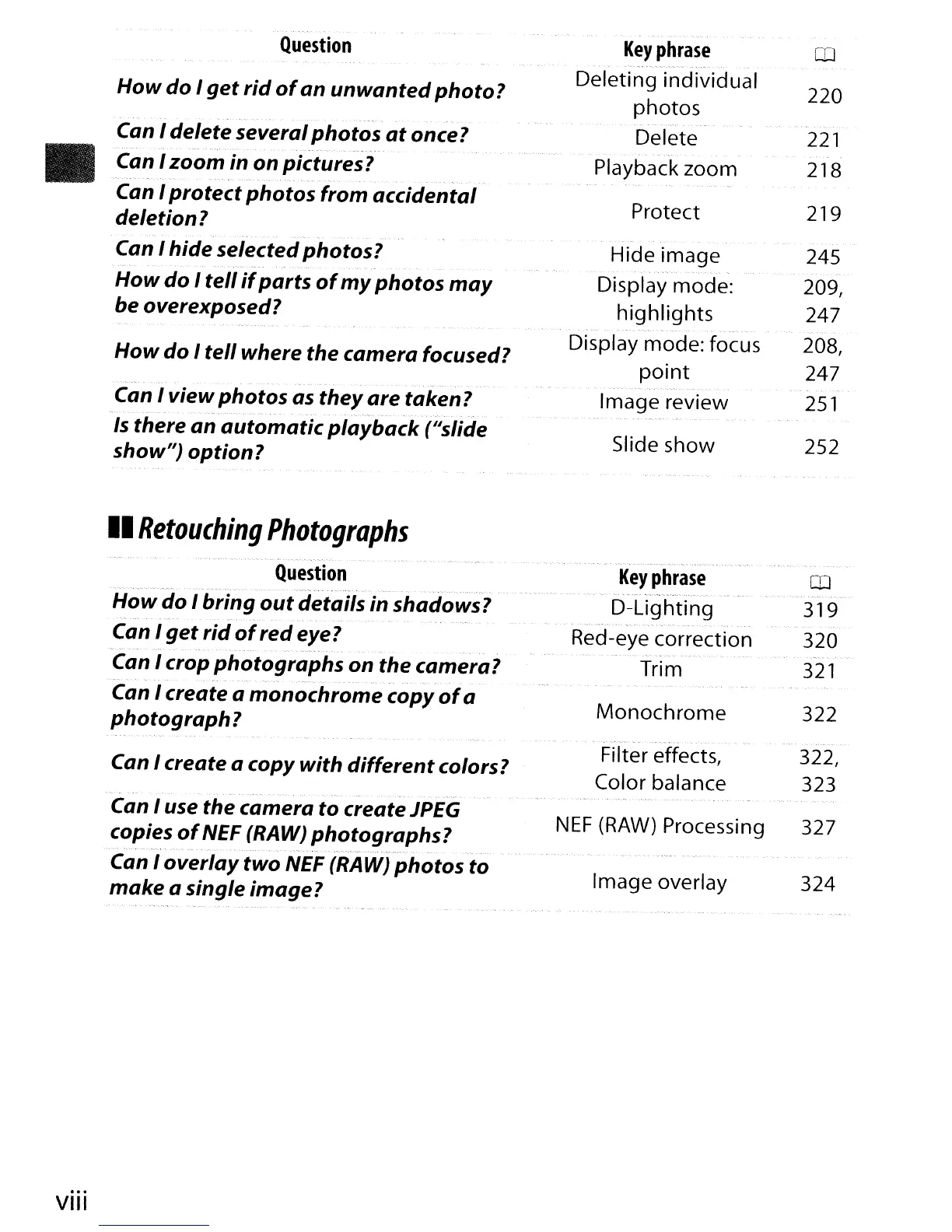
Question
How
do I
get
rid
of
an
unwanted
photo?
..
-
~
Can I delete severalphotos
at
once?
.
...
,
,-.
-
._-._,
....••
Can I zoom in on pictures?
.
","
.~
~-
,.
- . -
.-
..
"
'.-
..
'.
-.
Can I protect photos from accidental
deletion?
Can I hide selected photos?
How
do I tell
if
parts
of
my
photos
may
be overexposed?
How
do I tell where the camera focused?
Can I viewphotos as they
are
taken?
. ~ ....
-.
-.
-
-.-
~-
-
-.
- .
..-'--
Is
there
an
automatic
playback
{"slide
show"} option?
II
Retouching
Photographs
Key
phrase
Deleting individual
photos
Delete
Playback zoom
Protect
Hide image
Display mode:
highlights
Display mode: focus
point
Image review
Slide show
CD
220
221
218
219
245
209,
247
208,
247
251
252
VIII
Question
"._' -
How
do I bring
out
details in shadows?
-
_._--.
. -- ,
..
Can I
get
rid
of
redeye?
Can I crop photographs
on the camera?
- -
~ .,~
".
.
...
-._".. .
--
Can I create a monochrome copy
of
a
photograph?
Can I create a copy with
different
colors?
~
'.
--. .
,.
.~._-
Can I use the camera to createlPEG
copies
of
NEF (RAW) photographs?
".-.,",
_.-
-.'
'~----'.-
-.-
- -
-_.~._--
•..
, _._.
-~_
..
-------~
..
_
-.-_
...• -
..
----".
Can I
overlay
two NEF (RAW) photos to
make
a single image?
Key
phrase
III
D-Lighting 319
.
---
'.~-
.".-,-.-'
'._~'-'.-
-.-
Red-eye correction 320
Trim
321
Monochrome
322
._--
Filter effects, 322,
Color balance 323
NEF
(RAW)
Processing 327
Image overlay 324



 To Next Page