EasyManua.ls Logo

Nikon D300S - E3: Flash Cntrl for Built-In Flash

Nikon D300S
501 pages
Print Icon
To Next Page IconTo Next Page
To Previous Page IconTo Previous Page
Loading...
e3:
Flash
Cntrl for Built-in
Flash
MENU
button
...
tfI
Custom Settings menu
I
~,
i.LSZ:
z_·
_iilol:.J:N"_~lII
'-Ii_S_-'Gr"':~¥O'WIQ.Clt~lillj_:
:U_.:_~·f_:@jMl""""
__
~
__
'
~"L_H_.iS':-_-:
_f.
~:ilj
__
d-
;;;":4~~~~~~.;
.r?r
_~
•.
'd;1;!O
.-
-j"
§?-~~J
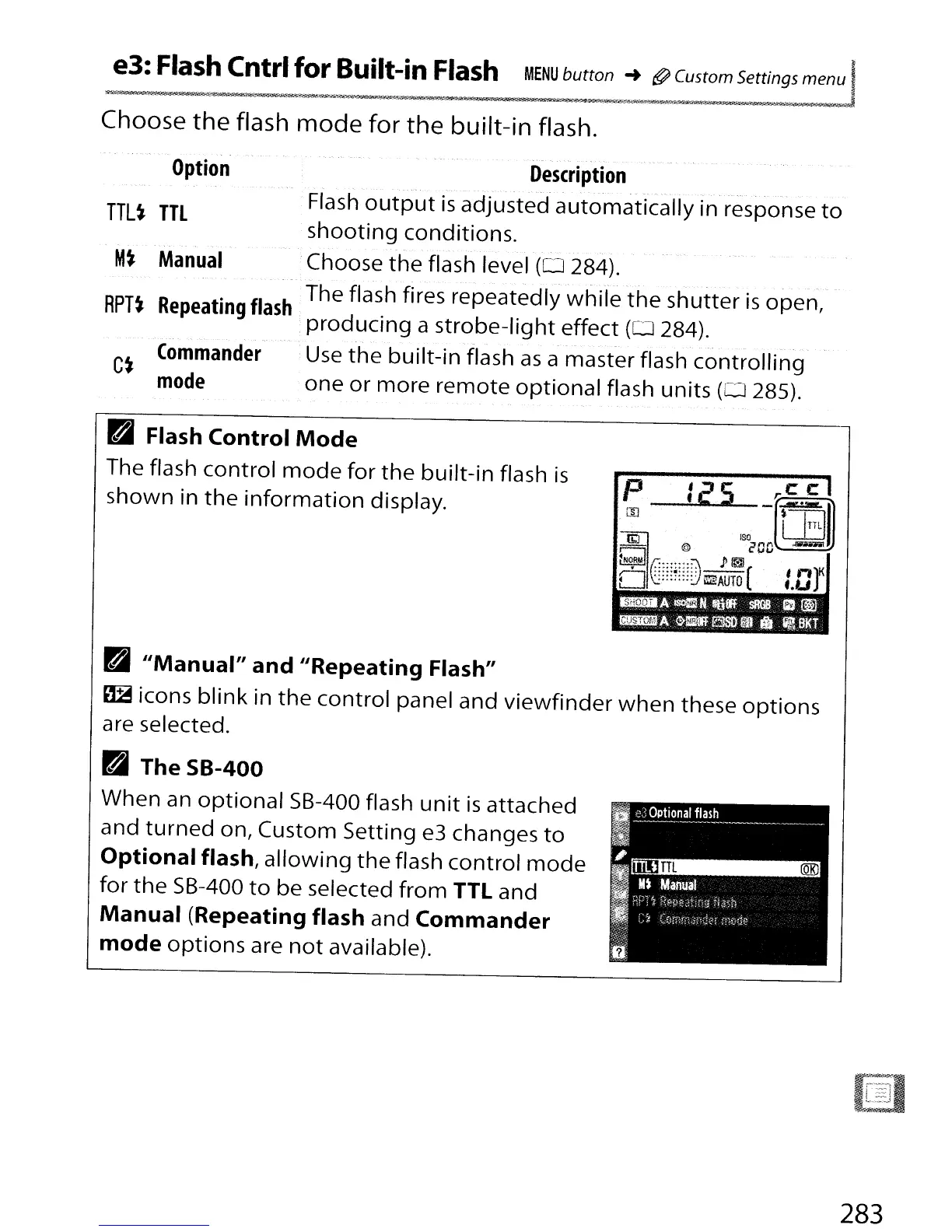
Choose
the
flash
mode
for
the
built-in
flash.
-
..
Option
TTL~
TTL
M~
Manual
RPT~
Repeating
flash
Commander
C~
mode
Description
._---"
.-,
-
- -
Flash
output
is
adjusted
automatically
in response
to
shooting
conditions
.
.Choose
the
flash level
(0
284).
The flash fires
repeatedly
while
the
shutter
is
open,
producing
a
strobe-light
effect
(0
284).
Use
the
built-in
flash
as
a
master
flash
controlling
one
or
more
remote
optional
flash
units
(0
285).
B
Flash Control
Mode
The flash
control
mode
for
the
built-in
flash
is
shown
in
the
information
display.
P
Ie'S
_r~
m
'1:11
L..L::J
~"
"'cDO-
~NOAul
.P
~
':;:::~::::;
;;:;;-- , n
D(.······)~AuTO(
f.Ur
Pv
£;,~
D
IIManual" and IIRepeating Flash"
~
icons
blink
in
the
control
panel
and
viewfinder
when
these
options
are selected.
D
TheSB-400
When
an
optional
5B-400 flash
unit
is
attached
and
turned
on,
Custom
Setting
e3 changes
to
Optional flash,
allowing
the
flash
control
mode
for
the
5B-400
to
be
selected
from
TTL
and
Manual (Repeating flash
and
Commander
mode
options
are
not
available).
283

Table of Contents

Other manuals for Nikon D300S

Related product manuals