EasyManua.ls Logo

Nikon D300S - The Information Display

Nikon D300S
501 pages
Print Icon
To Next Page IconTo Next Page
To Previous Page IconTo Previous Page
Loading...
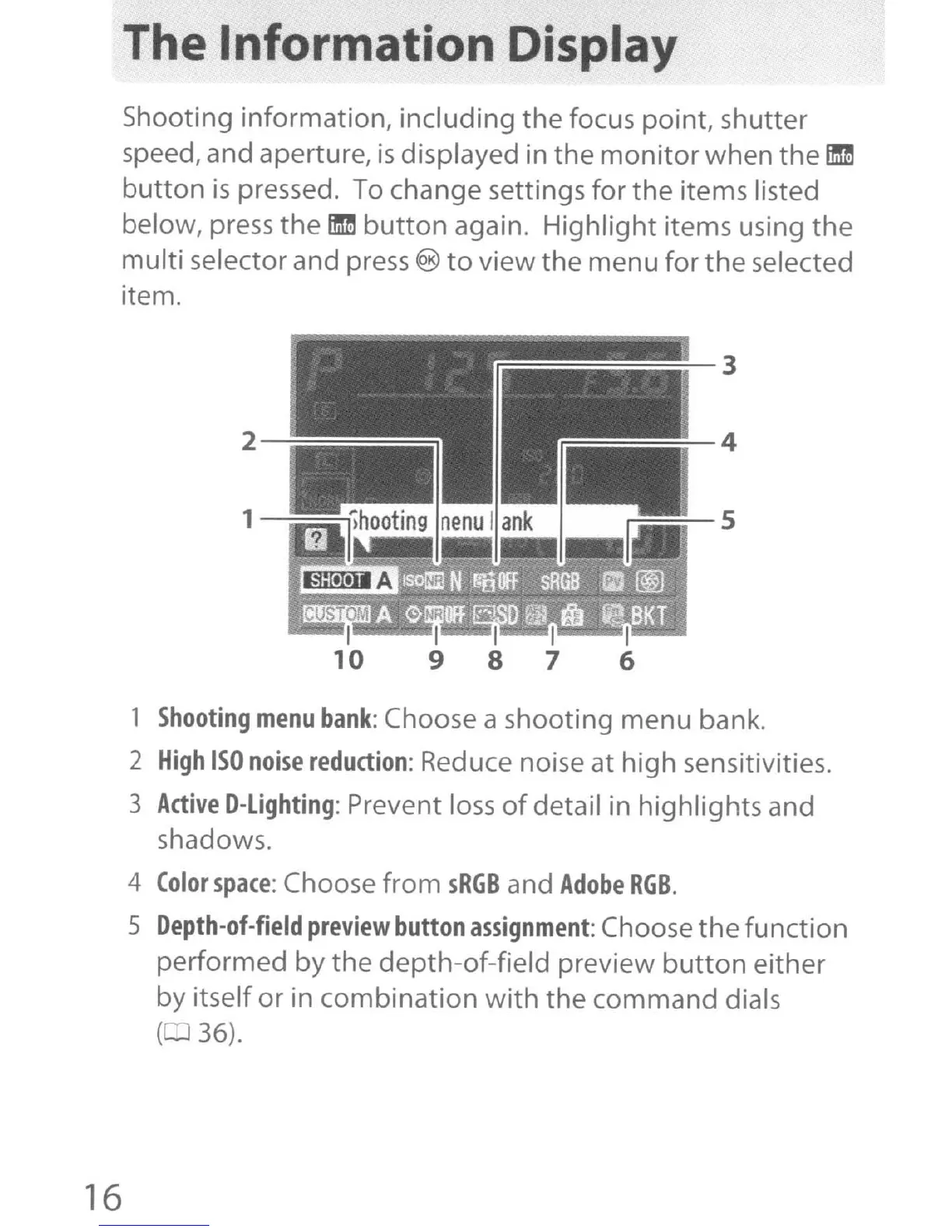
The Information Display
Shooting
information,
including
the
focus
point,
shutter
speed, and aperture,
is
displayed in
the
monitor
when
the
ID
button
is
pressed. To change settings
for
the
items listed
below, press
the
ID
button
again.
Highlight
items using
the
multi
selector and press ®
to
view
the
menu
for
the
selected
item.
2
---=::::::::::::::::::::::::::::::::::::::::::::::::::::;:::;;:;
~==--s
1
Shooting
menu
bank:
Choose a
shooting
menu
bank.
2
High
ISO
noise
reduction:
Reduce noise at
high
sensitivities.
3
Active
D-Lighting:
Prevent loss
of
detail in
highlights
and
shadows.
4
Color
space:
Choose
from
sRGB
and
Adobe
RGB.
5
Depth-ot-field
preview
button
assignment:
Choose
the
function
performed
by
the
depth-of-field
preview
button
either
by
itself
or
in
combination
with
the
command
dials
( 36).
16

Table of Contents

Other manuals for Nikon D300S

Related product manuals