EasyManua.ls Logo

Nikon D300S - Color Space

Nikon D300S
501 pages
Print Icon
To Next Page IconTo Next Page
To Previous Page IconTo Previous Page
Loading...
ColorSpace
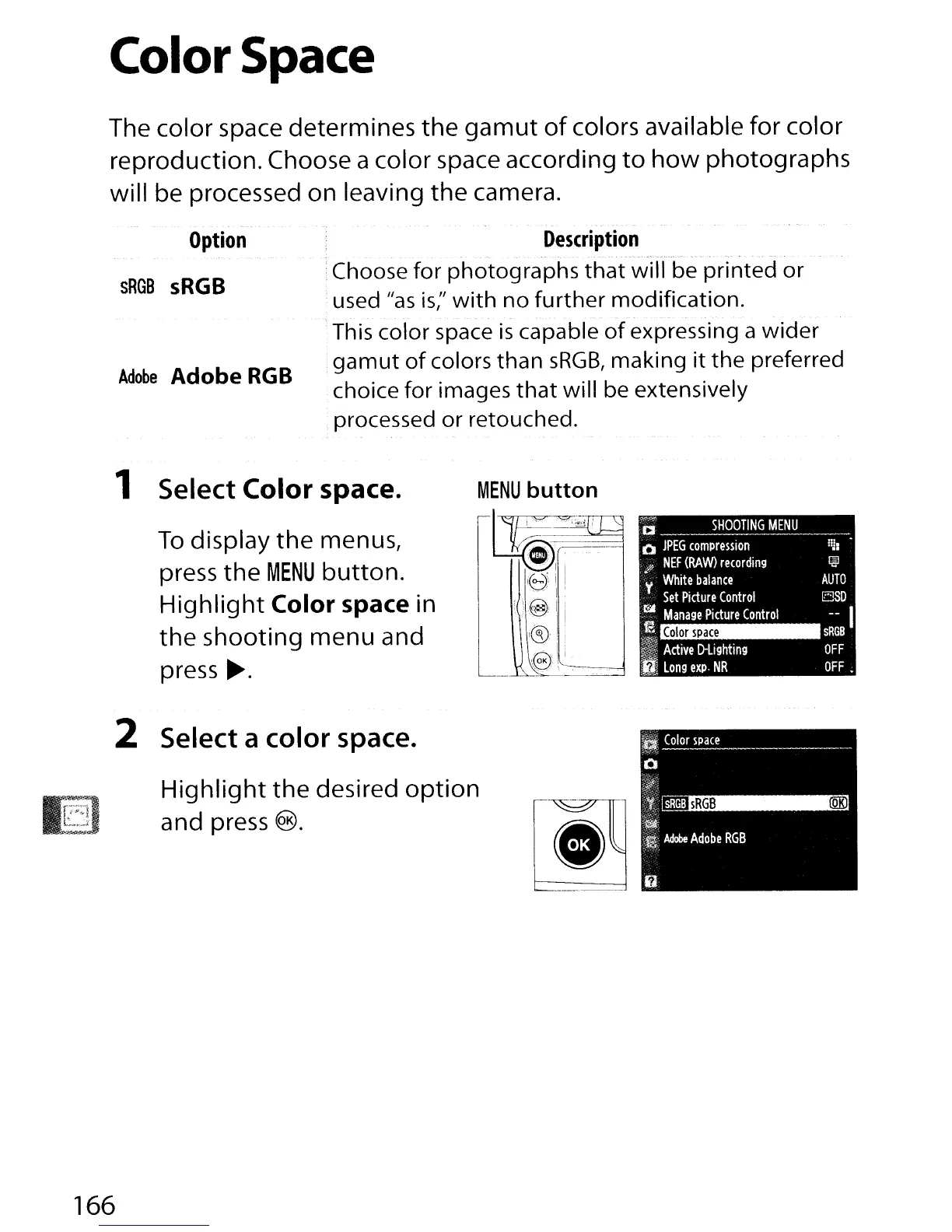
The color space determines the
gamut
of
colors available for color
reproduction. Choose a color space according
to
how
photographs
will be processed on leaving the camera.
Option
sRGB
sRGB
Adobe
Adobe
RGB
--
.
Description
.
"-"-'._~-----_._-------'
-.".
"."
.---'
:Choose for photographs
that
will be printed
or
used
Has
is;'
with
no
further
modification.
"."
.-
This color space
is
capable
of
expressing a wider
gamut
of
colors than
sRGB,
making
it
the preferred
choice for images
that
will be extensively
processed or retouched.
1 Select Color space.
To
display
the
menus,
press
the
MENU
button.
Highlight
Color space in
the
shooting menu and
press
~.
2 Select a color space.
Highlight
the
desired
option
and press ®.
166

Table of Contents

Other manuals for Nikon D300S

Related product manuals