EasyManua.ls Logo

Nikon D300S - Menu Guide; Playback Menu

Nikon D300S
501 pages
Print Icon
To Next Page IconTo Next Page
To Previous Page IconTo Previous Page
Loading...
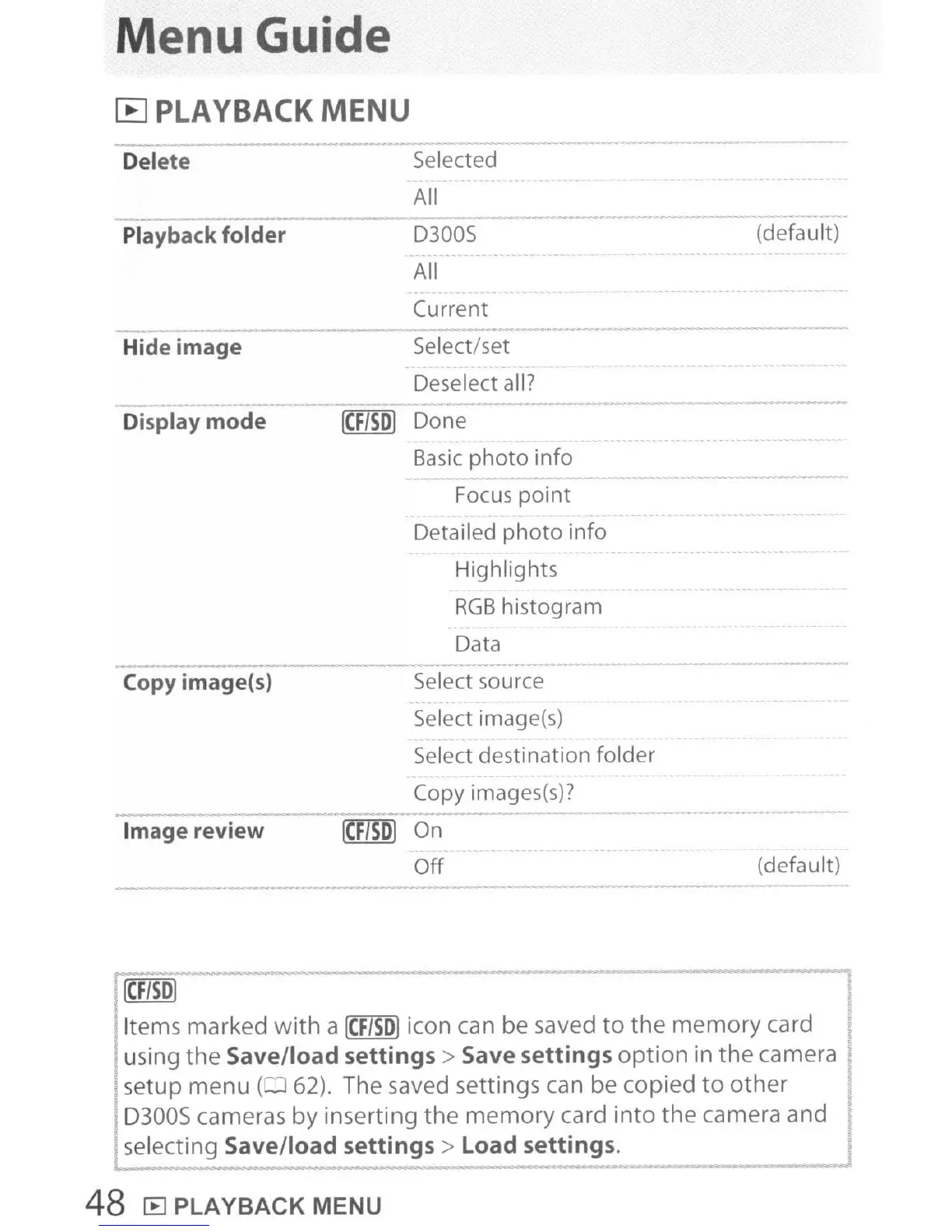
Menu Guide
[B
PLAYBACK
MENU
-
Delete
Selected
All
-
Playback folder D300S
(default)
All
Current
-
Hide image Select/set
Deselect all?
-
Display mode
Done
Basic
photo
info
-
Focus
point
Detailed
photo
info
Highlights
RGB
histogram
Data
-- -
._-
Copy image(s) Select source
Select image(s)
Select destination folder
Copy images(s)?
--
Image review
On
Off
(default)
leF/SO]
Items marked
with
a
[eF/SO)
icon can be saved
to
the
memory card
. using the
Save/load
settings>
Save
settings
option
in
the
camera
. setup menu
(062).
The saved settings can be copied
to
other
, D300S cameras by inserting the
memory
card
into
the camera and
selecting
Save/load
settings>
Load settings.
48 [E] PLAYBACK MENU

Table of Contents

Other manuals for Nikon D300S

Related product manuals