EasyManua.ls Logo

Nikon D300S - Page 480

Nikon D300S
501 pages
Print Icon
To Next Page IconTo Next Page
To Previous Page IconTo Previous Page
Loading...
-
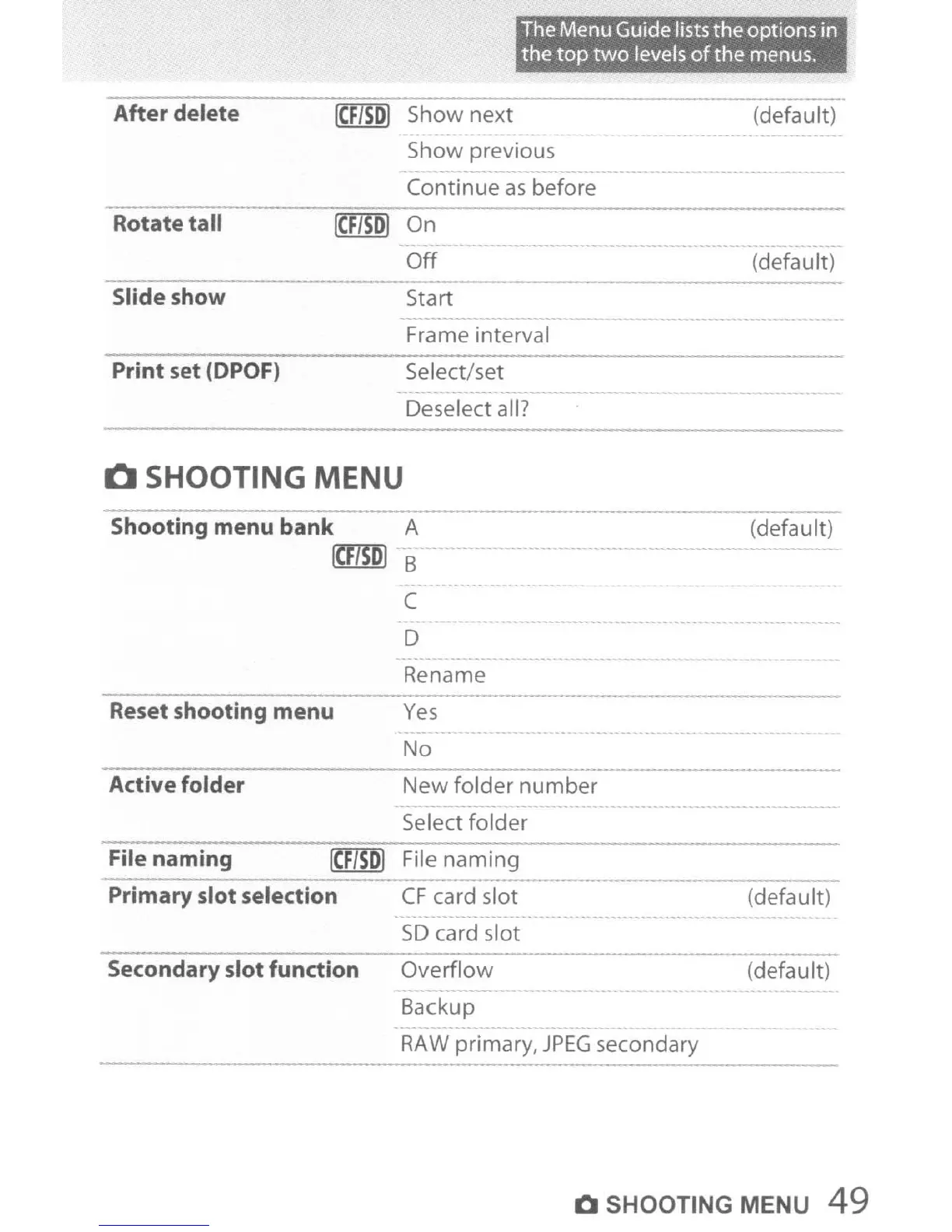
After delete
[(:FlSol
Show next
The Menu Guide lists the options in
the
top
two
levels
of
the menus.
(default)
Rotate tall
Slide
show
Print set (DPOF)
Show previous
Continue
as
before
(CF/sol
On
Off
Start
-
Frame interval
Select/set
- - -
--
-
Deselect all?
-
(default)
Q SHOOTING MENU
Shooting menu
bank
A
(CFlSOI
B
C
D
Rename
Reset shooting menu
Yes
No
(default)
Active folder
File naming
[eF/sol
Primary slot selection
Secondary slot function
New
folder
number
-
Select
folder
File
naming
CF
card slot
- - - ._---- - -
SD
card slot
Overflow
-
Backup
- - ---
RAW
primary,
JPEG
secondary
(default)
(default)
Q SHOOTING MENU 49

Table of Contents

Other manuals for Nikon D300S

Related product manuals