EasyManua.ls Logo

Nikon D300S - The Fn Button

Nikon D300S
501 pages
Print Icon
To Next Page IconTo Next Page
To Previous Page IconTo Previous Page
Loading...
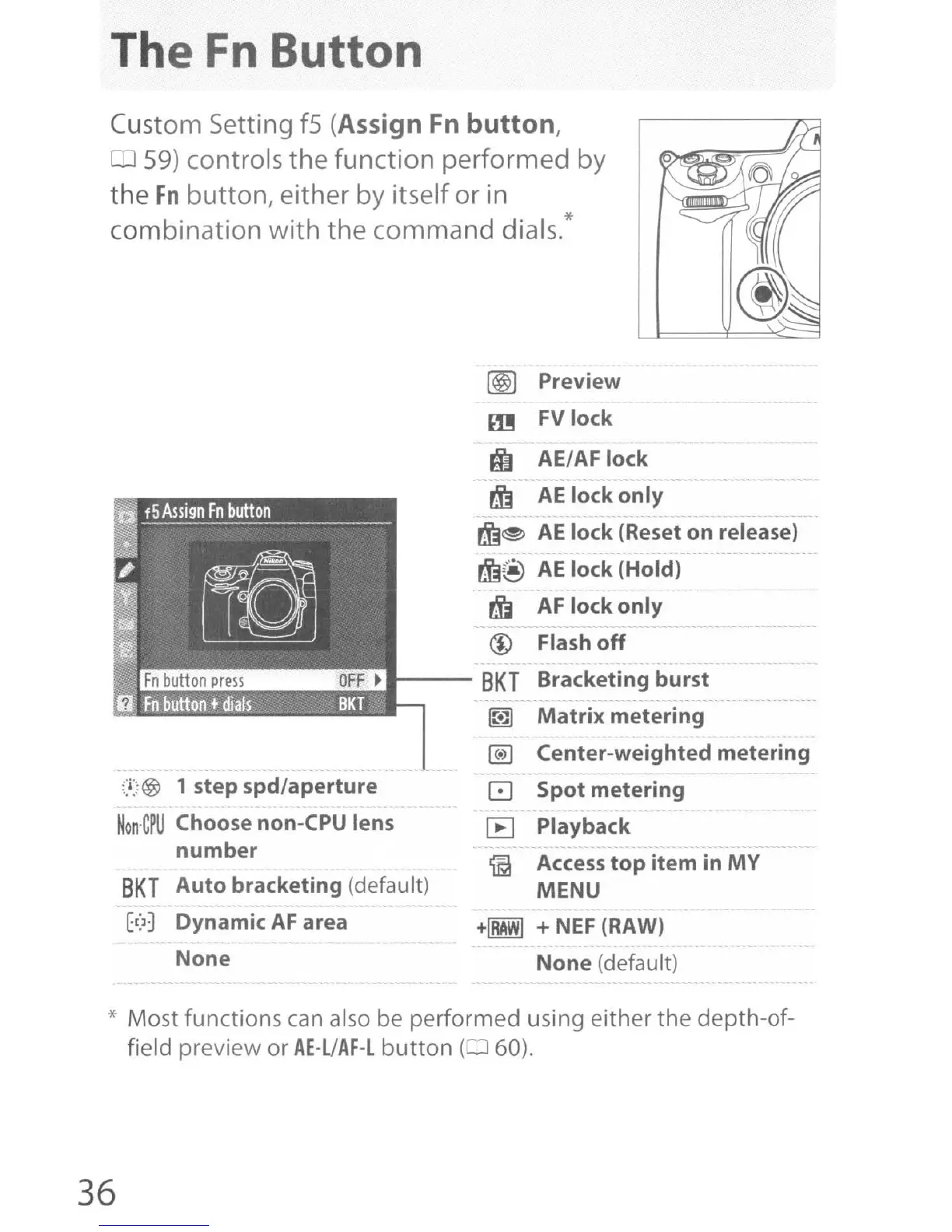
The
Fn
Button
Custom Setting f5 (Assign
Fn
button,
59) controls
the
function
performed
by
the
Fn
button,
either by itself
or
in
combination
with
the
command
dials.*
@l)
Preview
m
FVlock
it
AEI
AF
lock
rjj
AE
lock
only
rjj~
AE
lock
(Reset
on
release)
rjj@
AE
lock
(Hold)
~
AF
lock
only
@ Flash
off
---
SKT
Bracketing
burst
- -- - -
~
Matrix
metering
@)
Center-weighted
metering
o
Spot
metering
[E] Playback
~
Access
top
item
in
MY
MENU
+IRAWI
+
NEF
(RAW)
None
(default)
;:i:i@
1 step
spd/aperture
Non'C~U
Choose non-CPU lens
number
SKT
Auto
bracketing
(default)
Et>~
Dynamic
AF
area
None
* Most functions
can
also be performed using either
the
depth-of-
field preview
or
AE-UAF-L
button
(:J
60).
36

Table of Contents

Other manuals for Nikon D300S

Related product manuals