EasyManua.ls Logo

Nikon D300S - Image Size

Nikon D300S
501 pages
Print Icon
To Next Page IconTo Next Page
To Previous Page IconTo Previous Page
Loading...
Image
Size
Choose
from
the
following
-
--,"
Size
when
printed at
300
dpi
(approx.)
*
-
._--
.
--
36.3 x 24.1
em
(14.3 x 9.5 in.)
27.2
x 18.1
em
(10.7 x
7.1
in.)
18.2
x 12.1
em
(7.1
x 4.7 in.)
Size
(pixels)
",
_.
L
..
4,288
x 2,848
3,216
x 2,136
2,144
x 1,424
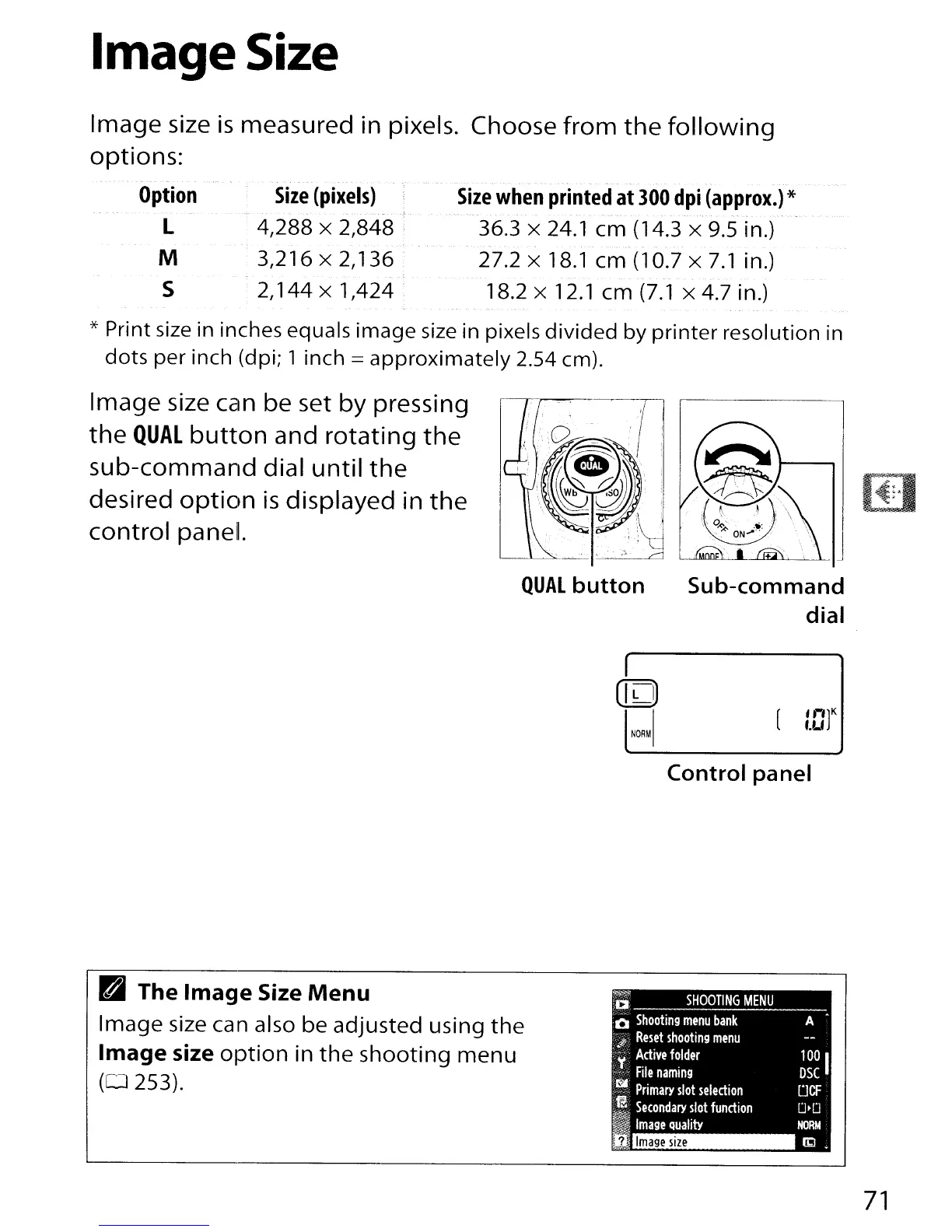
Image size
is
measured in pixels.
options:
Option
L
M
S
;,
* Print size in inches equals image size in pixels
divided
by
printer
resolution in
dots
per
inch (dpi; 1 inch =
approximately
2.54 em).
Image size can be set
by
pressing
the
QUAL
button
and
rotating
the
sub-command
dial
until
the
desired
option
is
displayed in
the
control
panel.
QUAL
button
Sub-command
dial
([0
I
[
'")K
f.U
NORM
Control
panel
A
100
I
DSC
DCF
D'D
NORM
lid
Image
size
;;
SHOOTING
MENU
~O
Shooting
menu
bank
:)
Reset
shooting
menu
:~."
Active
folder
't
F"I
"
-'
I e
naming
:~
Primary
slot
selection
,!,
Secondary
slot
fundion
I
Image
Quality
B
The
Image
Size
Menu
Image
size ean also
be
adjusted
using
the
Image
size
option
in
the
shooting
menu
(0253).
71

Table of Contents

Other manuals for Nikon D300S

Related product manuals