EasyManua.ls Logo

Nikon D300S - Focus and Shoot

Nikon D300S
501 pages
Print Icon
To Next Page IconTo Next Page
To Previous Page IconTo Previous Page
Loading...
Focus
and
Shoot
1
, !
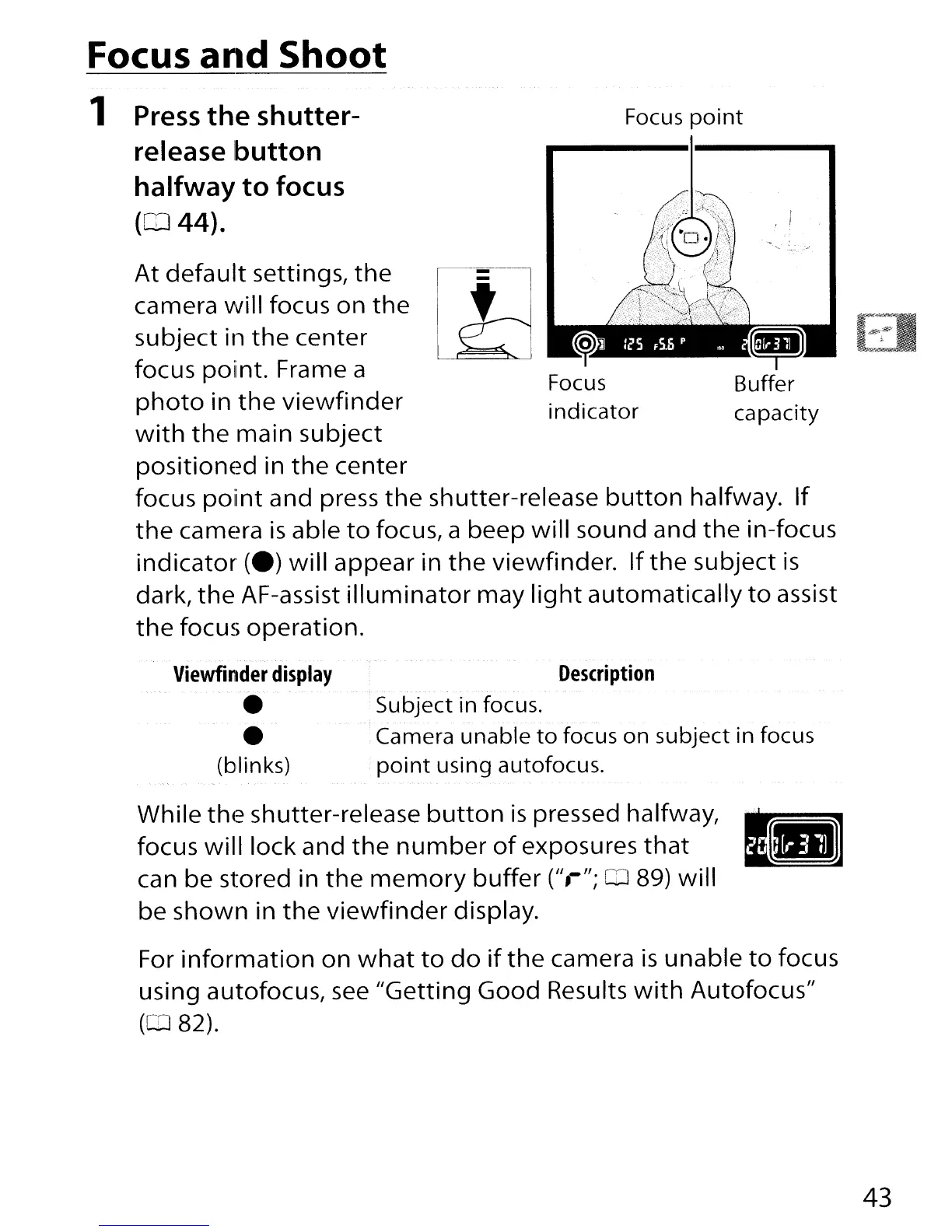
Focus
point
At
default
settings,
the
camera
will
focus on
the
subject in
the
center
focus poiint. Frame a
photo
in
the
viewfinder
with
the
main subject
positioned
in
the
center
focus
point
and press
the
shutter-release
button
halfway.
If
the
camera
is
able
to
focus, a beep
will
sound and
the
in-focus
indicator
(e)
will
appear in
the
viewfinder. If
the
subject
is
dark,
the
AF-assist
illuminator
may
light
automatically
to
assist
the
focus operation.
1
Press
the
shutter-
release button
halfway
to
focus
(CD
44).
Viewfinder
display
(blinks)
Description
---
Subject in focus.
Camera unable
to
focus on subject in focus
point
using autofocus.
While
the
shutter-release
button
is
pressed halfway,
I~
focus
will
lock and
the
number
of
exposures
that
~
can be stored in
the
memory
buffer
(",";
QJ
89)
will
be shown in
the
viewfinder
display.
For
information
on
what
to
do
if
the
camera
is
unable
to
focus
using autofocus,
see
"Getting
Good Results
with
Autofocus"
(082).
43

Table of Contents