EasyManua.ls Logo

Nikon D300S - Basic Setup

Nikon D300S
501 pages
Print Icon
To Next Page IconTo Next Page
To Previous Page IconTo Previous Page
Loading...
Basic
Setu~
The language
option
in the setup menu
is
automatically
highlighted
the
first
time
menus are displayed. Choose a language
and set
the
time
and date. Note
that
if
the
time
and date are
not
set,
~
will
blink
in the
monitor
and the
time
and date recorded
with
photographs will be incorrect.
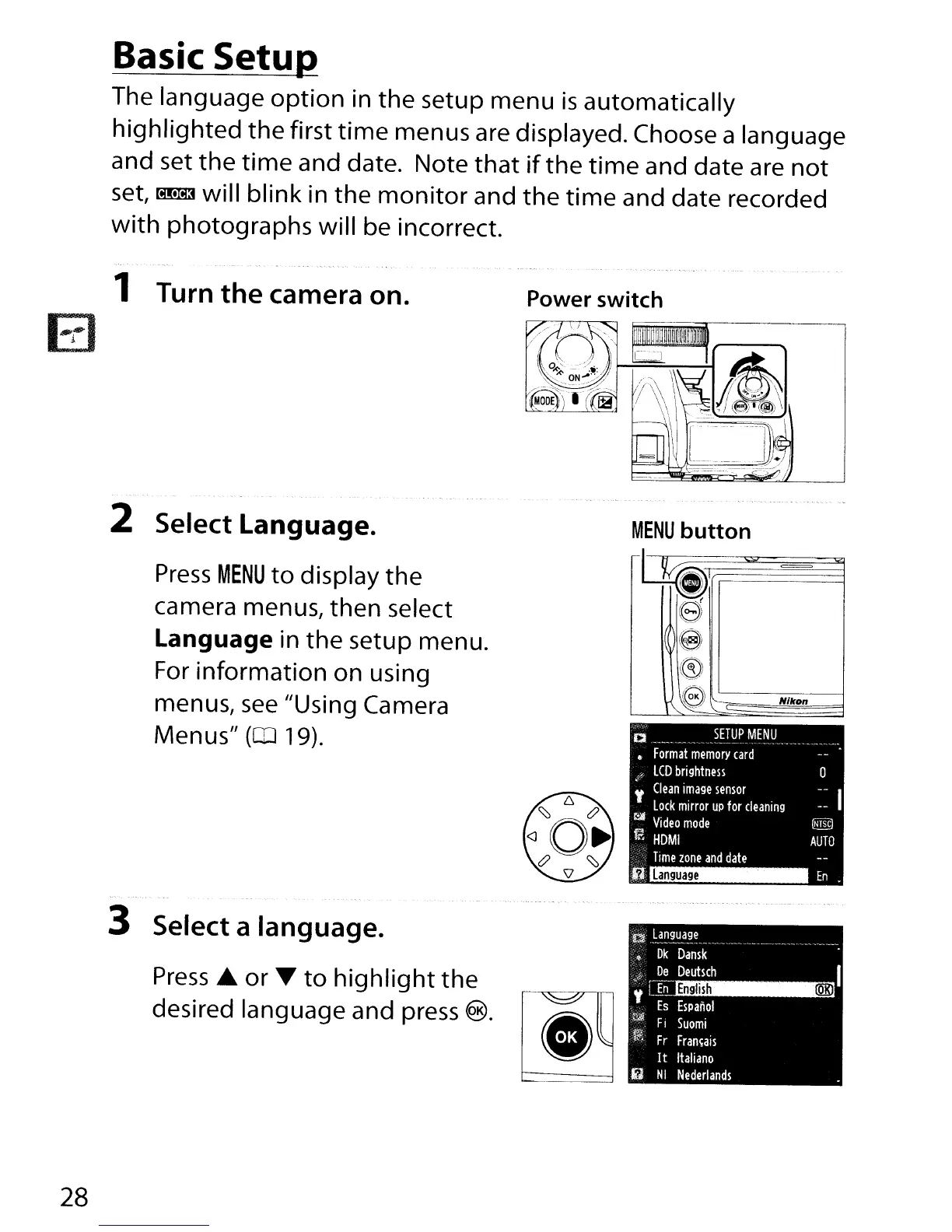
1 Turn the camera on.
Power switch
En
o
[Nill"J
AUTO
Language
D
SETUP
MENU
Format
memory
card
o
LCD
brightness
,
Clean
image
sensor
Lock
mirror
UP
for
cleaning
t:iJ
Video
mode
~
HOMI
Time
zone
and
date
-~
..
rl
=
.cr;;=
~)
e
@
((5)
,~
Nlkon
\
"-
'-
MENU
button
~
2 Select Language.
Press
MENU
to
display the
camera menus, then select
Language in
the
setup menu.
For
information on using
menus,
see
"Using Camera
Menus"
(CD
19).
3 Select a language.
Press'"
or.
to
highlight
the
desired language and press
®.
28

Table of Contents

Other manuals for Nikon D300S

Related product manuals