EasyManua.ls Logo

Nikon D300S - Page 55

Nikon D300S
501 pages
Print Icon
To Next Page IconTo Next Page
To Previous Page IconTo Previous Page
Loading...
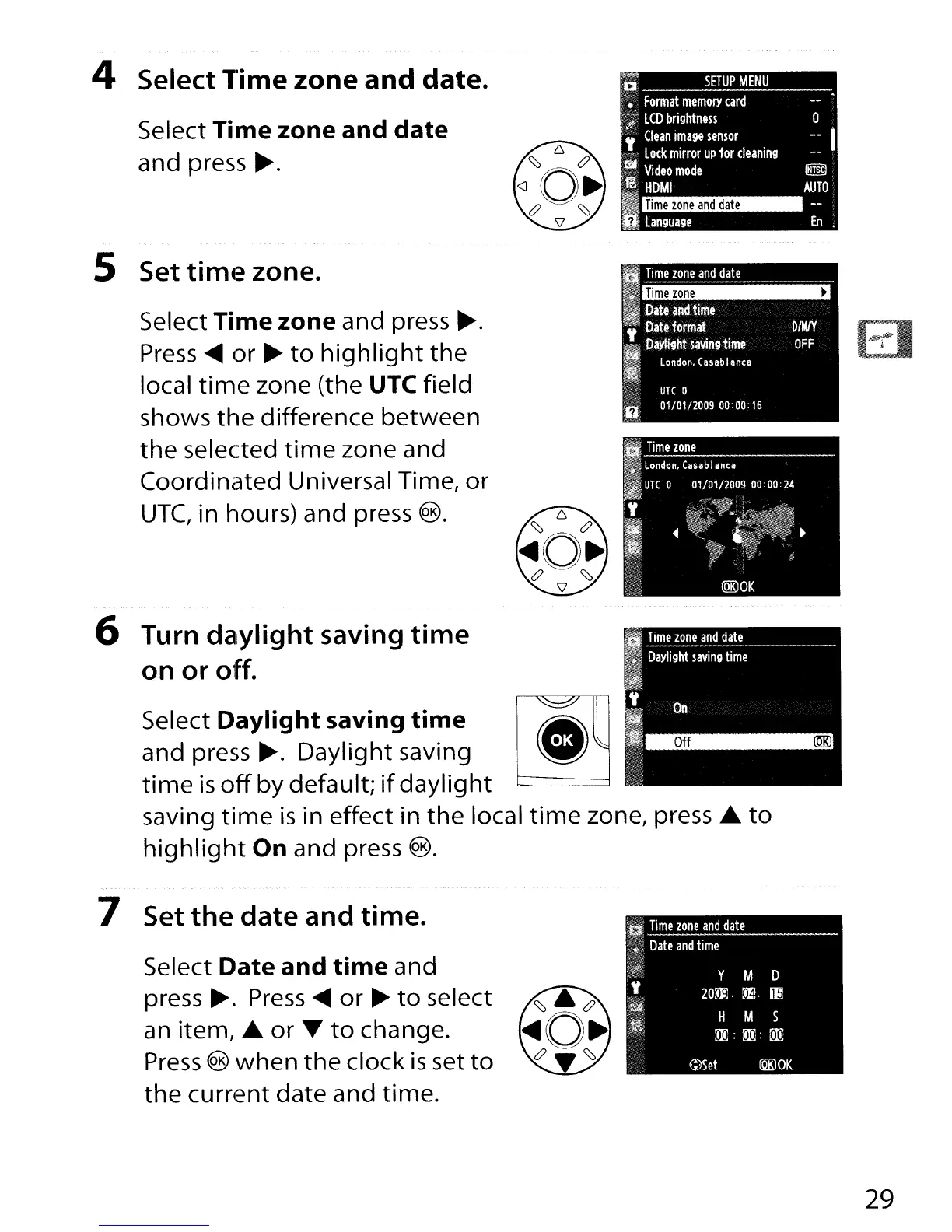
4 Select Time zone and date.
Select Time zone and
date
and press
~.
DIMlY
OFF
Time
zone
~
I
Time
zone
and
date
Ilpatundtime
II
Date
format
iD~~:~:b~'
;:},;
UTe
0
fl
01/01120090000:16
Select Time zone and press
~.
Press
~
or
~
to
highlight
the
local
time
zone (the UTe field
shows
the
difference between
the
selected
time
zone and
Coordinated Universal Time,
or
UTe,
in hours) and press
®.
5 Set time zone.
Off
(QRl
II
Time
zone
and
date
III
Daylight
saving
time
I
HI
~
__
'ii'"
Select Daylight saving
time
and press
~.
Daylight saving
time
is
off
by
default;
if
daylight
saving
time
is
in effect in
the
local
time
zone, press
...
to
highlight
On and press
®.
6 Turn daylight saving
time
on or off.
7 Set the date and time.
Select Date and
time
and
press
~.
Press
~
or
~
to
select
an
item, ...
or
T
to
change.
Press
®
when
the
clock
is
set
to
the
current date and time.
29

Table of Contents

Other manuals for Nikon D300S

Related product manuals