EasyManua.ls Logo

Nikon D300S - Basic Photography and Playback; Turn the Camera on

Nikon D300S
501 pages
Print Icon
To Next Page IconTo Next Page
To Previous Page IconTo Previous Page
Loading...
Basic Photography
and
Playback
Turn
the
Camera On
Before
takin~]
photographs,
turn
the
camera on and check
the
battery
level and
number
of
exposures remaining
as
described
below.
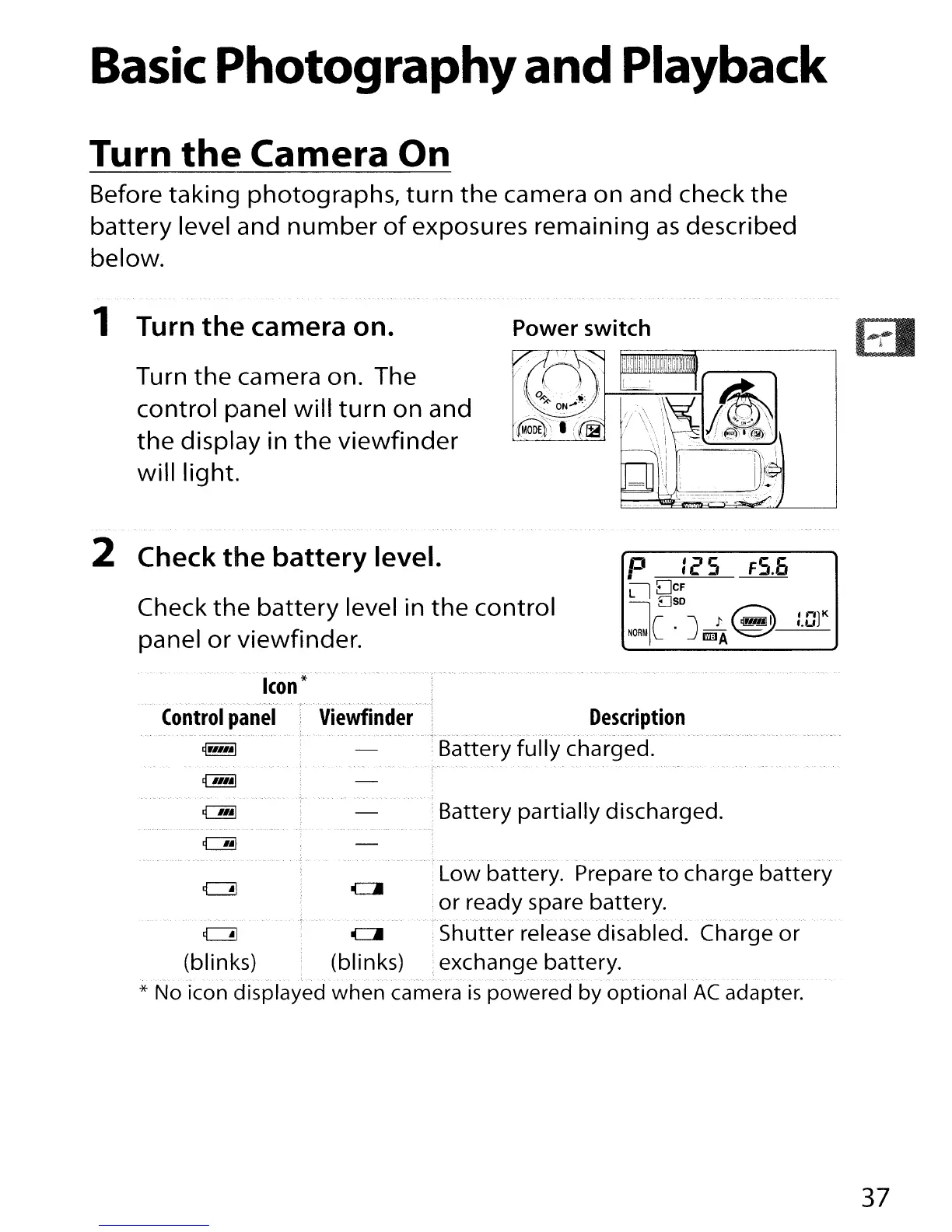
1 Turn
thE~
camera
on.
Turn
the
camera on. The
control panel will
turn
on and
the
display in
the
viewfinder
will light.
Power switch
2 Check
the
battery
level.
Check
the
battery
level in
the
control
panel or viewfinder.
p
:25
F5.6
llDcF
OSD
Ie .J
J'
~
:.Gt
NORMI
IID.JA
~
Icon*
Control
panel
Description
Battery
fully
charged.
Battery partially discharged.
Low battery. Prepare
to
charge
battery
or
ready spare battery.
c=!1
ell
Shutter release disabled. Charge
or
(blinks) (blinks) exchange battery.
* No icon displayed
when
camera
is
powered
by
optional
AC
adapter.
37

Table of Contents

Other manuals for Nikon D300S

Related product manuals