EasyManua.ls Logo

Nikon D300S - Copy Image(S)

Nikon D300S
501 pages
Print Icon
To Next Page IconTo Next Page
To Previous Page IconTo Previous Page
Loading...
Copy
Image{s)
MENU
button
...
lB
playback menu
Copy images between
memory
cards. This
option
is
only
available
when
two
memory
cards are inserted in the camera.
Option
Select
source
Select
image(s}
Select
destination
folder
Copy
image(s}?
To
copy images:
Description
Select the card from which pictures will be copied.
Select
the
pictures
to
be copied.
Select the folder
to
which pictures will be copied.
Copy
the
images.
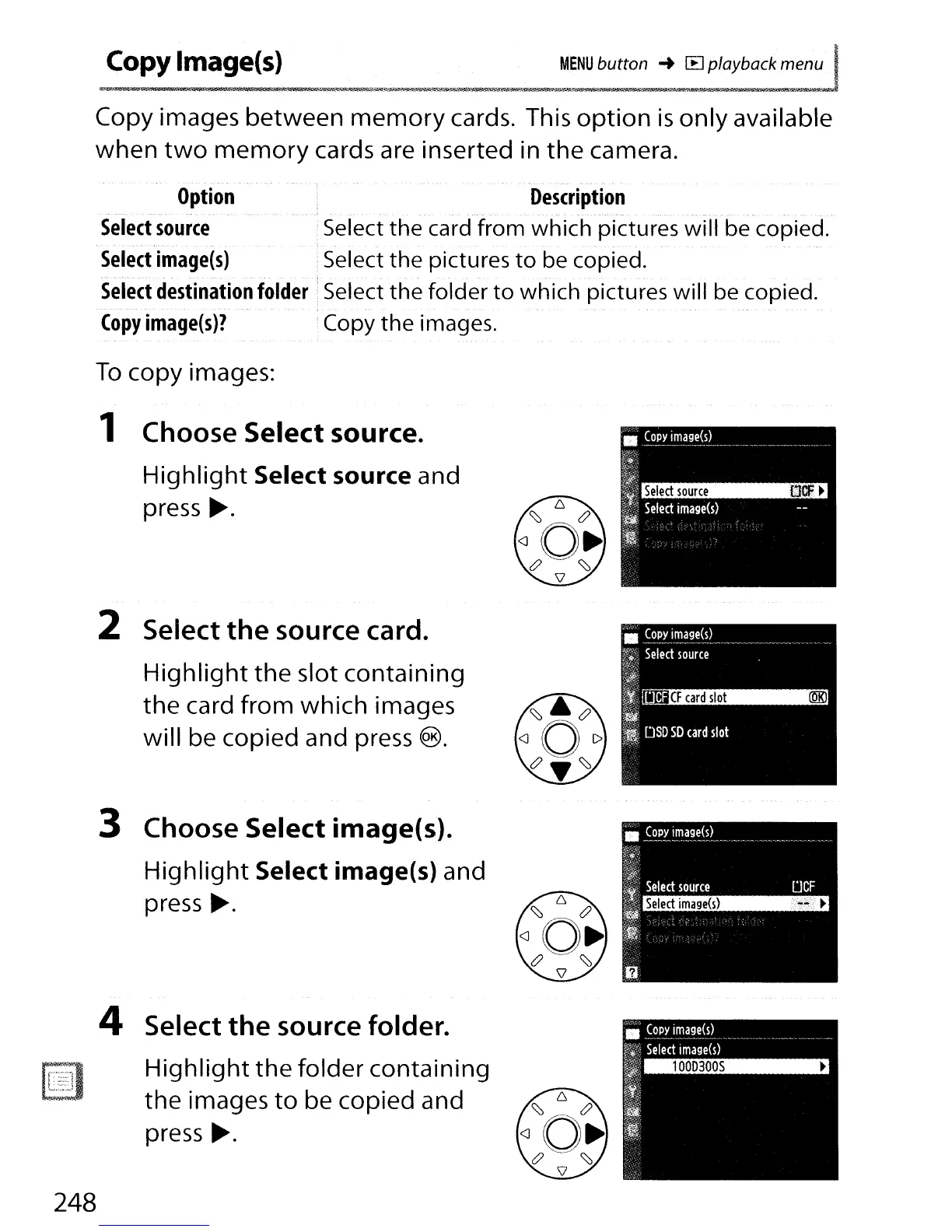
1 Choose Select source.
Highlight
Select source and
press
~.
2 Select
the
source card.
Highlight
the slot containing
the
card from which images
will be copied and press
®.
3 Choose Select image(s).
Highlight
Select image(s) and
press
~.
4 Select
the
source folder.
Highlight
the
folder containing
the images
to
be copied and
press
~.
248

Table of Contents

Other manuals for Nikon D300S

Related product manuals