EasyManua.ls Logo

Nikon D300S - A7: Focus Point Wrap-Around; A8: AF Point Selection; A8;AF Pointselection

Nikon D300S
501 pages
Print Icon
To Next Page IconTo Next Page
To Previous Page IconTo Previous Page
Loading...
a7:
Focus
Point Wrap-Around
MENU
button
...
cfI
Custom Settings menu I
~:;:t!j.~_
-Gtj.-~
I!"t~~tri'§
_§<!t.,
II
JiB?
:..--,
3'j"
_ _
~_-
-i"~~-§-:;;[_£
l'~~~~~~~~~~
Choose
whether
focus-point
selection "wraps
around"
from
one
edge
of
the
viewfinder
to
another.
oCD
Option
Wrap
No
wrap
Description
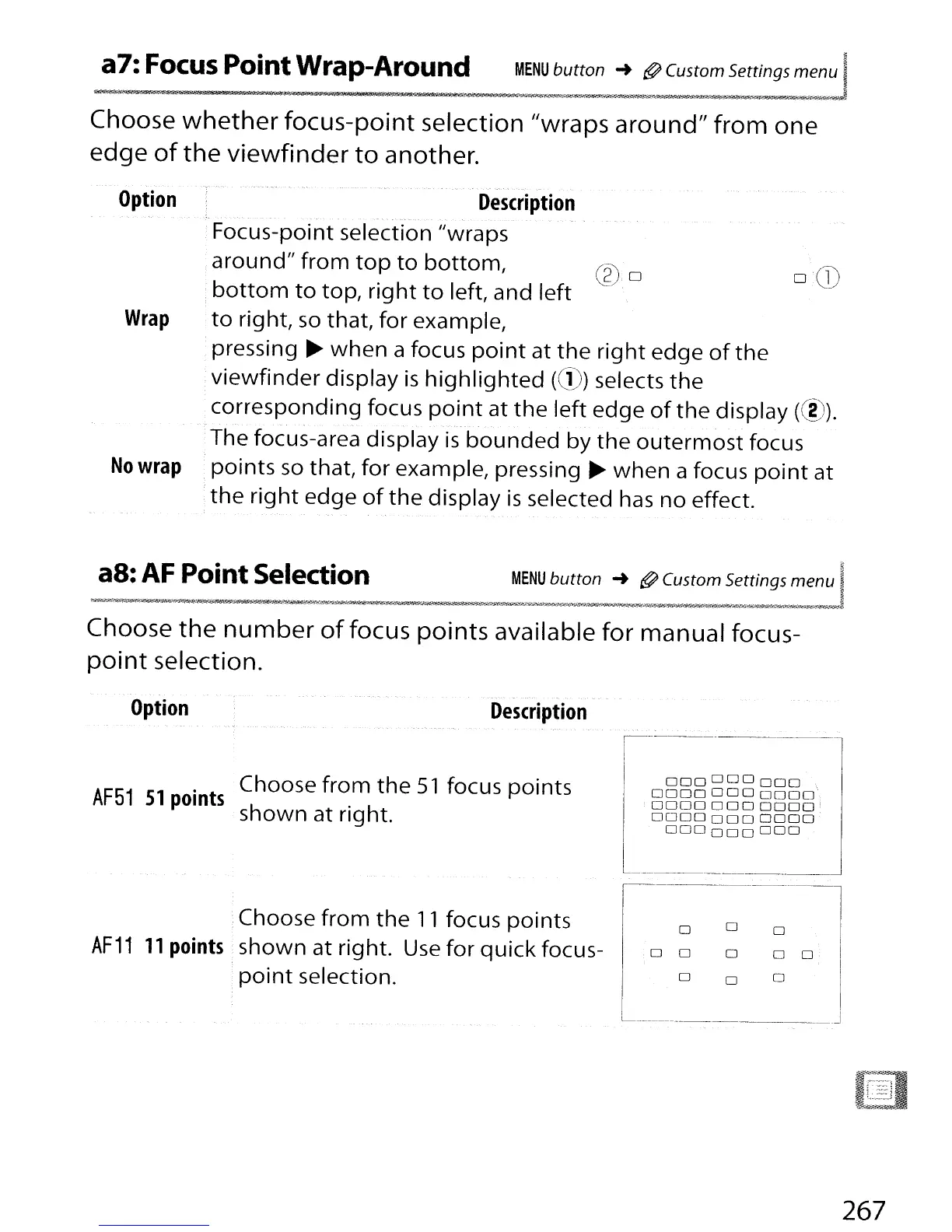
Focus-point selection Jlwraps
around"
from
top
to
bottom,
(gj,o
.
bottom
to
top,
right
to
left, and
left
to
right,
so
that,
for
example,
.pressing
~
when
a focus
point
at
the
right
edge
of
the
viewfinder
display
is
highlighted
(CD)
selects
the
corresponding
focus
point
at
the
left
edge
of
the
display (00).
The focus-area display
is
bounded
by
the
outermost
focus
points
so
that,
for
example, pressing ~
when
a focus
point
at
the
right
edge
of
the
display
is
selected
has
no effect.
Choose
the
number
of
focus points available
for
manual focus-
point
selection.
Choose
from
the
51
focus
points
AF51
S1
points
shown
at right.
Option
Description
I
000000000
,I
00000000000,
00000000000
!
00000000000
.
000000
000
I
L
---'
Choose
from
the
11
focus
points
AF11
11
points
shown at right.
Use
for
quick
focus-
point
selection.
o
o
0
o
o
o
o
o
o
0
o
_______
J
267

Table of Contents

Other manuals for Nikon D300S

Related product manuals