EasyManua.ls Logo

Nikon D300S - E3 Flash Cntrl for Built-In Flash

Nikon D300S
501 pages
Print Icon
To Next Page IconTo Next Page
To Previous Page IconTo Previous Page
Loading...
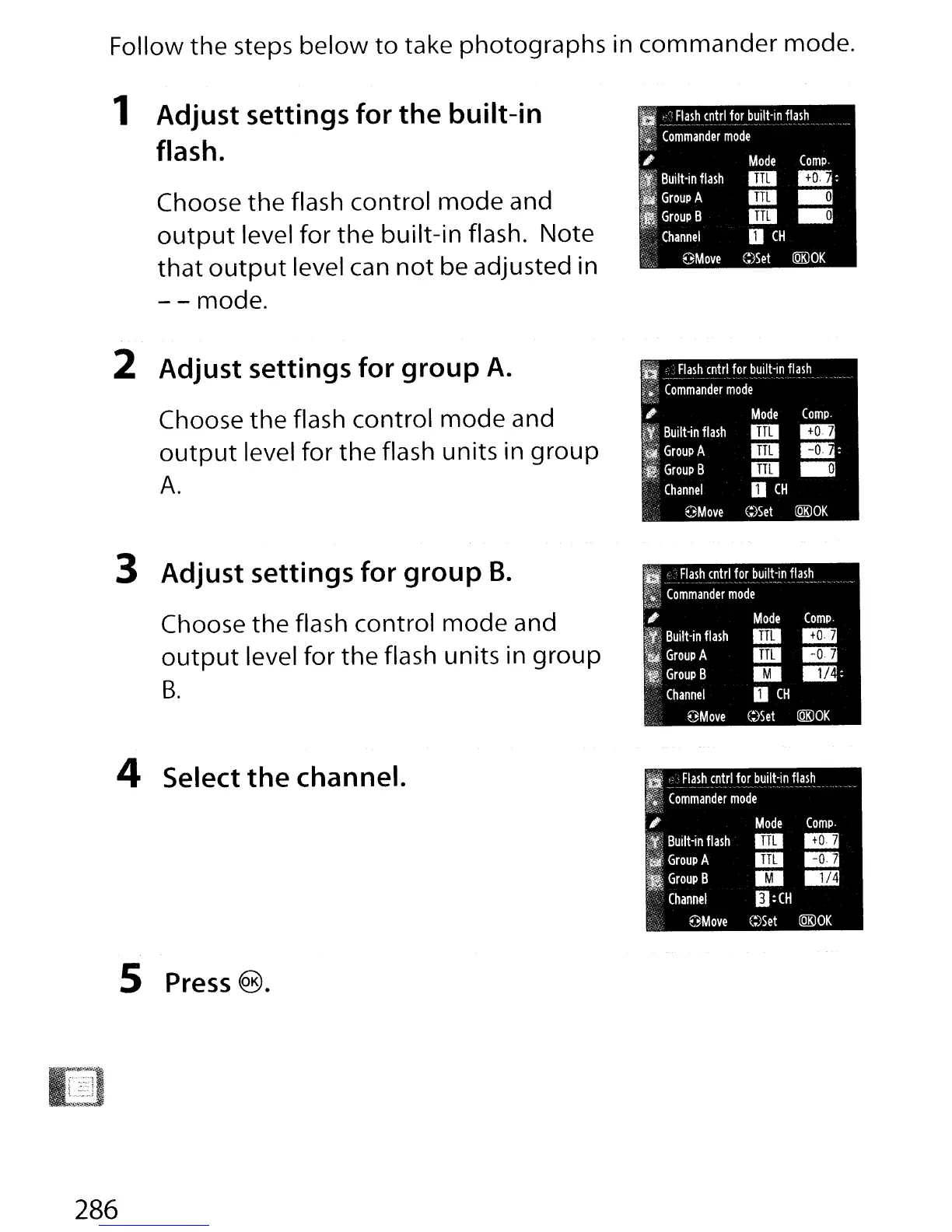
Follow the steps
below
to
take photographs in
commander
mode.
1 Adjust settings for
the
built-in
flash.
Choose
the
flash control
mode
and
output
level for
the
built-in flash. Note
that
output
level can
not
be adjusted in
- - mode.
II
_~
.~_~~~5~trlf~,,--
b~!~t-In,flas.~.__
I~;
Commander
mode
/fif{:
.
.oc"j
,;
Mode
Compo
I,
Built-in
flash
IiII
_:
If
Group
A
IiiI
~
II
Group
B
IiII
~
"""i·'
....
Channel
0
CH
OMove
C:)Set
lQKlOK
Flash
cntrl
for
built-in
flash
---_._._-
--
Commander
mode
Compo
B.4
..
:
~
2 Adjust settings for group
A.
Choose
the
flash control
mode
and
output
level for
the
flash units in
group
A.
,.
~:
Built-in
flash
fi
Group
A
I,
Group
B
Channel
OMove
Mode
IiII
IiII
l1li
o
CH
C:)Set
lQKlOK
lQKlOK
Compo
B.4
..
D:
Mode
IiII
lUI
EI
o
CH
E::)Set
OMove
8"
Flash
cntrl
for
built-in
flash
t~5
-Comm'ander
mode
If:;W;";"-
;
"iIt:~
Built-in
flash
i
Group
A
I;
Group
B
Channel
3 Adjust settings for group
B.
Choose
the
flash control
mode
and
output
level for
the
flash units in
group
B.
Compo
..
..
IE
4 Select
the
channel.
I;~
JI_~~h_~~trl!o!blJilt:in
fla,sh
'.'
~~~.
Commander
mode
t>.
,
Mode
fJi'
Built-in
flash
IiII
~
Group
A
IiII
GroupB
EI
"<
Channel
II:CH
OMove
C;)$et
(QK)OK
5
Press
®.
286

Table of Contents

Other manuals for Nikon D300S

Related product manuals