•
Trim
MENU
button
..
&j
retouch
menu
I
,
•.
):P30?7'
·F6§!.l!-~_.:i:i<-"!ij-~~~~~~Jt'41;~~~~-'R:§_
-:-"1'l[j!~
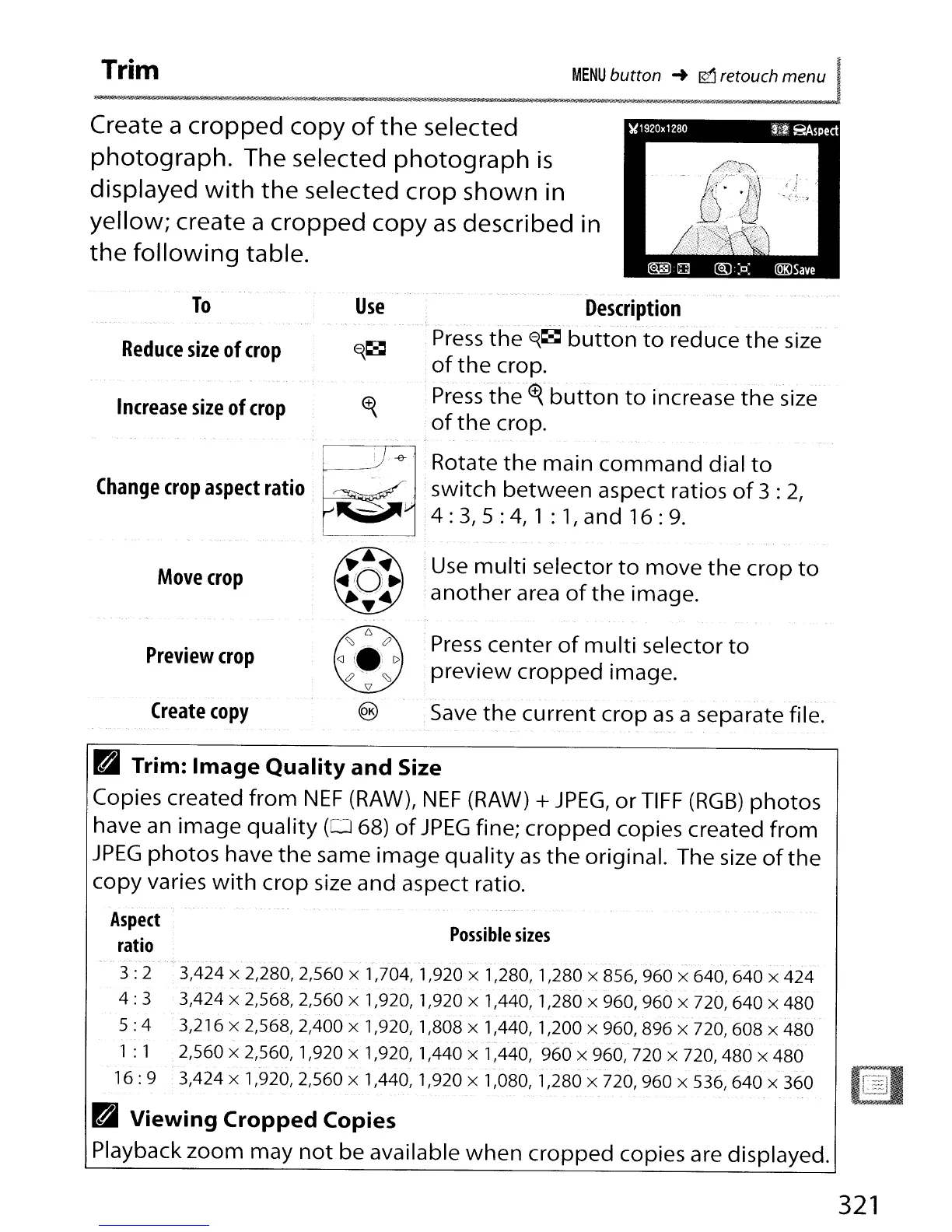
Create a
cropped
copy
of
the
selected
photograph.
The selected
photograph
is
displayed
with
the
selected crop shown in
yellow; create a
cropped
copy
as
described in
the
following
table.
Use
To
Reduce
size
of
crop
Increase
size
of
crop
Change
crop
aspect
ratio
Description
.
..'~
. - -
_.
- . - -
'.-.-
-.--.
~
-
'.-.
-
'._--
~
Press
the
~~
button
to
reduce
the
size
of
the
crop.
Press
the(~
button
to
increase
the
size
·
of
the
crop.
~
.
Rotate
the
main
command
dial
to
....
-;;,If,
,.
•switch
between
aspect ratios
of
3 :
2,
...
...
4 :
3,
5 :
4,
1 :
1,
and
16:
9.
Move
crop
Preview
crop
Create
copy
;
Use
multi
selector
to
move
the
crop
to
·
another
area
of
the
image.
Press
center
of
multi
selector
to
preview
cropped
image.
·
Save
the
current
crop
as
a separate file.
Possible
sizes
B Trim:
Image
Quality
and
Size
Copies created
from
NEF
(RAW),
NEF
(RAW)
+
JPEG,
or
TIFF
(RGB)
photos
have an image
quality
(0
68)
of
JPEG
fine;
cropped
copies created
from
JPEG
photos
have
the
same
image
quality
as
the
original. The size
of
the
copy
varies
with
crop
size and aspect ratio.
Aspect
ratio
- - . -
-'.'..
-'-'.",'"
.-
-.- -
".
3 : 2 3,424 x 2,280, 2,560 x 1,704, 1,920 x 1,280, 1,280 x 856, 960 x 640, 640 x 424
.. .
-,
-."
4:
3 3,424 x 2,568, 2,560 x 1,920, 1,920 x 1,440, 1,280 x 960, 960 x
720,640
x 480
5:
4 3,216 x 2,568,2,400 x 1,920, 1,808 x 1,440, 1,200 x 960, 896 x 720, 608 x 480
1 : 1 2,560
x 2,560, 1,920 x 1,920, 1,440 x 1,440, 960 x 960, 720 x
720,480
x 480
16:
9 3,424 x 1,920,2,560 x 1,440, 1,920 x 1,080, 1,280 x 720, 960 x
536,640
x 360
B Viewing
Cropped
Copies
Playback
zoom
may
not
be available
when
cropped
copies are displayed.
321



 To Next Page