!~:
Aperture-Priority Auto
In aperture-priority auto, you choose
the
aperture
while
the
camera
automatically selects the shutter speed
that
will produce the
optimal
exposure.
To
take photographs in aperture-priority auto:
1 Select
exposure
mode
A.
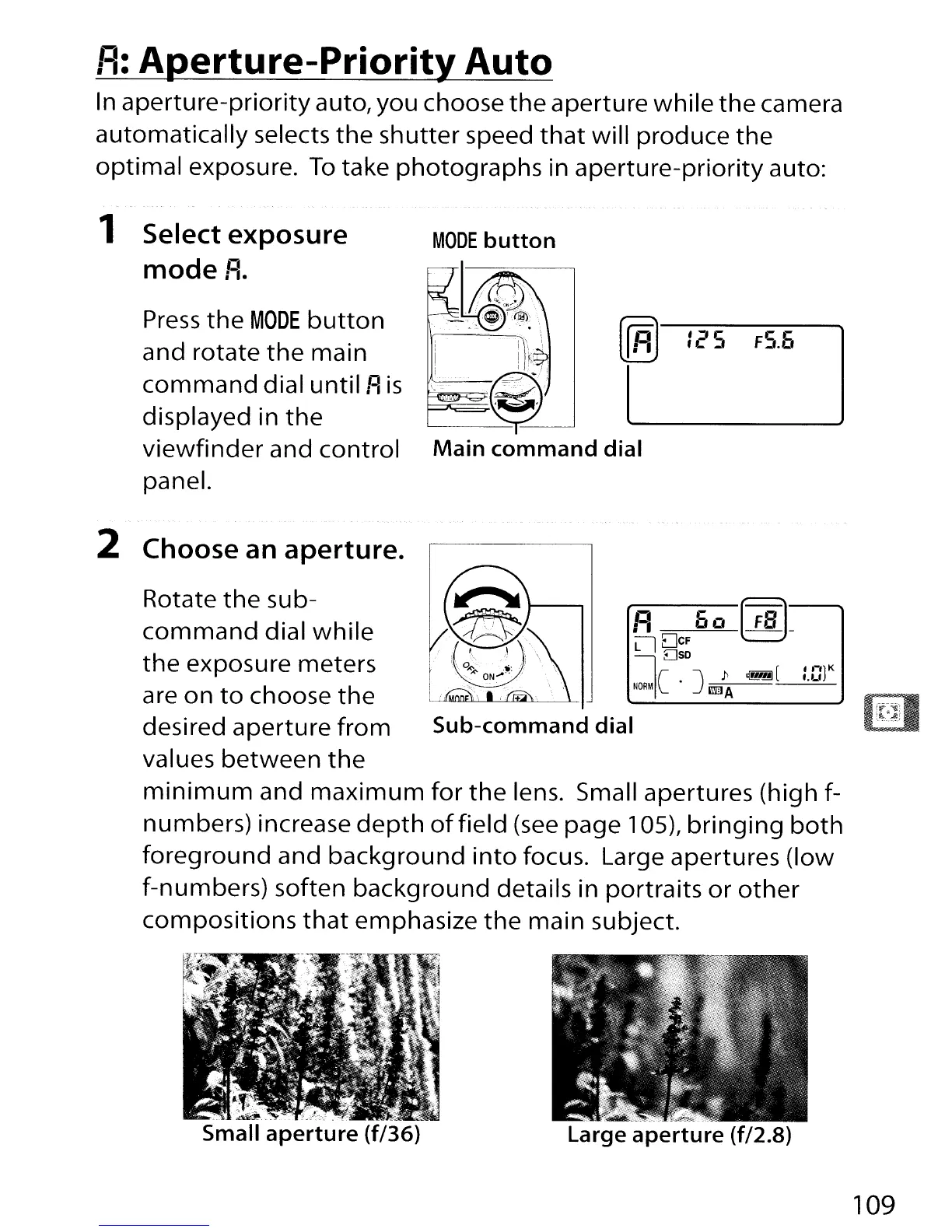
Press
the
MODE
button
and rotate
the
main
command
dial
until
A
is
displayed in
the
viewfinder
and control
panel.
MODE
button
"I
\ i
I";
i
Ii..::>....,
'
;,,\~
~g~'
Main
command
dial
, ::I C
f
I:;"
~
FS.b
II-
1
1
K
I.LI
R
60
(fS]_
LlDcF
080
Ie J
)1
~(
NORMI
• I'1illA
Sub-command
dial
Rotate
the
su
b-
command
dial
while
the
exposure meters
are on
to
choose
the
desired aperture
from
values
between
the
minimum
and
maximum
for
the
lens. Small apertures (high f-
numbers) increase
depth
of
field
(see
page 105),
bringing
both
foreground
and background
into
focus. Large apertures (low
f-numbers) soften background details in portraits
or
other
compositions
that
emphasize
the
main subject.
2 Choose an
aperture.
Large
aperture
(f/2.B)
109



 To Next Page