EasyManua.ls Logo

Nikon D300S - Page 139

Nikon D300S
501 pages
Print Icon
To Next Page IconTo Next Page
To Previous Page IconTo Previous Page
Loading...
B
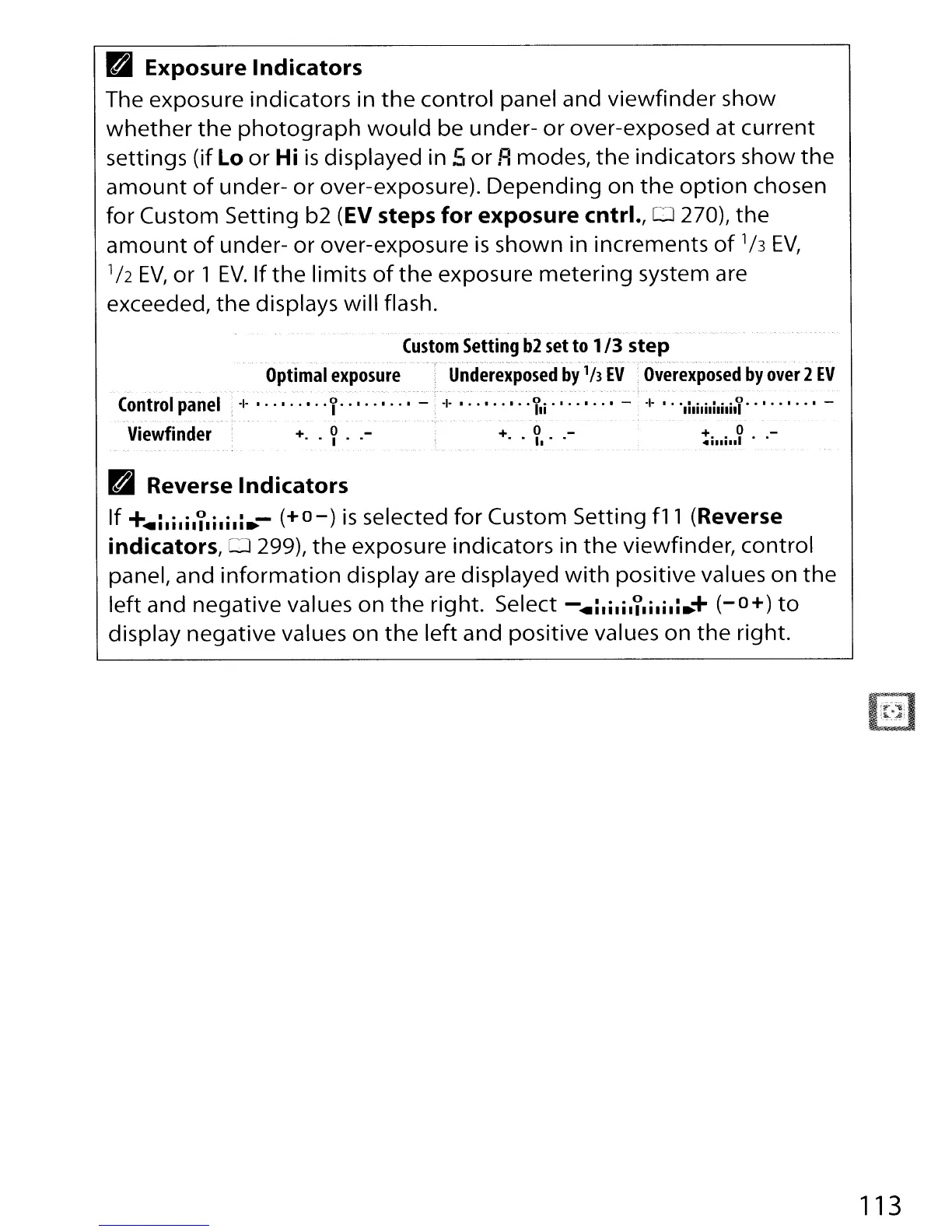
Exposure
Indicators
The exposure indicators in
the
control
panel and
viewfinder
show
whether
the
photograph
would
be under-
or
over-exposed at
current
settings
(if
Lo
or
Hi
is
displayed in 5
or
Fl
modes,
the
indicators show
the
amount
of
under-
or
over-exposure).
Depending
on
the
option
chosen
for Custom Setting b2
(EV
steps
for
exposure
cntrl.,
0 270),
the
amount
of
under-
or
over-exposure
is
shown in increments
of
1h
EV,
1h
EV,
or
1
EV.
If
the
limits
of
the
exposure
metering
system are
exceeded,
the
displays will flash.
Custom
Setting
b2
set
to
1/3
step
Optimal
exposure
Underexposed
by'h
EV
Overexposed
by
over
2
EV
Control
panel
Viewfinder
-1-
1 -
+ 0
. . .. .
+ 0 _
....
' .
+
..
o
•..
-
4111111
B Reverse
Indicators
If
+
...
i.i.ililili.i.-
(+0-)
is
selected
for
Custom Setting
fll
(Reverse
indicators,
0 299),
the
exposure indicators in
the
viewfinder,
control
panel, and
information
display are displayed
with
positive values
on
the
left
and negative values on
the
right. Select -
...
i.ili,l.ilili.+
(-0+)
to
display negative values on
the
left
and positive values on
the
right.
113

Table of Contents