EasyManua.ls Logo

Nikon D300S - Page 152

Nikon D300S
501 pages
Print Icon
To Next Page IconTo Next Page
To Previous Page IconTo Previous Page
Loading...
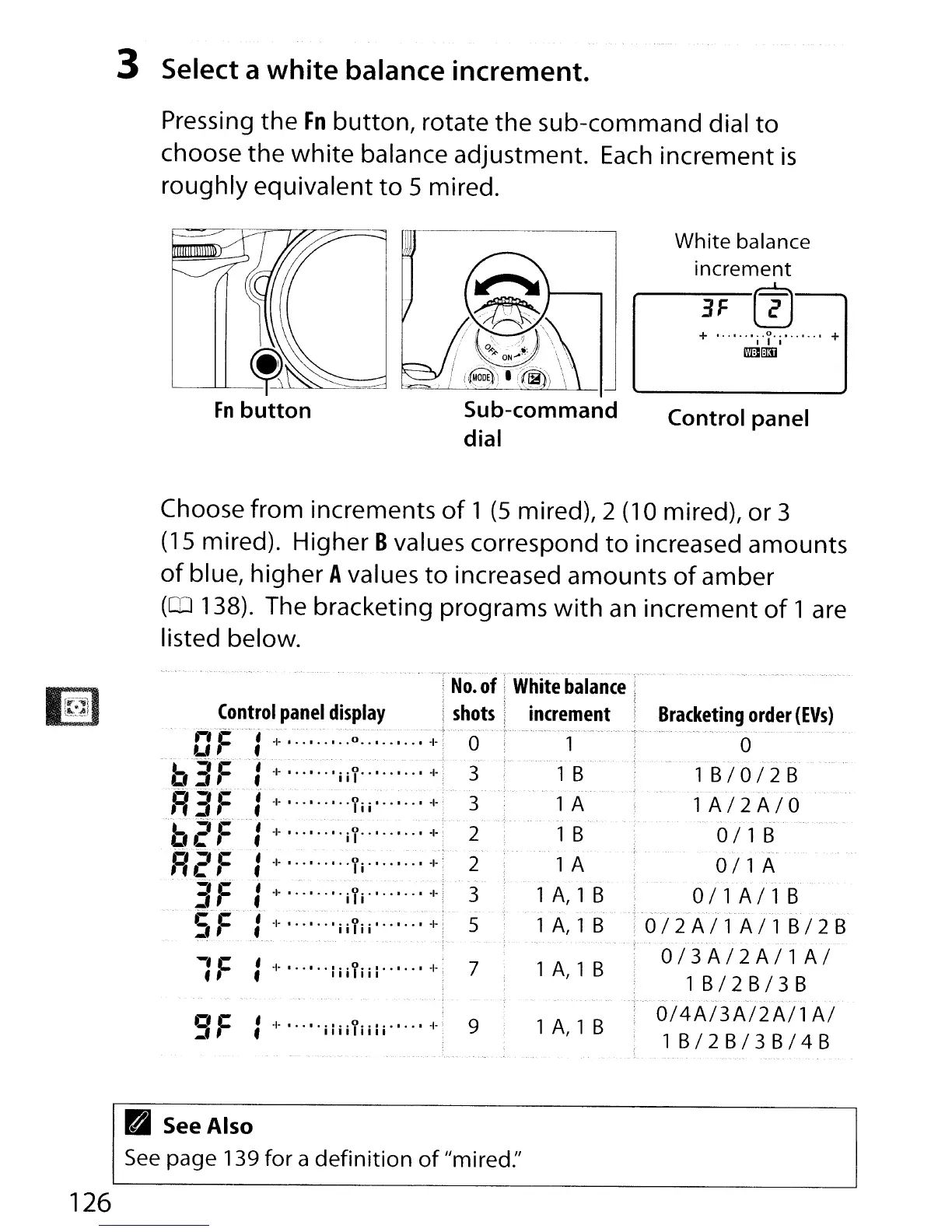
3 Select a white balance increment.
Pressing the
Fn
button,
rotate
the
sub-command dial
to
choose
the
white
balance adjustment.
Each
increment
is
roughly equivalent
to
5 mired.
Sub-command
dial
White balance
increment
3F
(!)
+ ,.
"""i'I'i""""
+
m~
Control panel
Choose from increments
of
1
(5
mired), 2 (10 mired), or 3
(15
mired). Higher Bvalues correspond
to
increased amounts
of
blue, higher Avalues
to
increased amounts
of
amber
(CD
138). The bracketing programs
with
an
increment
of
1 are
Iisted below.
Bracketing
order
(EVs)
.--.-----~--~,
.....
-,'
.-.-."--
..
_.
-
--
o
1
B/O/2B
1
A/2A/O
,
---
-.,.
-
--~
.-
011
B
-
..
- -_.
011
A
O/lA/lB
~
...
,',",
-,.'
0/2A/l
All
B/2B
_.
--
.,
- -
....
,
O/3A/2A/l
AI
1
B/2B/3B
O/4A/3A/2A/l
AI
1
B/2B/3B/4B
9 1
A,
1 B
No.
of
White
balance
shots
increment
o 1
3 1 B
3 1 A
2 1 B
2
lA
3 1
A,
1 B
5 1
A,l
B
7 1
A,
1 B
9F :
-I-
..
··iiiiliiii··
..
·-1-
1F :
-I-
·
..
·
..
;iiliil
..
·
..
·-I-
Control
panel
display
tfF"-':
~~'.:
~o:
:
;--1-
'b3F :
-I-
..
····iil
.. ·..
····-I-
·R3:=:·-I-·.:·.·
·yii ·.
-I-
f.2-
F'
-:
~
';'.jy'.
~.~.;
+
FlC"F'
:
-1-
·Ii··
..
·
..
· +
3F
I +
iii"
-I-
5F
:
-I-
..
..
·iiYii·
..
·
..
;+
B See
Also
See
page 139
for
a
definition
of
"mired:'
126

Table of Contents

Other manuals for Nikon D300S

Related product manuals