EasyManua.ls Logo

Nikon D300S - Page 178

Nikon D300S
501 pages
Print Icon
To Next Page IconTo Next Page
To Previous Page IconTo Previous Page
Loading...
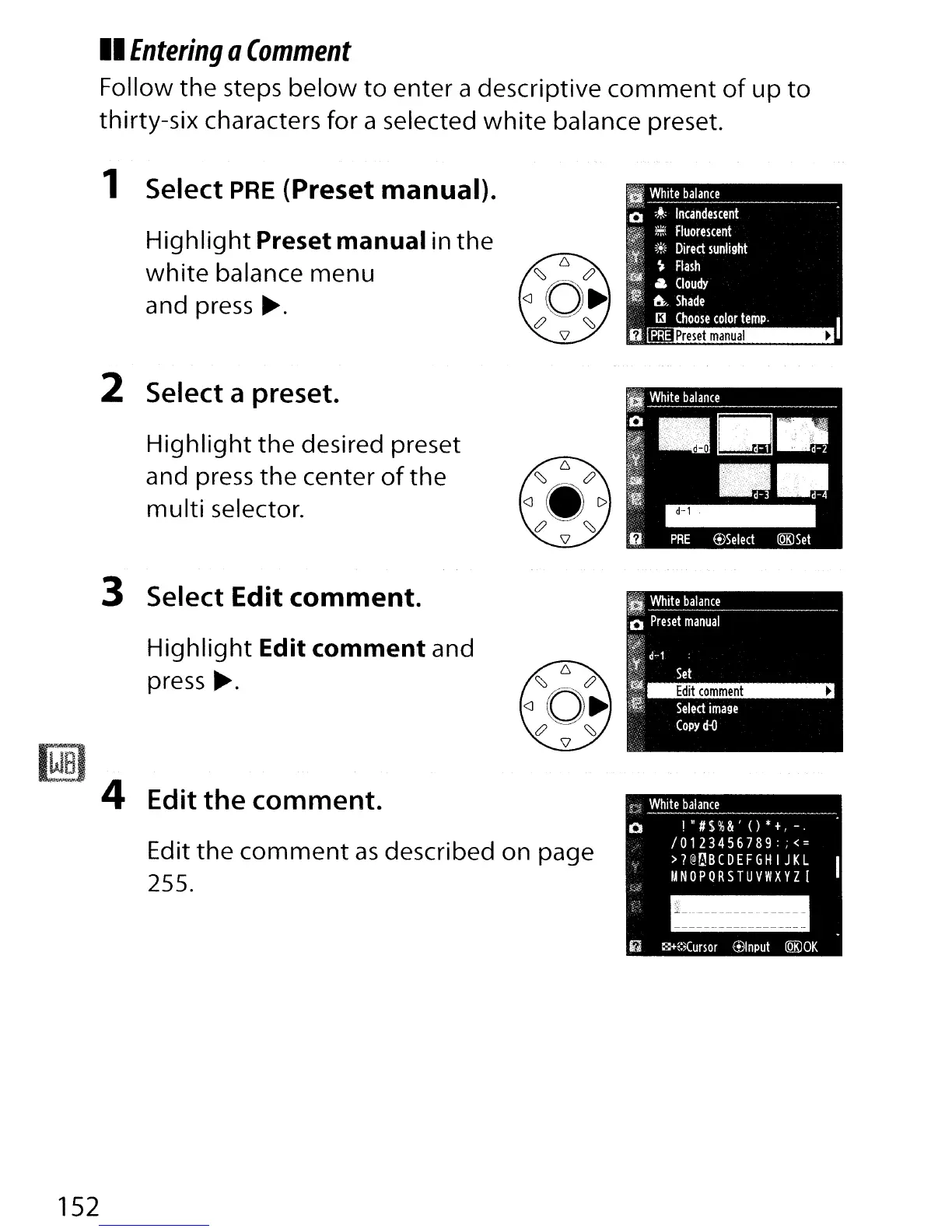
II
Entering
a
Comment
Follow
the
steps
below
to
enter a descriptive
comment
of
up
to
thirty-six characters for a selected
white
balance preset.
1 Select
PRE
(Preset manual).
Highlight
Preset manual in the
white
balance menu
and press
~.
2 Select a preset.
Highlight
the
desired preset
and press the center
of
the
multi
selector.
152
3 Select Edit comment.
Highlight
Edit comment and
press
~.
4 Edit
the
comment.
Edit
the
comment
as
described on page
255.
f.c'f!
White
balance
o
!"#$%&'()*+,_.
10123456789:;
<=
>?@~BCDEFGHIJKL
UNOPQRSTUVWXYZ[
--
- -
----
------
---------
--------
6
~+E:lCursor
@Input
lQK)OK

Table of Contents

Other manuals for Nikon D300S

Related product manuals