EasyManua.ls Logo

Nikon D300S - Page 216

Nikon D300S
501 pages
Print Icon
To Next Page IconTo Next Page
To Previous Page IconTo Previous Page
Loading...
@13
43
[Q'D
["'01350
-:
"~)0001
'00"
JiDOOl
x1
=0001
B
E3Move
(:)Set
Interval
timer
shooting
o
~0Start
time
~!;
~~
.
I
II
.~.
·7·-_:·-'
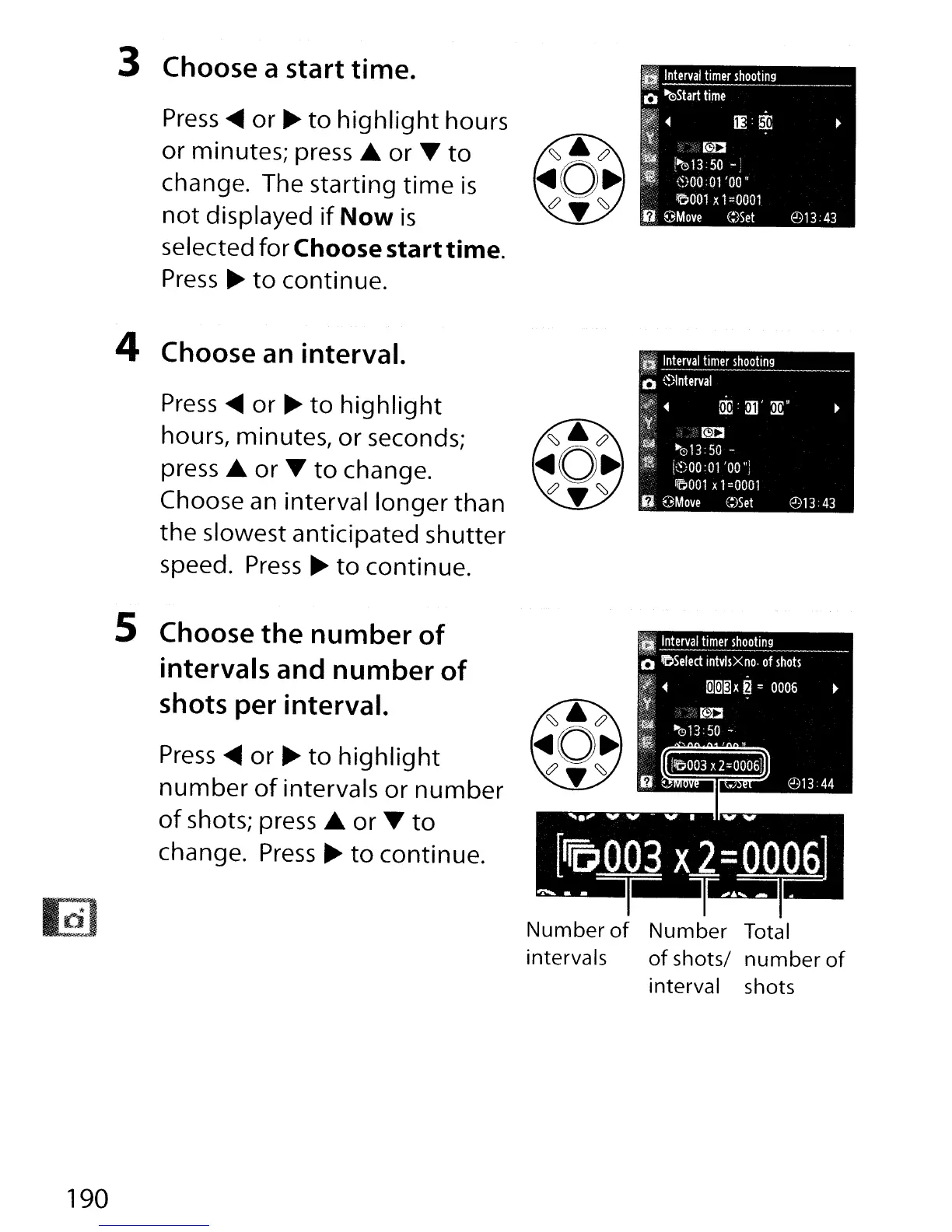
Press
....
or
..
to
highlight
hours
or
minutes;
press'"
or
T
to
change. The starting
time
is
not
displayed
if
Now
is
selected for Choose starttime.
Press"
to
continue.
3 Choose a start time.
4 Choose an interval.
Press
....
or
..
to
highlight
hours, minutes, or seconds;
press
...
or
T
to
change.
Choose an interval longer than
the slowest anticipated shutter
speed.
Press"
to
continue.
5 Choose
the
number
of
intervals and number
of
shots per interval.
Press
....
or
..
to
highlight
number
of
intervals
or
number
of
shots; press ...
or
T
to
change.
Press"
to
continue.
Number
of
Number Total
intervals
of
shots/
number
of
interval shots
190

Table of Contents

Other manuals for Nikon D300S

Related product manuals