EasyManua.ls Logo

Nikon D300S - Page 231

Nikon D300S
501 pages
Print Icon
To Next Page IconTo Next Page
To Previous Page IconTo Previous Page
Loading...
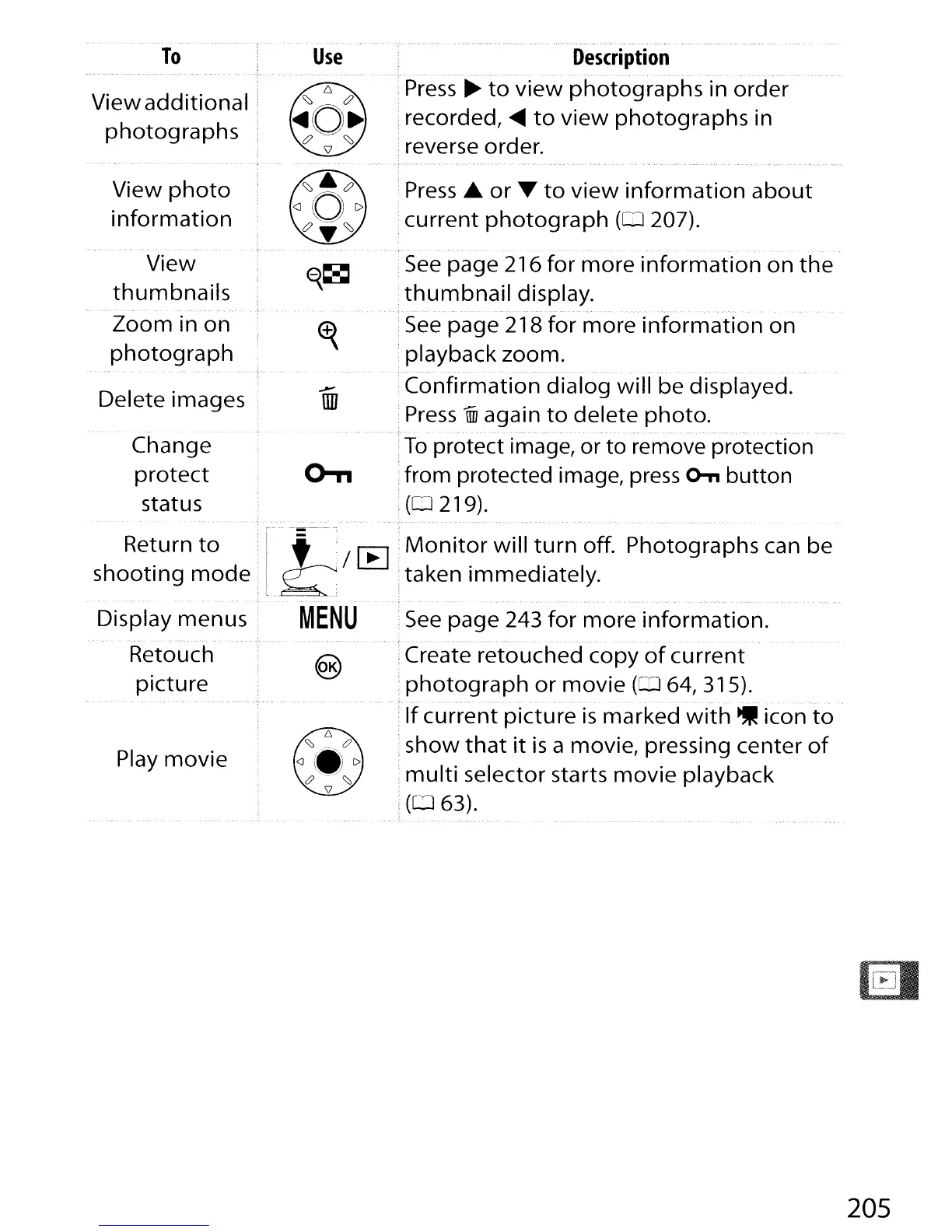
To
View
additional
,
photographs
Use
Description
....
,
--
"
~
--
".- "
..
'~"',
."
~
.•..
,
Press
~
to
view
photographs
in
order
:recorded,
.....
to
view
photographs
in
reverse order.
View
photo
information
View
thumbnails
Zoom
in
on
photograph
Delete images
Change
protect
status
Press.
or
T
to
view
information
about
current
photograph
(0
207).
-~_
..
-
~
_..
. ".-' .
.--
.-
•..•
'.-
".
.-".
See
page
216
for
more
information
on
the
thumbnail
display.
-". -
.....
See
page
218
for
more
information
on
playback
zoom.
Confirmation
dialog
will
be displayed.
Press
1iD
again
to
delete
photo
.
.",
.'-
.",
To
protect image, or
to
remove protection
:from protected image, press
o-n
button
:
(0219).
'See
page
243
for
more
information
.
..•..
,",
--
".-
.-._
_...
-
..
-
..
-
..
_".-
, -."
-."-
..
".'.
"".-
..
Create
retouched
copy
of
current
photograph
or
movie
(CD
64, 315).
"
.-
.-
..
'.--.'
....•. ,
.....
If
current
picture
is
marked
with.
icon
to
show
that
it
is
a movie, pressing
center
of
multi
selector starts
movie
playback
(063).
Play
movie
.
.._.
-.
'.'."
,
•..
-.-'._-.-. .
-.
-.-, . ".-.--".-.-
-._.-"
.-".
"
..
".
..
..
"
--...
.
Return
to
:
1'-'
't';/[E] .
Monitor
will
turn
off.
Photographs
can be
shooting
mode:
l_~
taken
immediately
.
... ." -
'."
-.,.
..
•..•
-.
-'.-.
..
.--
Display
menus:
MENU
Retouch
picture
205

Table of Contents

Other manuals for Nikon D300S

Related product manuals