EasyManua.ls Logo

Nikon D300S - Page 257

Nikon D300S
501 pages
Print Icon
To Next Page IconTo Next Page
To Previous Page IconTo Previous Page
Loading...
~Printer
default
~
';:(
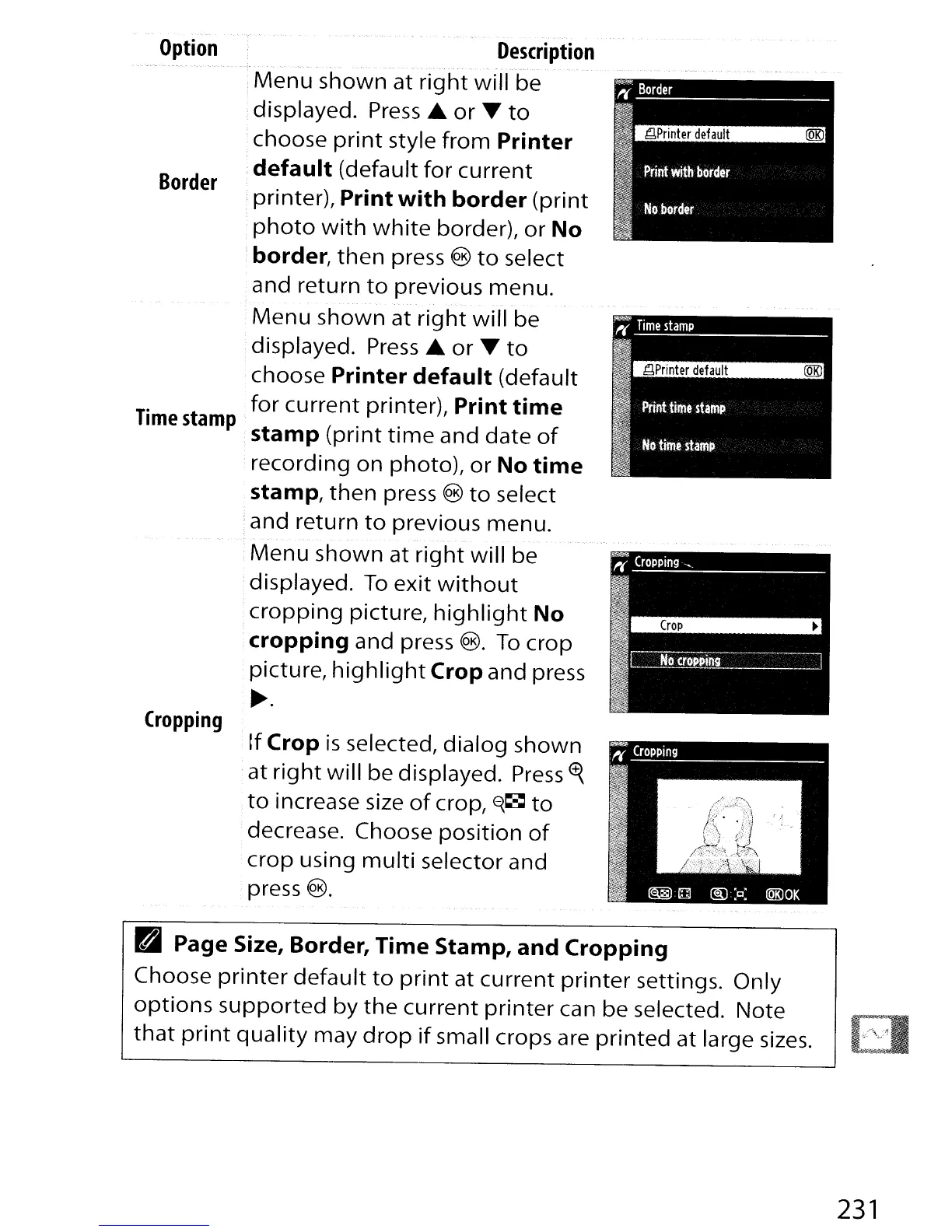
Border
II
I
11
Print
with
border
I
No
border
!f
Crop
is
selected,
dialog
shown
at
right
will
be displayed.
Press
<f{
to
increase size
of
crop,
E{~
to
decrease. Choose
position
of
crop
using
multi
selector and
·press
®.
Border
--
Option
Cropping
Description
Menu
shown
at
right
will
be
,displayed.
Press
...
or
~
to
;choose
print
style
from
Printer
default
(default
for
current
;printer), Print
with
border
(print
photo
with
white
border),
or
No
border,
then
press ®
to
select
and return
to
previous menu.
Menu
shown
at
right
will
be
displayed.
Press'"
or
~
to
choose Printer
default
(default
..
for
current
printer), Print
time
Time
stamp
·stamp
(print
time
and
date
of
recording
on
photo),
or
No
time
stamp,
then
press ®
to
select
:and return
to
previous menu.
·
Menu
shown
at
right
will
be
displayed.
To
exit
without
cropping
picture,
highlight
No
cropping
and press
®.
To
crop
picture,
highlight
Crop and press
~.
~
Page Size, Border, Time Stamp, and Cropping
Choose
printer
default
to
print
at
current
printer
settings. Only
options
supported
by
the
current
printer
can be selected. Note
that
print
quality
may
drop
if
small crops are
printed
at large
sizes.
231

Table of Contents

Other manuals for Nikon D300S

Related product manuals