EasyManua.ls Logo

Nikon D300S - Page 326

Nikon D300S
501 pages
Print Icon
To Next Page IconTo Next Page
To Previous Page IconTo Previous Page
Loading...
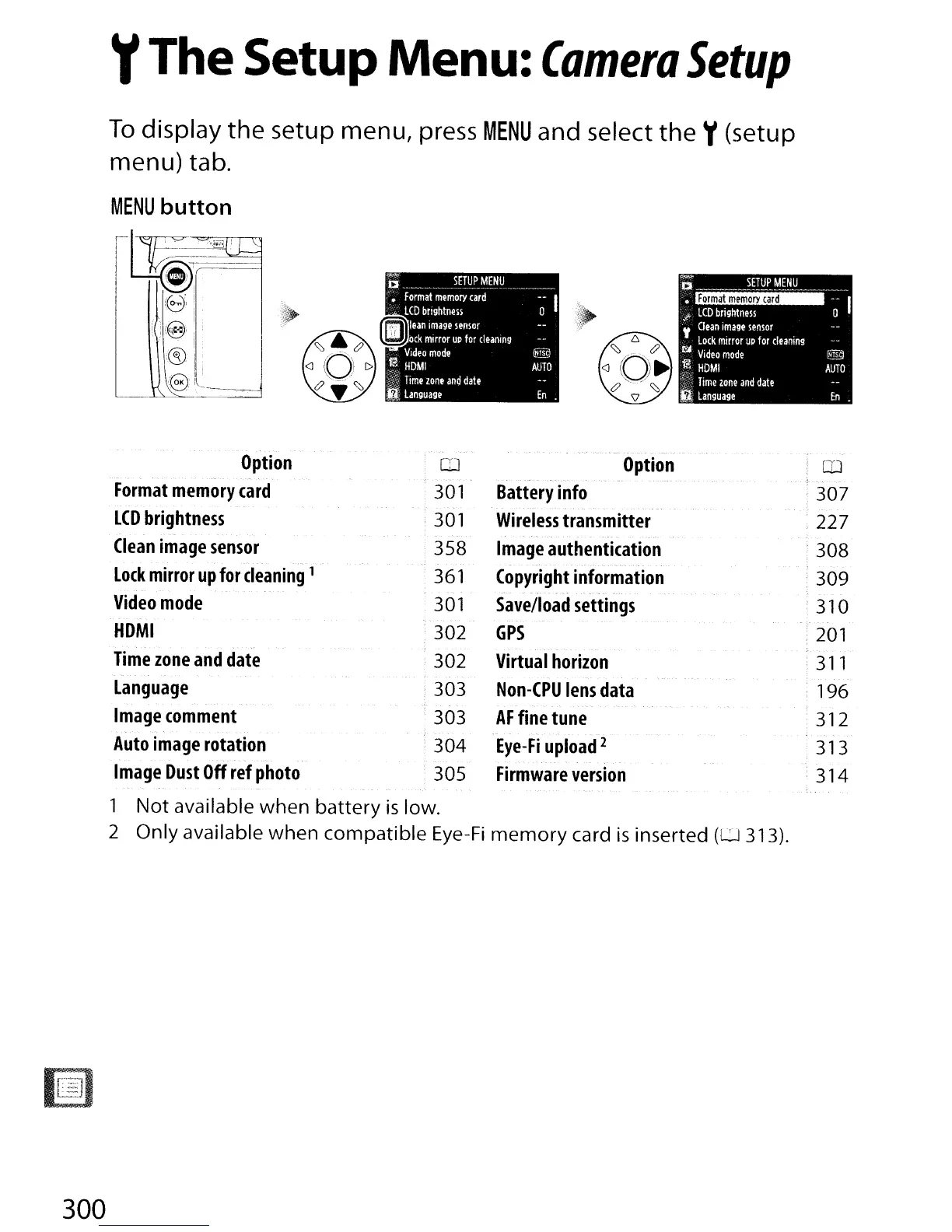
yThe Setup Menu:
Camera
Setup
To
display
the
setup
menu,
press
MENU
and select
the
y(setup
menu)
tab.
MENU
button
1
1~;~iJ:_
L.f1@i
---~
'(cr." '
IZ./l'
~
, !
~'i'"
'@'--~
-
-~
Option
Battery
info
Wireless
transmitter
Image
authentication
Copyright
information
Save/load
settings
GPS
Virtual
horizon
Non-CPU
lens
data
AF
fine
tune
Eye-Fi
upload
2
Firmware
version
Option
[IJ
Format
memory
card
'
301
LCD
brightness
!
301
Clean
image
sensor
358
Lock
mirror
up
for
cleaning
1
361
Video
mode
301
HOMI
302
Time
zone
and
date
' 302
Language
: 303
Image
comment
303
Auto
image
rotation ' 304
Image
Dust
Off
ref
photo
305
1
Not
available when battery
is
low.
2 Only available when compatible
Eye-Fi
memory
card
is
inserted
(U
313).
'QJ
,
307
227
, 308
.309
310
201
,
311
196
312
313
314
300

Table of Contents

Other manuals for Nikon D300S

Related product manuals