EasyManua.ls Logo

Nikon D300S - Page 356

Nikon D300S
501 pages
Print Icon
To Next Page IconTo Next Page
To Previous Page IconTo Previous Page
Loading...
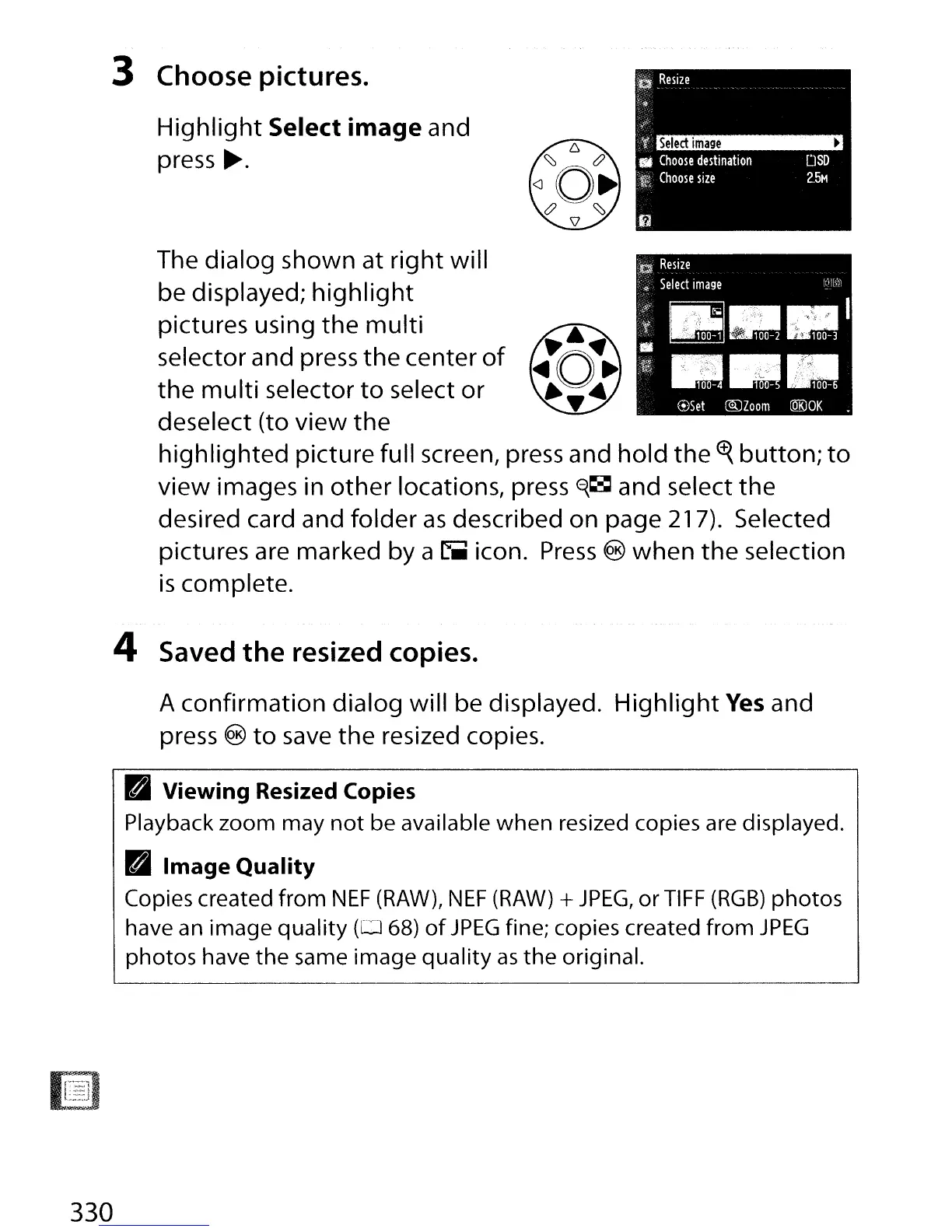
3 Choose pictures.
Highlight
Select image and
press
~.
The dialog shown at
right
will
be displayed;
highlight
pictures using the
multi
selector and press
the
center
of
the
multi
selector
to
select or
deselect (to view
the
highlighted
picture full screen, press and hold
the
~
button;
to
view images in
other
locations, press
~~
and select the
desired card and folder
as
described on page 217). Selected
pictures are marked by a
riiiii
icon.
Press
@)
when
the
selection
is
complete.
4 Saved
the
resized copies.
A confirmation dialog will be displayed.
Highlight
Yes
and
press
@)
to
save
the resized copies.
III Viewing Resized Copies
Playback
zoom
may
not
be available
when
resized copies are displayed.
III
Image
Quality
Copies created
from
NEF
(RAW),
NEF
(RAW) +
JPEG,
or
TIFF
(RGB)
photos
have an
image
quality
(0
68)
of
JPEG
fine; copies created
from
JPEG
photos
have
the
same
image
quality
as
the
original.
330

Table of Contents

Other manuals for Nikon D300S

Related product manuals