EasyManua.ls Logo

Nikon D300S - Page 397

Nikon D300S
501 pages
Print Icon
To Next Page IconTo Next Page
To Previous Page IconTo Previous Page
Loading...
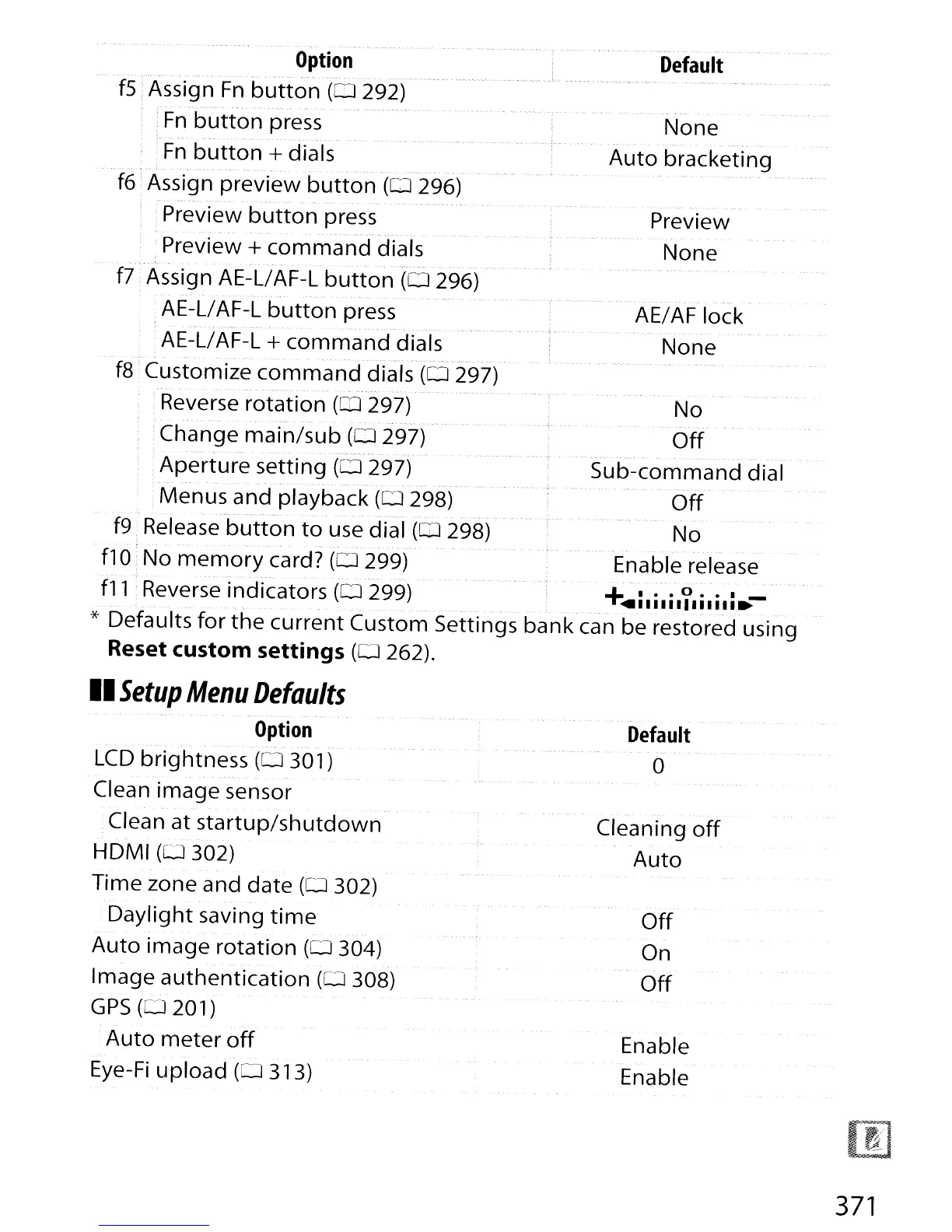
Default
''-
Preview
None
AE/AF lock
None
None
"--.
.'.
--
...
Auto
bracketing
No
Off
.-.'
.-
---
. ------.
",-.
Sub-command
dial
Off
No
Enable release
,___
,
,'
c_
Option
--.'-.-.-.-
..
.'._--
','-
f5
Assign
Fn
button
(0
292)
;
Fn
button
press
.-.-
'
...
_-._--.-.--.
- . -
Fn
button
+ dials
f6
1
Assig'n
preview
button
(0
296)
, Preview
button
press
-
-.
. _---,
..
-
Preview +
command
dials
f7
Assign AE-L/AF-L
button
(0296)
,AE-L/AF-L
button
press
AE-L/AF-L
+
command
dials
. -
".-.
-
.'---'--"~'.""
- - -
f8
Customize
command
dials
(0
297)
;Reverse rotatio'n
(OJ
297)
--.
-
..
Change
main/sub
(0
297)
Aperture
setting
(0
297)
, , '
,Menus and playback
(0
298)
-~.'
..
_-
-- -
"--.
,",.-
. -
f9 Release
button
to
use dial
(0
298)
flO No
memory
card?
(0
299)
-
-.---.
-
."--
- - -
f11
Reverse indicators
(0299)
+
..
i.i.i.Y.i.i.i.-
.'----,.
-
._--
* Defaults
for
the
current
Custom Settings
bank
can be restored using
Reset custom
settings
(0
262).
II
Setup
Menu
Defaults
Option
...
-'
--
LCD
brightness
(0301)
Clean image sensor
Clean at
startup/shutdown
HDMI
(0302)
Time zone and
date
(0
302)
Daylight
saving
time
Auto
image
rotation
(0
304)
Image
authentication
(0
308)
GPS
(0201)
Auto
meter
off
Eye-Fi
upload
(0313)
Default
o
Cleaning
off
Auto
Off
On
Off
Enable
Enable
371

Table of Contents

Other manuals for Nikon D300S

Related product manuals