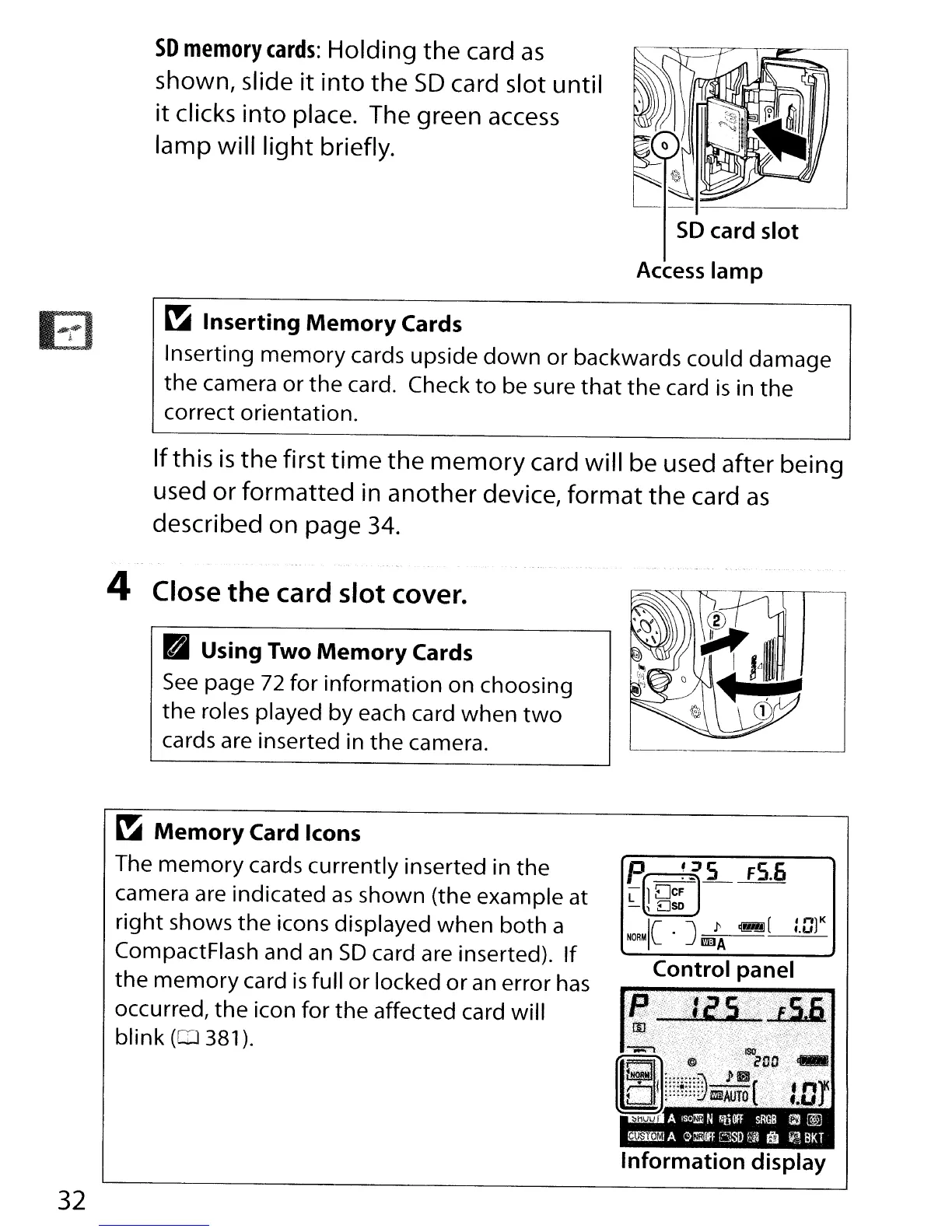
SO
memory
cards:
Holding
the
card
as
shown, slide
it
into the
SD
card slot until
it
clicks
into
place. The green
access
lamp will
light
briefly.
El
SD
card slot
Access
lamp
~
Inserting
Memory
Cards
Inserting
memory
cards upside
down
or backwards could damage
the camera or the card. Check
to
be sure
that
the card
is
in the
correct orientation.
Ifthis
is
the
first
time
the
memory
card will be used after being
used
or
formatted in another device, format
the
card
as
described on page
34.
32
4 Close
the
card slot cover.
B Using Two
Memory
Cards
See
page 72 for information on choosing
the
roles played by each card when
two
cards are inserted in
the
camera.
~
Memory
Card Icons
The
memory
cards currently inserted in the
camera are indicated
as
shown (the example at
right shows the icons displayed when both a
CompactFlash and
an
SO
card are inserted). If
the
memory
card
is
full
or
locked
or
an
error
has
occurred, the icon for the affected card will
blink
(0381).
P.~L
FS.6
L 1
DcF
-,
EJSD
Ie
.J
l'
~(
:.:Jl
K
NORM
mA
Control panel
Information
display



 To Next Page