OPERATING MANUAL
5-46
21833-3.4
NORMARC 7013
INSTRUMENT LANDING SYSTEM
Remote Maintenance and Monitoring ©1999 Navia Aviation AS
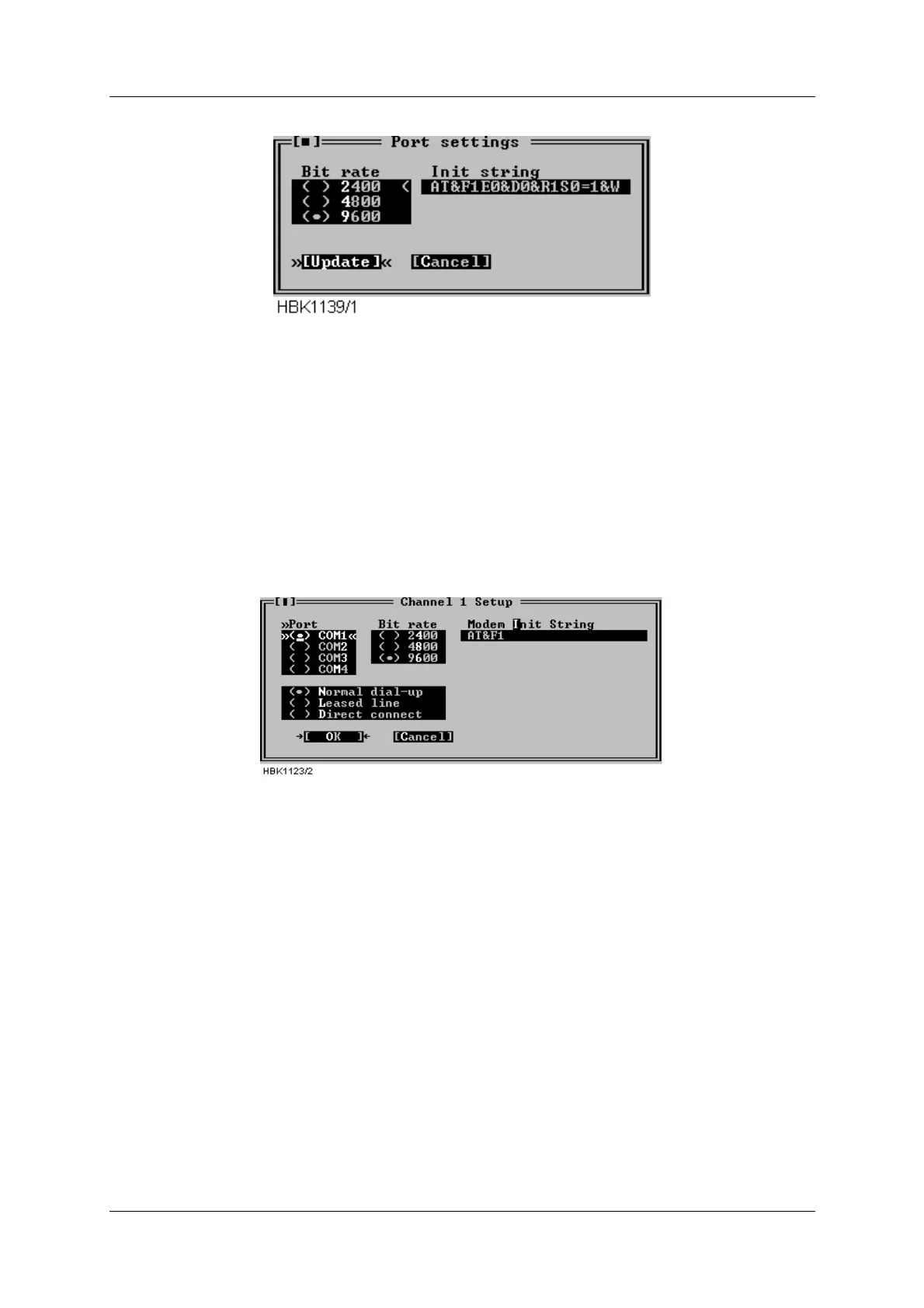
Figure 5-62 ILS port settings for USRobotics dial up connection
4. Initializing the remote modem.
• Pressing the «Send init» button in the ILS modem settings window makes the ILS send the
initialization string on the port selected in the port list.
• The ILS will also send the these init strings each time the ILS is powered on.
5.29.3 Configuring the local modem
1. All modem DIP switches should be left in their factory default positions.
2. Configure the «Channel Setup» for the dial up connection as follows:
Figure 5-63 Local modem configuration
The modem will automatically dial and connect to the remote ILS when a connection with this
channel is selected by the user.
Of course, the telephone number to dial when connecting to this station must be configured in
the ILS Station Setup window.
Users of the DOS version should also select «Use DTR to hangup». The hangup string is
ignored.
NOTE
Some PBX dial tones are not recognized by the modem. In this case the modem will not
start dialing when the user has selected a station to connect to. The problem is cor-
rected by entering X3 in the init string field. E.g.: AT&F1X3



 To Next Page