Using the BayStack 350 Series 10/100 Autosense Switch
1-8
893-00992-E
Security
Your BayStack 350 switch security feature can provide three levels of security for
your local area network (LAN):
• MAC address-based security -- Limits access to the switch based on allowed
source MAC addresses.
• RADIUS-based security -- Limits administrative access to the switch through
user authentication.
• SNMP security -- Limits administration access via IP filtering.
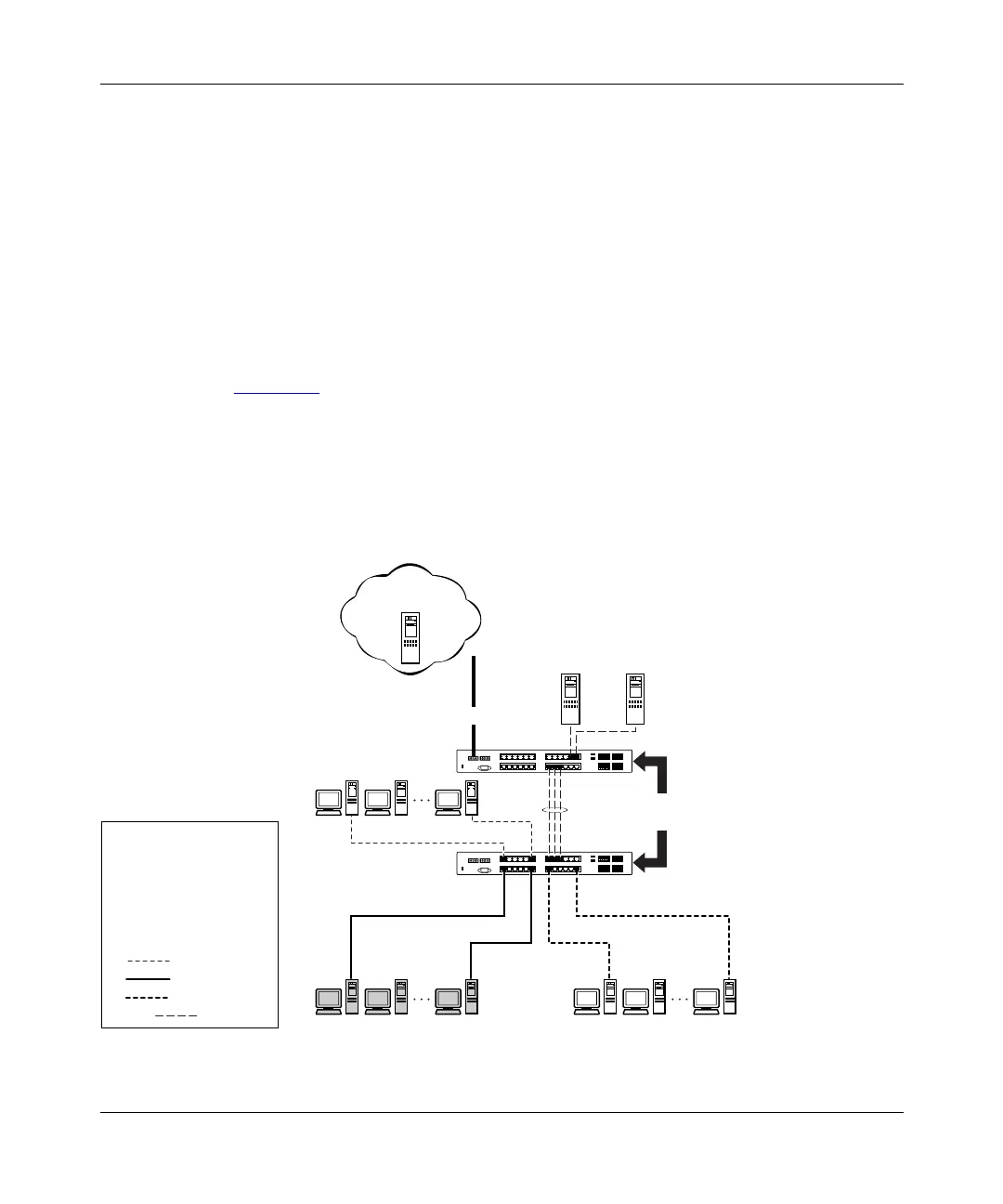
Figure 1-4
shows a typical campus VLAN configuration using security features.
This example assumes that the administration and teachers offices (and the
switches) are physically secured. In this configuration, the student VLAN (V2) is
denied access to ports occupied by VLANs V1, V3, and V1 + V3. Only students
who are authorized (as specified by the MAC address-based security feature) can
access the switch on the secured ports.
Figure 1-4. BayStack 350 Switch Security Feature
BS35076A
RADIUS-based and
SNMP security
BayStack 350
Legend
MAC address-based
security disabled for
(VLANs): V1, V3, V1+V3
MAC address-based
security enabled for
(VLAN) V2
BayStack 350
Administration
Students
V1
V1+V3
V2
V1
V2
V3
V1+V3
V3
Teachers
Library
Grades
RADIUS server
To network
center
F














 To Next Page